
For game art, UI, and animation teams
Build item evolution chains from a single concept
Start with one weapon, coin, gem, chest, or collectible and turn it into a full progression set. Create upgrade stages that feel connected, readable, and ready for game art, UI, or animation workflows.
Before and after
See how one starting item can expand into a full progression set.
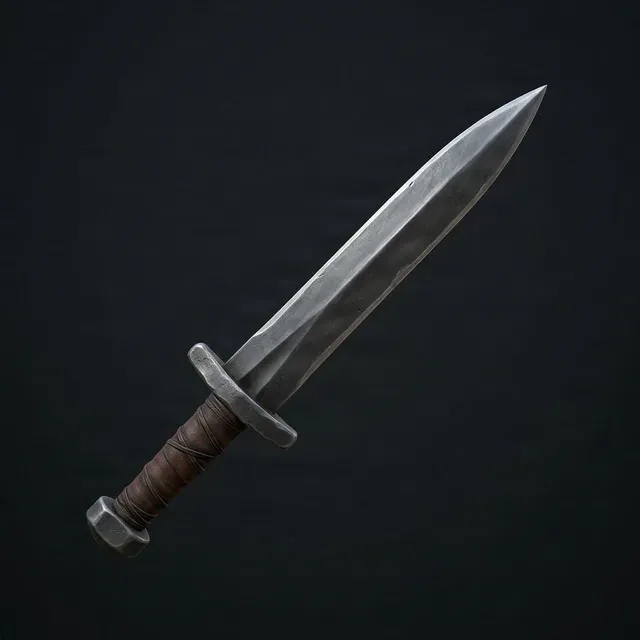
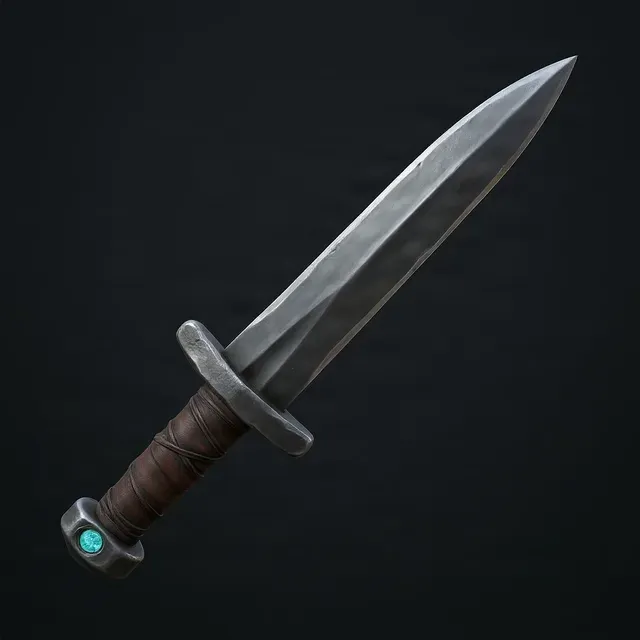
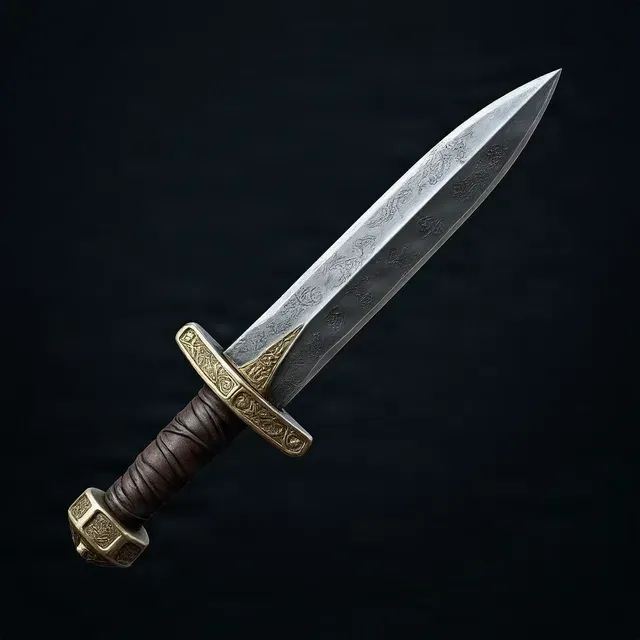
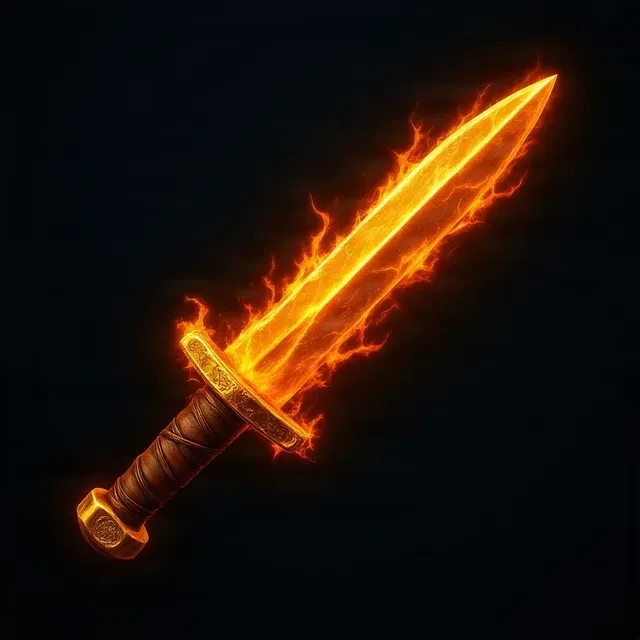
Base sword to a four-stage rarity progression
Examples shown for demonstration. Results depend on the clarity of the source item and the evolution direction you describe.
Useful for weapons, armor, loot, currencies, collectibles, and rarity systems
Why teams use item evolution chains
A good evolution chain helps players understand value at a glance. It also saves art time by giving your team a clear visual ladder instead of designing every item tier from scratch.
Show progression clearly
Keep the same item family
Move faster in pre-production
Useful for more than just weapons
Item evolution chains are useful anywhere visual progression matters.
Weapons and armor
Build upgrade tiers for swords, shields, staffs, guns, helmets, or accessories.
Currencies and resources
Create clearer value steps for coins, gems, shards, tokens, or premium currencies.
Loot and rewards
Show chest upgrades, event rewards, gacha items, and collectible unlockables.
Crafting materials
Turn a raw material into a polished, rare, or enchanted version.
UI item systems
Generate families of icons that read consistently inside inventories, stores, or progression menus.
Animation and marketing
Use item chains in trailers, motion graphics, patch notes, and store feature art.
How the progression should work
The best evolution chains do not randomly redesign the item. They build on the same core shape while increasing value, detail, and visual impact.
Start with a clear base item
Use a simple image where the item shape is easy to read.
Choose how many stages you need
Three stages work for simple upgrades. Four or five stages work better for rarity ladders and economy systems.
Describe the upgrade direction
Tell the tool whether the item should become richer, stronger, more magical, more luxurious, or more rare.
Review the full chain
Check whether each stage feels connected, readable, and increasingly valuable.
What makes a strong evolution chain
A stable silhouette
Players should still recognize the same item family from stage to stage.
Clear value increase
Each step should feel more important than the last one, not just different.
Controlled visual growth
Details, materials, glow, shape accents, and ornamentation should build gradually.
A believable final tier
The last stage should feel rewarding, not overloaded or disconnected from the original.
Item evolution chain vs drawing every tier manually
Manual design
- Best when
- You already have a full art pipeline and want total manual control.
- Tradeoff
- It takes longer to explore multiple progression directions.
Item evolution chain
- Best when
- You need to go from one approved concept to a usable upgrade ladder quickly.
- Tradeoff
- The result is strongest when the base item is clear and the progression direction is well defined.
Simple image variations
- Best when
- You only need alternate looks, not a structured upgrade chain.
- Tradeoff
- Variations often do not communicate rarity or progression clearly.
Best practices for better results
- Use a single item, not a full scene
- Choose a clear front or three-quarter view
- Avoid heavy backgrounds and clutter
- Keep the item fully visible
- Be specific about rarity, materials, or mood
- Say what should stay the same as the item evolves
What kinds of items work best?
This works best for clearly readable items such as weapons, armor pieces, coins, gems, relics, chests, consumables, and collectible props. The cleaner the source item is, the easier it is to build a strong progression chain.
Can I create a rarity ladder like common, rare, epic, and legendary?
Yes. That is one of the most natural uses for this workflow. A four-stage chain is often a good fit for rarity systems because each item can represent a clear increase in value and visual importance.
Will the item still look like the same object?
That should be the goal. A good evolution chain keeps the core identity of the item while gradually improving materials, ornamentation, shape accents, or energy effects.
What is the difference between an evolution chain and simple image variations?
A variation changes the look. An evolution chain shows progression. In a strong evolution chain, each stage should feel related to the previous one and communicate a clearer sense of upgrade or rarity.
How many stages should I use?
Three stages are enough for simple upgrade paths. Four stages usually work best for rarity ladders. Five stages can work if you need a longer progression path, but each step should still remain visually distinct.
Can I use this for in-game currency upgrades?
Yes. Coins, gems, shards, tokens, and premium currencies are a strong fit because players need to understand value differences quickly.
Is this useful for UI icon production?
Yes. Many teams use this kind of workflow to explore item families for inventory screens, stores, event rewards, progression systems, and shop bundles.
Can I use this for animation or trailers?
Yes. Evolution chains are also useful for motion graphics, item reveals, reward animations, patch-note art, and marketing visuals where progression needs to be shown clearly.
What kind of image should I upload?
A single item on a simple background is best. Avoid full scenes, overlapping objects, or images where the item is tiny in frame.
Will this replace a final production artist?
No. It is best used to speed up ideation, direction setting, and content exploration. Teams can then refine the strongest results into final production assets.
Can I use it for non-fantasy items?
Yes. It can work for fantasy, sci-fi, stylized, and even cleaner casual game items. The key is that the item should have a readable silhouette and a clear upgrade direction.
What if the results change too much between stages?
Use a clearer base item and describe what should stay consistent. For example, mention the main shape, material family, or core motif that should carry across the chain. You can also retry a single stage without regenerating the whole chain.
Turn one approved item into a full progression set
If you already have a base item concept, you do not need to design every upgrade tier from zero. Start with one clear item and build a chain your team can review, refine, and use across game content.