
Remove Stains from Clothes in Photos with AI
Love the photo, but wish that stain wasn't there? Keep the moment you love and make the clothing stain less noticeable.
Clean Up Clothing Stains in Your Photos
Upload a selfie, portrait, or full-body photo with a visible stain on your clothing. Choose a quick AI edit or select the stained area yourself.
Tell AI which clothing stains you want removed. No manual brushing or selection required.
A convenient starting point for obvious coffee splashes, food marks, and other visible stains on clothing.
Image
RequiredAdd Image
Click or drag one source image here to start editing.
PNG, JPG, JPEG, or WEBP. The upload card is the primary starting point.
Your Favorite Outfit, Without the Distracting Stain

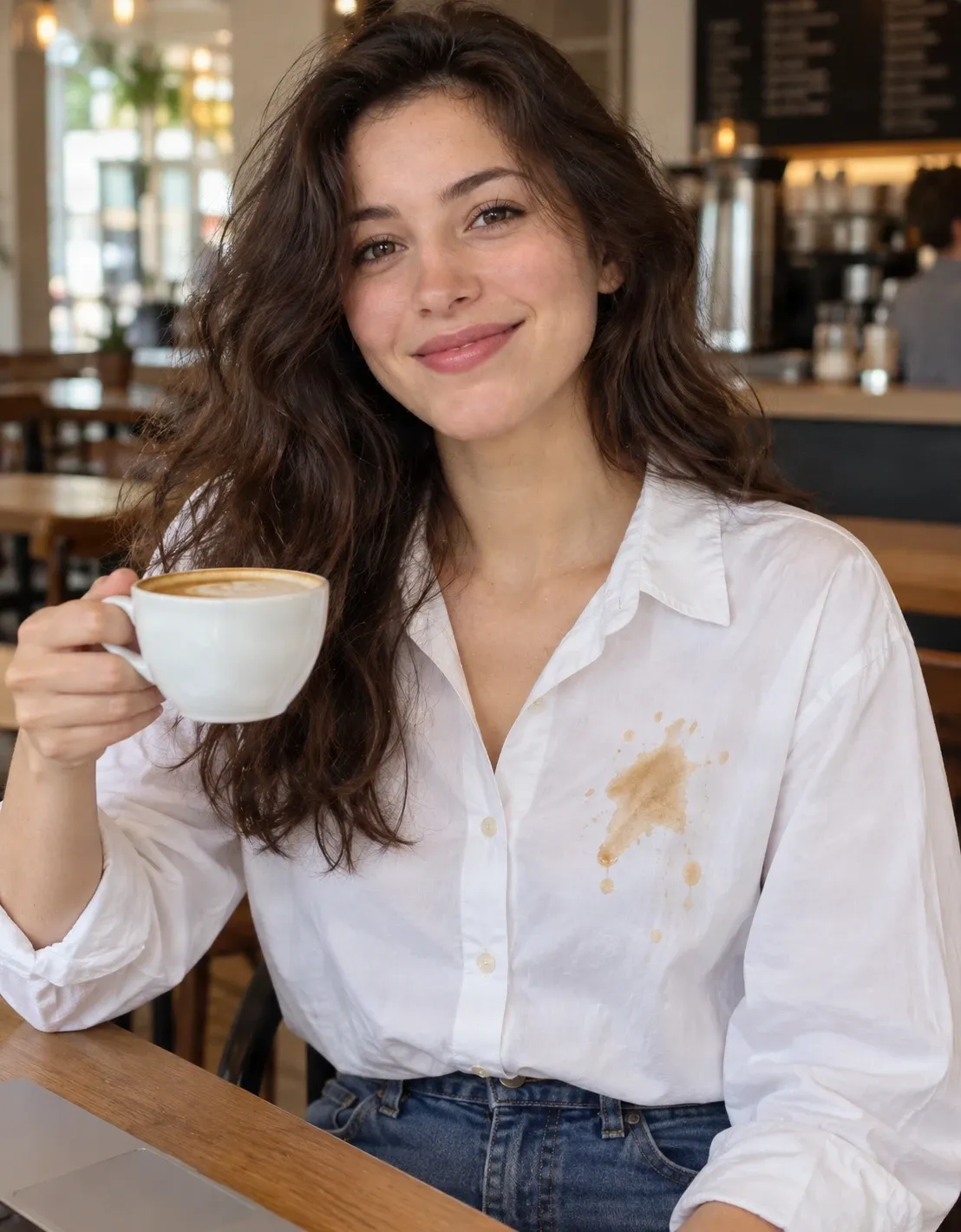
This café portrait example was edited with Quick Remove using the prompt “the visible stains on the clothing,” with no mask. The visible coffee stain is no longer apparent in the edited result. The framing is slightly tighter and parts of the background and fabric were reconstructed, so compare the full image before using it.
Try It on Your PhotoRecent Sessions
You finally get a picture you really like. Your smile looks great, the lighting is just right, and everyone is looking at the camera. Then you notice a coffee splash or food stain on your shirt. Don't let one little accident distract from the entire photo. Upload your picture and use AI to remove visible stains from clothing. Start with Quick Remove for an easy cleanup, or choose Magic Eraser to target a specific spot. Keep the moment you love and create a cleaner-looking version of your photo.
KEEP THE PHOTO YOU LOVE
A Little Spill Shouldn't Ruin a Great Picture
Picture this: you're out for coffee with a friend. The light coming through the window is perfect. Someone takes a photo, and for once, you love everything about it. Then you look closer. There's a coffee stain on your white shirt.
Maybe it happened just before the photo was taken. Maybe you didn't notice it until later. Either way, the moment is gone, and there's no easy way to take exactly the same picture again.
You don't necessarily want a different outfit, a beauty filter, or a completely new image. You just want the stain to be less noticeable. Upload the picture, describe the unwanted marks, and see whether AI can create a cleaner-looking version of the clothing. If you like the result, save it. If not, keep the original photo exactly as it was.
Keep the smile. Keep the outfit. Let the stain fade.
Fix the Distracting Detail, Not the Whole Photo
Remove Visible Coffee Stains
Clean Up Food Marks
Keep the Outfit You Actually Wore
Work with Photos You Already Have
Choose How Much Control You Want
Review the Result Before Downloading
How to Remove Stains from Clothes in Photos
Upload Your Photo
Tell AI What to Remove
Let AI Edit the Fabric
Review and Download
Two Ways to Clean Up a Stained Outfit
| Quick Remove | Magic Eraser |
|---|---|
| Describe scratches and stains in everyday language | Select particular stained areas directly |
| No manual brushing or selection required | You define the area to edit |
| Convenient for obvious stains and general cleanup | Useful for a single mark near clothing details |
| AI decides how to edit the image | A focused selection can limit the edit region |
Start with Quick Remove for a straightforward stain. Use Magic Eraser when you need more control over a specific area. Neither mode guarantees an exact reconstruction.
WHAT TO EXPECT
AI Can Remove a Stain from a Picture—Not from the Actual Clothes
This tool changes the appearance of a digital photograph. It doesn't physically clean clothing or remove a stain from fabric in real life. When AI edits a visible mark, it generates replacement pixels based on the surrounding garment.
The edited area may look convincing, but it isn't necessarily an exact reproduction of the fabric hidden beneath the stain. Simple, light-colored materials may be easier to reconstruct than complicated textures, embroidery, printed graphics, or patterned fabrics.
The editor may also change folds, shading, buttons, garment edges, or parts of the surrounding photo. For casual personal photographs, those changes may be acceptable.
For product listings, resale, insurance, documentation, or other uses where the stain is a material fact, preserve the original and avoid presenting a misleading version of the item.
A cleaner-looking picture should still tell the story you intend it to tell.
Fabric Details Make a Difference
Stains on Plain White Clothing
Stains on Patterned Fabrics
Large Stains Covering Multiple Folds
Stains Near Skin or Accessories
When Would You Remove a Clothing Stain from a Picture?
Café and Coffee Shop Photos
Family Gatherings
Birthday Parties
Vacation Photos
Profile Pictures
Clothing Resale Photos
TYPES OF CLOTHING STAINS
What Kinds of Stains Can You Try to Remove?
Coffee Stains
Coffee splashes often create dark brown marks that stand out against white or light-colored clothing. Try editing them in selfies, café photos, and casual portraits.
Food Stains
Sauce splashes and small food marks can be distracting in dinner photos, family pictures, or event portraits.
Oil and Grease Marks
AI can attempt to edit a darkened patch, although subtle differences in fabric texture and shine can be challenging.
Makeup Marks on Clothing
Foundation or lipstick marks on a shirt collar may be visible in close-up photographs. Select the affected fabric while avoiding nearby skin.
Small Dirt and Mud Spots
A small patch of dirt on jeans, a jacket, or casual clothing can sometimes be edited without intentionally changing the garment.
Drink Splashes
Visible drops or splashes from drinks can be retouched in photographs, depending on how much of the fabric is affected.
Results vary with stain size, material, garment pattern, image quality, and the detail AI must reconstruct.
How to Make Clothing Stain Removal Look More Natural
- Start with a clear, well-lit photo so the fabric texture around the stain is visible.
- For Quick Remove, describe only the stain. Avoid asking AI to replace the whole garment or redesign the photo.
- Look closely at fabric texture to see whether the edited area still resembles the original material.
- Inspect buttons, seams, and collars; these details may be affected when AI edits nearby fabric.
- Use Magic Eraser for a small isolated mark when a localized edit is more appropriate.
- Check the entire photo, including faces, hands, accessories, and the background, for unexpected changes.
- Keep the original file separately, especially when the photo is a meaningful personal memory.
Common mistakes to avoid
Removing More Than the Stain
A prompt that asks AI to change the entire shirt can result in a different garment instead of a focused cleanup.
Ignoring the Fabric Pattern
The edit may leave mismatched stripes, softened embroidery, or an inconsistent printed design.
Selecting Too Much Clothing
Covering a large clean region with Magic Eraser increases the area AI needs to reconstruct.
Checking Only the Stained Area
The edit may also change a sleeve, button, hand, or face elsewhere. Compare the whole image before downloading.
Frequently asked questions
How do I remove stains from clothes in a photo?
Upload your picture, choose Quick Remove, and describe the visible stains on the clothing. AI will attempt to remove the marks and reconstruct the affected fabric. Review the result before downloading.
Can AI remove a coffee stain from a shirt in a picture?
AI can attempt to remove visible coffee stains from clothing in photographs. Results depend on the stain size, fabric texture, lighting, and surrounding details.
Can I remove clothing stains from a photo without Photoshop?
Yes. Use this online AI photo editor without manually cloning or painting over every affected pixel in Photoshop.
Will the AI change the color or style of my clothes?
It may. The intended edit is to remove the stain, but AI can also alter shading, fabric texture, garment details, or other parts of the image. Compare the result with the original.
Does this work on white shirts?
You can try removing visible stains from white shirts and other light-colored garments. Folds, shadows, and buttons can still affect the result.
Can I remove food stains from my clothes in a picture?
Yes. You can try editing visible sauce marks, food splashes, and other stains. Larger marks or those on complicated patterns may be more difficult.
Can I remove stains from black or dark clothing?
You can try, but subtle differences in color, texture, or shine on dark fabric may be harder for AI to match naturally.
Does the tool work on patterned shirts or dresses?
It may, but repeating patterns, embroidery, logos, and printed graphics are harder to reconstruct accurately. Check the edited area for inconsistent details.
Can AI remove oil or grease stains from clothing photos?
You can try editing visible oil or grease marks. Because they can affect fabric brightness and texture without a sharp edge, results vary.
Is Quick Remove or Magic Eraser better for clothing stains?
Quick Remove is convenient when a stain is obvious and easy to describe. Magic Eraser gives you more control over the selected area, which can help near important clothing details.
Do I need to select the stain manually?
Not with Quick Remove: describe the visible mark. With Magic Eraser, select the stained area directly before AI processes the edit.
Will the edit change my face or body?
It can. Although the goal is to edit clothing, AI may change details outside the stain. Review your face, hands, body shape, and other important areas.
Can I use this tool for wedding or graduation photos?
Yes. You can try retouching small stains in personal event photos. Review detailed dresses, suits, lace, embroidery, and distinctive textures carefully.
Can I remove stains from clothing product photos?
You can attempt a visual edit, but don't use the result to misrepresent a product's real condition. For resale listings, make sure the image accurately reflects what the buyer will receive.
Does this tool actually clean the stain from my clothes?
No. It edits the digital image only. It does not clean, repair, or otherwise change the physical garment.
How can I tell if the stain was removed naturally?
Compare the edited picture with the original. Check whether the stain is less noticeable, the fabric looks consistent, and seams, collars, and buttons remain natural. Inspect the rest of the photo for unintended changes.
More Ways to Clean Up Your Favorite Photos
Remove Unwanted Objects from Product Photos
Remove unwanted objects, distracting props, and background clutter from product photos with AI. Keep your products in focus and create cleaner images online.
OpenRemove Glasses from a Photo with AI
Remove glasses from a photo with AI. Upload your portrait, remove eyeglass frames and lens reflections, and create a natural-looking photo without glasses.
OpenRemove a Person From a Photo with AI
Remove unwanted people, photobombers, tourists, or strangers from photos with AI. Describe the person or select them precisely, then let AI rebuild the background naturally.
OpenKEEP THE MOMENT
A Great Photo Deserves Better Than a Distracting Stain
You don't have to retake a picture just because of a coffee spill or food mark. Upload the photo you already love, describe the stain, and see whether AI can create a cleaner-looking version.
Remove Stains from My PhotoStart with Quick Remove or select a stain using Magic Eraser. Results may vary, so review the edited clothing and keep your original picture.
Creative Toolkit Index
Explore More AI Features
Quick access to precision layer extraction, AI photo editing & asset tools.