
Remove Power Lines From Photos with AI
Clean up distracting power lines, utility wires, cables, and overhead lines without cropping or rebuilding the entire photo. Describe what should disappear or select the lines precisely, then let AI reconstruct the scene behind them.
Useful for real estate, architecture, landscapes, travel photography, street scenes, and other outdoor images.
Quick Remove · Recommended
Describe the power lines or wires you want removed. No mask needed.
Best for clearly visible lines crossing sky, walls, roads, or other simple backgrounds.
Image
RequiredAdd Image
Click or drag one source image here to start editing.
PNG, JPG, JPEG, or WEBP. The upload card is the primary starting point.

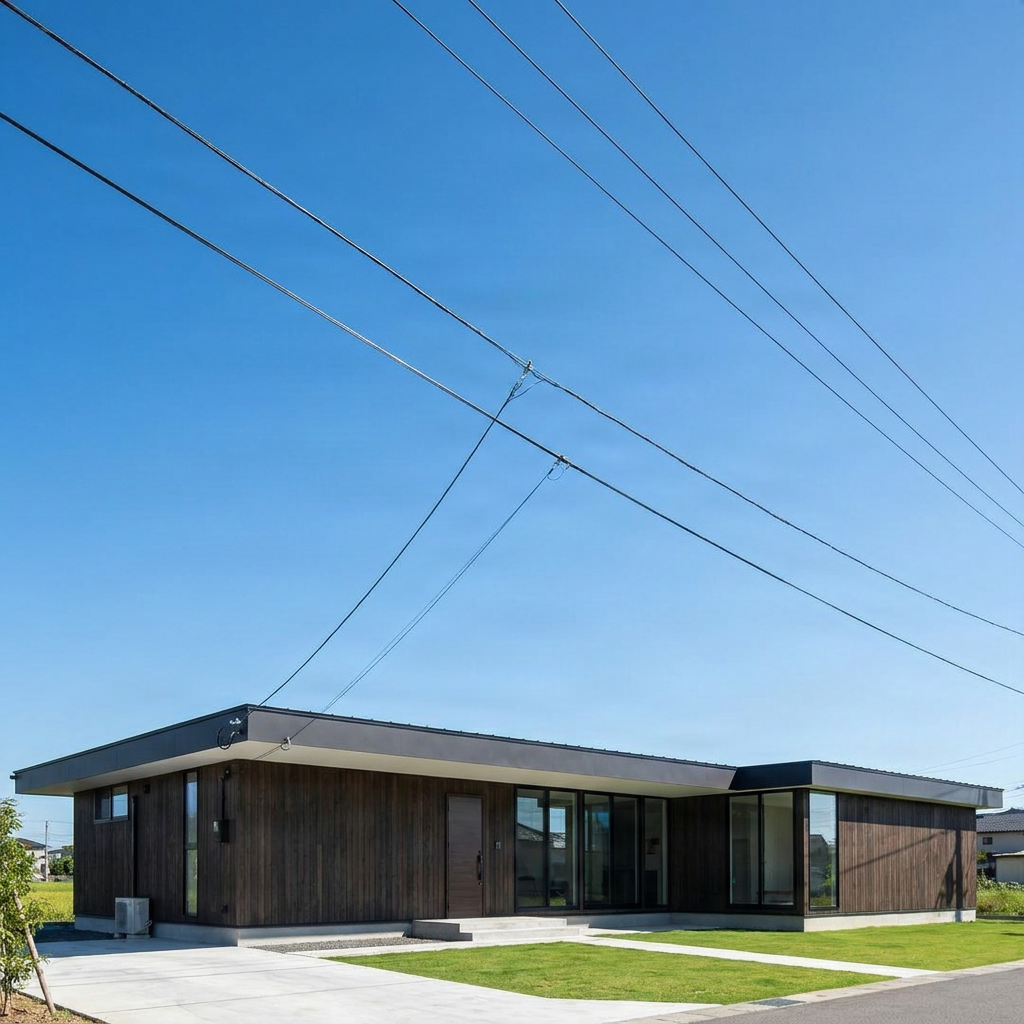
Clean up distracting power lines, utility wires, cables, and overhead lines without cropping or rebuilding the entire photo. Describe what should disappear or select the lines precisely, then let AI reconstruct the scene behind them.
Recent Sessions
CLEANER OUTDOOR PHOTOS
Remove Power Lines Without Cropping Away the Scene
Power lines can cut across skies, buildings, landscapes, and architectural details, making an otherwise strong photo feel cluttered.
Instead of cropping away part of the image, ImageToLayers removes the targeted wires and generates new visual content in the narrow areas they previously covered.
The surrounding photo remains the visual reference, helping AI continue nearby colors, textures, edges, lighting, and perspective.
Keep the composition. Remove the visual clutter.
AI Reconstructs the Area Behind the Wire
A power line may cover only a narrow strip of pixels, but those pixels can pass through several different parts of a scene.
When the line is removed, AI uses nearby visual information to generate a plausible continuation of the sky, wall, roof, tree, road, window, or other background behind it.
The reconstructed content is newly generated. It is not a recovery of the exact original pixels that were hidden behind the wire.
What Kinds of Wires and Lines Can You Remove?
Power Lines
Utility Wires
Telephone Lines
Overhead Cables
Wires Across Buildings
Wires Across the Sky
How to Remove Power Lines From Photos
Upload the Photo You Want to Clean Up
Tell AI Which Lines Should Disappear
Try Quick Remove First
Switch to Magic Eraser When Precision Matters
Trace the Entire Wire
Check Every Crossing Point
Remove the Line and Rebuild the Scene
Compare Before and After
Refine Difficult Sections if Needed
Quick Remove or Magic Eraser?
| Quick Remove | Magic Eraser |
|---|---|
| Describe the unwanted wires | Select the lines precisely |
| No mask required | Preview and refine the selection |
| Best for sky and simple backgrounds | Best for trees, buildings and complex edges |
| Fastest workflow | More control around intersections |
| Recommended starting point | Use when precision matters |
Simple background → Quick Remove. Detailed intersections → Magic Eraser.
WHY WIRES CAN BE TRICKY
Thin Lines Can Cross a Lot of Visual Detail
A power line may be only a few pixels wide, but it can pass through several completely different parts of the image.
The same line might cross blue sky, tree branches, a roof edge, a window, brickwork, and a sign before reaching the other side of the frame.
Each section may require a different reconstruction, which is why precise selection matters more as the background becomes more detailed.
How Difficult Is the Background?
Clear Sky
Trees & Foliage
Architecture
Signs & Text
Where Power Line Removal Is Most Useful
Real Estate Photography
Architecture
Landscape Photography
Travel Photography
Street Photography
Marketing & Hospitality
KNOW THE DIFFERENCE
Removing a Wire Is Different From Removing a Utility Pole
Thin Wire
Thin wires usually cover a relatively small portion of the image and need less reconstruction.
Utility Pole
Removing a pole may require reconstructing a much larger region, including buildings, roads, trees, signs, or other scene details.
Thin line → less reconstruction. Large pole → more reconstruction.
KNOW THE DIFFERENCE
Remove the Wires Without Changing the Composition
AI Wire Removal
Keeps the original frame and edits the local distraction instead.
Cropping
Can hide a distracting cable, but it may also remove sky, architecture, scenery, or other parts of the composition you wanted to keep.
Keep the frame. Fix the distraction.
Tips for Cleaner Power Line Removal
- Describe the wire clearly when several lines are visible.
- Start with Quick Remove for wires crossing simple backgrounds.
- Use Magic Eraser around architecture, trees, text, signs, and complex edges.
- Select the complete line from end to end.
- Keep the mask narrow around thin wires.
- Check every place where the line crosses another object.
- Leave poles and nearby structures outside the selection unless they should also disappear.
- Review text, logos, windows, bricks, railings, and repeating geometry carefully.
Common Mistakes
Selecting Only Part of the Wire
Small leftover sections can remain visible. Check the full line from one end to the other before generating.
Making the Selection Too Wide
Large masks give AI more of the scene to regenerate. Keep the selection focused around thin wires whenever possible.
Ignoring Intersections
Zoom in where the line crosses roofs, branches, windows, signs, text, railings, or other structured details.
Accidentally Selecting the Pole
A utility pole is a much larger object than a thin wire. Keep it outside the selection unless you also want the pole removed.
Expecting Exact Hidden Details
AI creates a plausible continuation using visible context. It cannot retrieve the exact original pixels that were hidden behind the wire.
Frequently Asked Questions
Can AI remove power lines from photos?
Yes. ImageToLayers can remove visible power lines, utility wires, overhead cables, and similar thin distractions from a photo. For simple lines crossing clear sky or plain surfaces, Quick Remove is usually enough. If the wires cross trees, buildings, windows, signs, or other detailed areas, Magic Eraser gives you more control over the exact removal region.
Can I remove electrical wires from a photo without cropping it?
Yes. The tool removes the targeted wires while keeping the original image composition. Instead of cropping away part of the scene, AI generates new visual content in the narrow areas where the wires appeared.
Can I remove several power lines at once?
Yes. You can remove multiple lines in one edit when they belong to the same cleanup task. With Quick Remove, describe the group clearly. For complicated or overlapping lines, Magic Eraser may provide cleaner control.
Do I need to trace every wire manually?
Not always. Quick Remove lets you describe the unwanted wires in text, so obvious lines can often be removed without drawing a mask. Manual selection becomes more useful when the lines are thin or cross detailed backgrounds.
What is the best way to describe power lines for Quick Remove?
Describe their position, direction, color, or what they cross. If several wires appear in the image, be specific about which ones should disappear so the instruction is less ambiguous.
Can I remove power lines that cross a blue sky?
Yes. Clear sky is usually one of the easier backgrounds because the surrounding color and gradient provide strong visual context. Check the result for seams or uneven gradients, especially if the line is thick.
Can AI remove wires that cross trees or foliage?
Yes, but foliage is more difficult than open sky. Branches, leaves, and irregular textures create many small visual details that AI must reconstruct. Magic Eraser and a focused selection are usually better for this case.
Can I remove wires that cross a house or building?
Yes. Power lines can be removed from rooflines, walls, windows, balconies, and facades. Use a focused selection and inspect the crossing points closely afterward.
Can I remove telephone lines and communication cables too?
Yes. Telephone lines, communication wires, overhead cables, and similar thin linear objects can be handled in the same way.
Can I remove a utility pole as well as the wires?
Yes, but removing a pole is a substantially larger edit than removing thin wires. Use Magic Eraser for this kind of removal and review the reconstructed geometry carefully.
Does AI restore the exact original scene behind the wire?
No. AI creates a plausible reconstruction based on nearby colors, textures, edges, lighting, and scene structure. The result is newly generated content rather than recovered hidden pixels.
Will removing wires change the rest of the photo?
The edit is focused on the targeted removal area, while the surrounding image is used as visual context. Most of the composition remains unchanged.
What if part of the wire is still visible after removal?
This usually means the description or selection did not cover the full line. Make the instruction more specific, or zoom in and include the complete unwanted wire before generating another result.
Can AI reconstruct text or logos hidden behind a wire?
Not reliably. AI may generate a visually plausible continuation of a sign or label, but exact lettering, logos, and branded graphics can be inaccurate.
Is power line removal suitable for real estate photography?
Yes. Exterior property photos are one of the strongest use cases because utility wires can distract from a clean view of a building.
Can I remove wires from landscape and travel photos?
Yes. You can remove overhead lines from mountain views, beaches, rural scenes, city streets, landmarks, and other travel or landscape images.
When should I use Quick Remove instead of Magic Eraser?
Use Quick Remove when the unwanted wires are obvious and easy to describe. Use Magic Eraser when the wires are thin, cross detailed structures, or require precise control around nearby objects.
Should I use a wide brush to make sure the whole wire is removed?
Usually not. A wider selection gives AI more surrounding content to regenerate, which can introduce unnecessary changes. Keep the selection as narrow as practical while still covering the complete line.
What image formats can I upload?
You can upload common formats including JPG, JPEG, PNG, and WebP.
Can I remove wires from high-resolution photos?
Yes, as long as the source file is supported by the tool. Final visual quality still depends on how complex the scene is and how much content must be reconstructed.
Related Tools
Remove a Person From a Photo
Remove tourists, strangers, photobombers, and unwanted background people.
OpenRemove Unwanted Objects
Remove general objects, clutter, wires, props, and other distractions from photos.
OpenGenerative Fill
Add, replace, or reconstruct content inside selected areas of an image.
OpenCLEAN UP THE VIEW
Clear the Wires. Keep the Scene.
Upload your photo, describe or select the unwanted power lines, and let AI reconstruct the areas they were covering.
Remove Power LinesStart with Quick Remove. Switch to Magic Eraser when the scene needs more precision.
Creative Toolkit Index
Explore More AI Features
Quick access to precision layer extraction, AI photo editing & asset tools.