
Video 01 — Product Intro
The character introduces a product and explains what makes it useful.
Example audio
"Meet a simpler way to bring your ideas to life. Here's how it works."
One character. A product message.
One character. Different messages. A familiar face in every video.
Character Reference
Start with a photo or reference video of the person or character you want viewers to recognize across your videos.
Use a clear portrait showing the character's face and recognizable appearance.
For multiple videos of the same character, reuse the same reference file instead of selecting a different image each time.
Voice Audio
Upload the audio recording for this video. Use a new recording for each message you want to create.
The reference video provides the character's appearance. Your uploaded voice audio determines the spoken message.
Character Consistency
Consistency starts with the reference you choose. For your next video, keep the character reference the same and upload a different audio recording.
Using the same reference helps guide a recognizable appearance across videos. Individual generations may still vary in facial details, clothing, or expression.
Your Talking Avatar Video Will Appear Here
Choose a character reference, upload your audio, and generate a talking video. Your finished result will open on its own page.
Your credit cost is shown before you generate.
Create new talking videos from the same character reference. Upload a photo or reference video, add your next voice recording, and generate another speaking performance while keeping your character's recognizable appearance.
Keep your character recognizable across different messages, lessons, and campaigns.
Reuse your character reference. Change the message, not the presenter.
See character consistency in action
A consistent talking avatar should feel familiar every time it appears.
Here is a video generated from one character reference and one voice recording. Use the same reference with a new recording to create your next message.
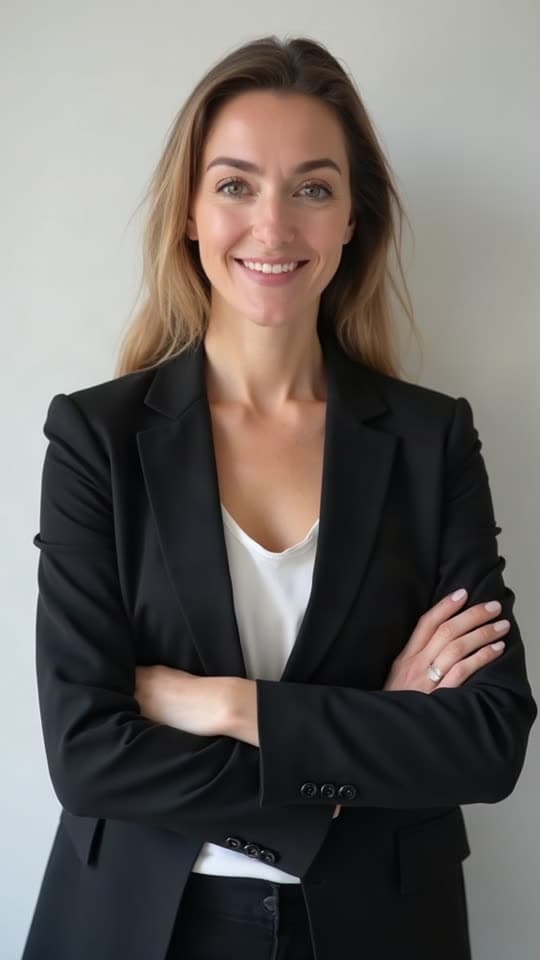
The character introduces a product and explains what makes it useful.
Example audio
"Meet a simpler way to bring your ideas to life. Here's how it works."
One character. A product message.
This video is a separate AI generation from the reference shown. Reusing the reference for another video can produce small visual differences.
Why consistency matters
You may have created a character you really like.
The face is right. The appearance fits your brand. The character works for your content.
But when you generate another video, even small differences in the face, hair, or overall appearance can make the character feel less familiar.
Consistent AI Talking Avatar is built around a simpler workflow: choose one character reference and continue using it as you create new speaking videos.
Change the message without intentionally changing the character.
The challenge
A single talking video can be useful.
But what if you need a second video?
Or a third?
Or a series of product explanations featuring the same digital presenter?
When the character's appearance changes between generations, the videos can start to feel disconnected.
That matters when you're building a recognizable brand presenter, teaching a course, or creating recurring content.
Using the same character reference gives AI a more consistent visual foundation for each new performance.
How it works
Upload a photo or reference video of the character you want to use. Choose a reference with a clear face and recognizable visual details.
Upload the message you want the character to deliver. Your audio controls the words, timing, and speaking rhythm.
Create your talking video, then use the same character reference with a different audio recording for your next video. The reference guides the character's appearance across separate performances.
Why use consistent avatars
Use the same visual reference to help your presenter remain recognizable across different videos.
Make introductions, announcements, lessons, or promotional videos without choosing a different character for every recording.
Give marketing and educational content a recurring on-screen presence that audiences can become familiar with.
Update the message by recording new audio instead of arranging another camera shoot.
Made for ongoing content
Brand Spokespersons
Use a recurring digital presenter for product introductions, announcements, and promotional messages. Keep the same character reference as you experiment with different scripts and offers.
Product Education
Create multiple product walkthroughs and explanations without selecting a new presenter for every topic. A familiar character can help your content feel more connected.
Online Courses
Use the same avatar reference across lesson introductions, explanations, and course updates. Create new speaking performances from new recordings while keeping the instructor visually familiar.
Social Media Series
Build a content series around a recognizable on-screen personality. Use the same reference for announcements, tips, short explanations, and recurring segments.
Multilingual Campaigns
Create separate videos using recordings in different languages while keeping the same character reference. This lets you adapt the message for different audiences without selecting a new presenter each time.
Customer Onboarding
Use a consistent digital guide across welcome messages, setup explanations, and feature introductions. Help customers recognize the presenter as they move through different parts of your product.
Character identity
Every new video is a separate generation.
If you change the source image or reference video each time, you're also changing the information the AI uses to understand the character.
Keeping the same reference provides a stable starting point.
The model can use recognizable facial features and other visible characteristics to guide each new talking performance.
This helps support consistency without requiring every video to use the same recording.
One character, more content
Start with a character reference that works for your project.
Use it for your first speaking video.
When the next message is ready, keep the reference and add a different audio recording.
This approach is useful for recurring announcements, updated product information, new lessons, or another language version of the same message.
The goal isn't to make every performance identical.
It's to help keep the person delivering those performances recognizable.
Choose your reference
Start With an Image You Already Have
Use a clear portrait when you have a character photo, professional headshot, or other suitable image. A photo is a straightforward way to define who should appear in the generated video.
Best for: Portrait-based avatars, illustrations, simple talking-head videos, and existing character images.
Give the Model More Visual Information
Use a video reference when you have footage of the person or character you want to reproduce. A video can provide examples of the character's appearance from multiple moments, including expressions and visible movement.
Best for: Existing presenters, recurring brand characters, and creators who already have suitable source footage.
Both methods create a new AI-generated speaking performance. A video reference does not mean the original footage is simply dubbed or preserved frame by frame.
Which tool should you use?
Create a talking video from a photo and audio.
A straightforward choice when you want to turn an image into a single speaking performance.
Open AI Talking Avatar GeneratorUse the same character reference for multiple audio-driven videos.
Better suited to recurring presenters, branded content, educational series, and projects where the character's identity matters from video to video.
Both tools create AI talking videos. This workflow puts character reference reuse and recognizable appearance at the center.
Recognizable, not frozen
Keeping a character recognizable doesn't mean making every video look exactly alike.
A presenter may smile in one recording, speak more seriously in another, or move their head differently depending on the audio.
Those variations are part of creating a speaking performance.
The goal is to help preserve the character's identity while allowing the generated delivery to change with each message.
Tips for consistent characters
For related videos, keep your source photo or video reference unchanged.
Use a reference where facial features are easy to recognize.
A face hidden behind hair, accessories, or other objects gives the model less useful information.
A clear, front-facing or slightly angled presenter is a good starting point.
Clear voice recordings make it easier for the model to follow the intended performance.
Check the facial appearance, hairstyle, clothing, and other important visual details across videos before publishing a series.
Understanding AI consistency
AI Talking Avatar generation creates a new speaking video each time.
Reusing a reference can help preserve recognizable facial features and the overall character appearance, but separate generations may still contain differences.
Hair, clothing details, facial proportions, lighting, background, expression, and movement can vary.
A clear reference and a repeatable workflow can improve the chances of a recognizable result, but cannot guarantee identical appearance in every frame or across every independent generation.
For important brand or educational content, review the results as a group before publishing them.
Use photos, videos, characters, and voice recordings that you own or are authorized to use.
Do not impersonate real people without permission, fabricate endorsements, or use AI-generated performances to mislead an audience.
When publishing commercial or branded content, review the rights to all source materials and make appropriate disclosures where required.
A consistent AI talking avatar is a character used across multiple generated speaking videos with the goal of maintaining a recognizable appearance. You can reuse the same visual reference with different audio recordings to make new performances.
Use the same character photo or reference video for each generation. Add a new audio recording for every message you want to create. Reusing the reference provides a more consistent visual starting point, although results can still vary.
Not necessarily. AI generation can introduce differences in facial features, hairstyle, clothing, expression, and other visual details. The model aims to maintain a recognizable identity, but exact consistency across separate videos is not guaranteed.
Yes. You can use the same reference for separate generations with different audio recordings. This is useful for product announcements, lessons, recurring content, and other multi-video projects.
Yes. You can provide a suitable portrait or character image. Clear facial features and supported image dimensions can help the model interpret the reference.
Yes. A reference video can provide additional visual information about the person or character. The model uses this reference to guide the generated appearance and performance.
A video reference may provide more information about a character's appearance and expressions, while a photo is easier to prepare. The better choice depends on your source material and the output you want. Neither guarantees perfect consistency.
Only one visual reference is used for a generation. When both are provided, the underlying model prioritizes the video reference. Choose the reference type that best fits your project.
Each generation requires a driving audio track. If you want the character to deliver a different message, upload a different recording. You can reuse the same recording for another generation, but it will deliver the same audio content.
This workflow uses uploaded audio rather than directly converting a written script into speech. You can record your message or prepare an authorized voice recording separately.
You can create separate generations with recordings in different languages. The tool does not automatically translate or dub the content, and lip-sync quality can vary by language and recording.
Yes. A reusable character reference is useful for recurring product introductions, brand updates, and marketing messages. Review each output to confirm that the presenter remains recognizable and suitable for your brand.
Yes. You can use the same reference for lesson introductions, explanations, updates, and other educational clips. Audio and output duration must remain within the limits shown in the editor.
The reference provides visual guidance for the character's appearance, including visible clothing and hairstyle. However, these details can change during generation, and the tool does not guarantee exact wardrobe or hairstyle preservation.
Not exactly. The reference video provides appearance and visual-performance guidance. The generated video is a new speaking performance driven by the uploaded audio, not a frame-by-frame reproduction of the source.
The length follows your audio, within the limits shown in the upload area. The underlying model supports longer recordings than the editor currently accepts.
Yes. You can create different messages using the same character reference for campaigns, announcements, educational content, and social media, provided you have the necessary rights to the character and audio.
You can create content for commercial projects using materials you are authorized to use, subject to the applicable service terms. Make sure you have permission for the person's likeness, voice, character, and other protected material, and avoid misleading endorsements or impersonation.
Create new speaking videos with the same character reference, whether you're building a product series, publishing lessons, or sharing regular updates.
One familiar character. More messages to share.
Creative Toolkit Index
Quick access to precision layer extraction, AI photo editing & asset tools.