
Sketch cleanup
Turn your rough sketch into clean line art
Upload a rough sketch and let AI help turn overlapping pencil strokes into cleaner outlines. Choose how much detail to keep, review the result, and download line art you can keep editing in your drawing software.
- Transparent PNG and layered PSD, optional SVG
- Choose how much to clean
- One price for every format
Clean up your sketch
Upload a pencil sketch, choose how strongly to clean it, and download the line art when it is ready.
Upload your sketch
A photo or scan of a pencil or pen drawing on paper.
JPG, PNG or WebP, up to 10 MB. Straight-on photos with even light give the cleanest result.
Cleanup time varies with the image and the processing queue.
Your cleaned sketch
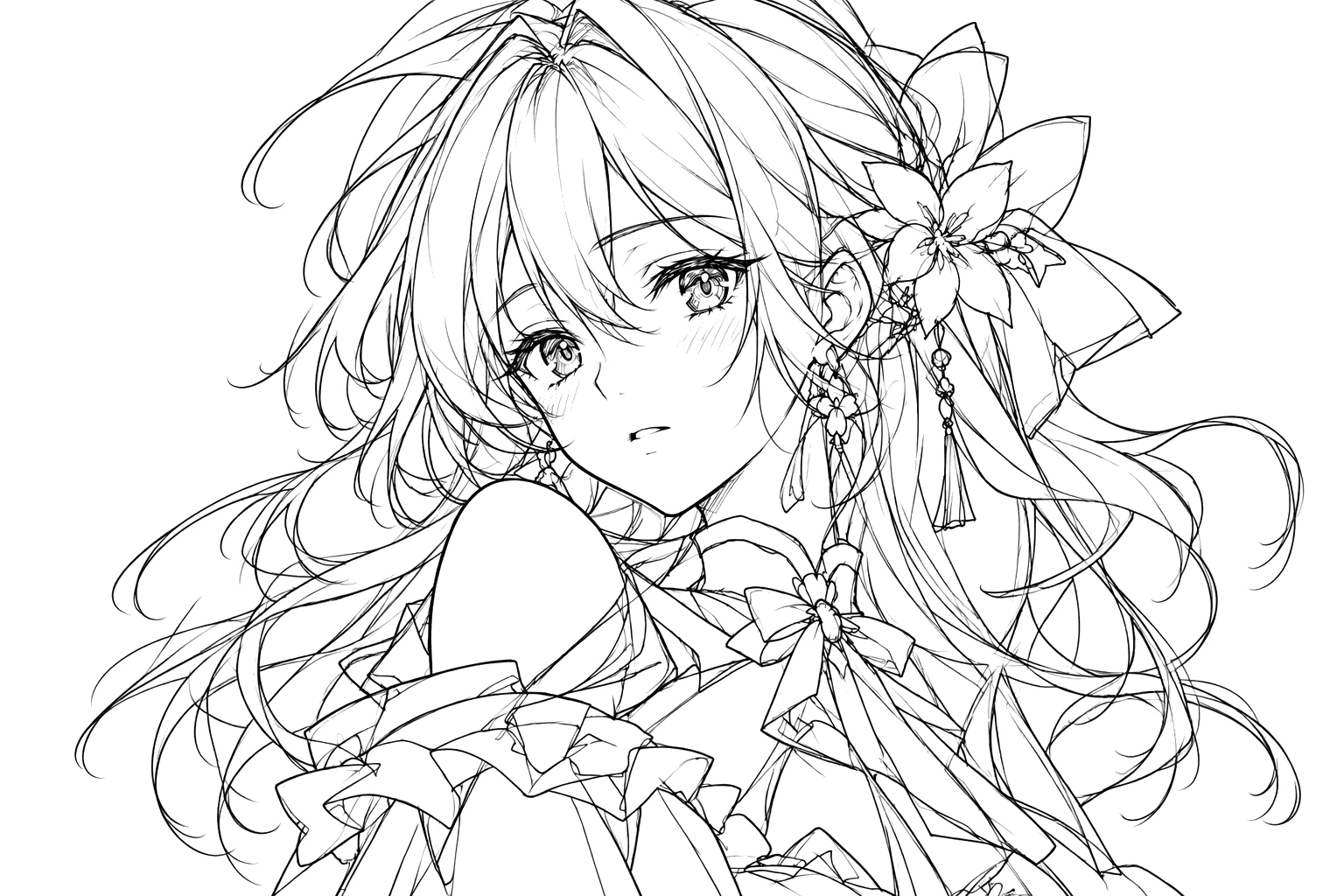
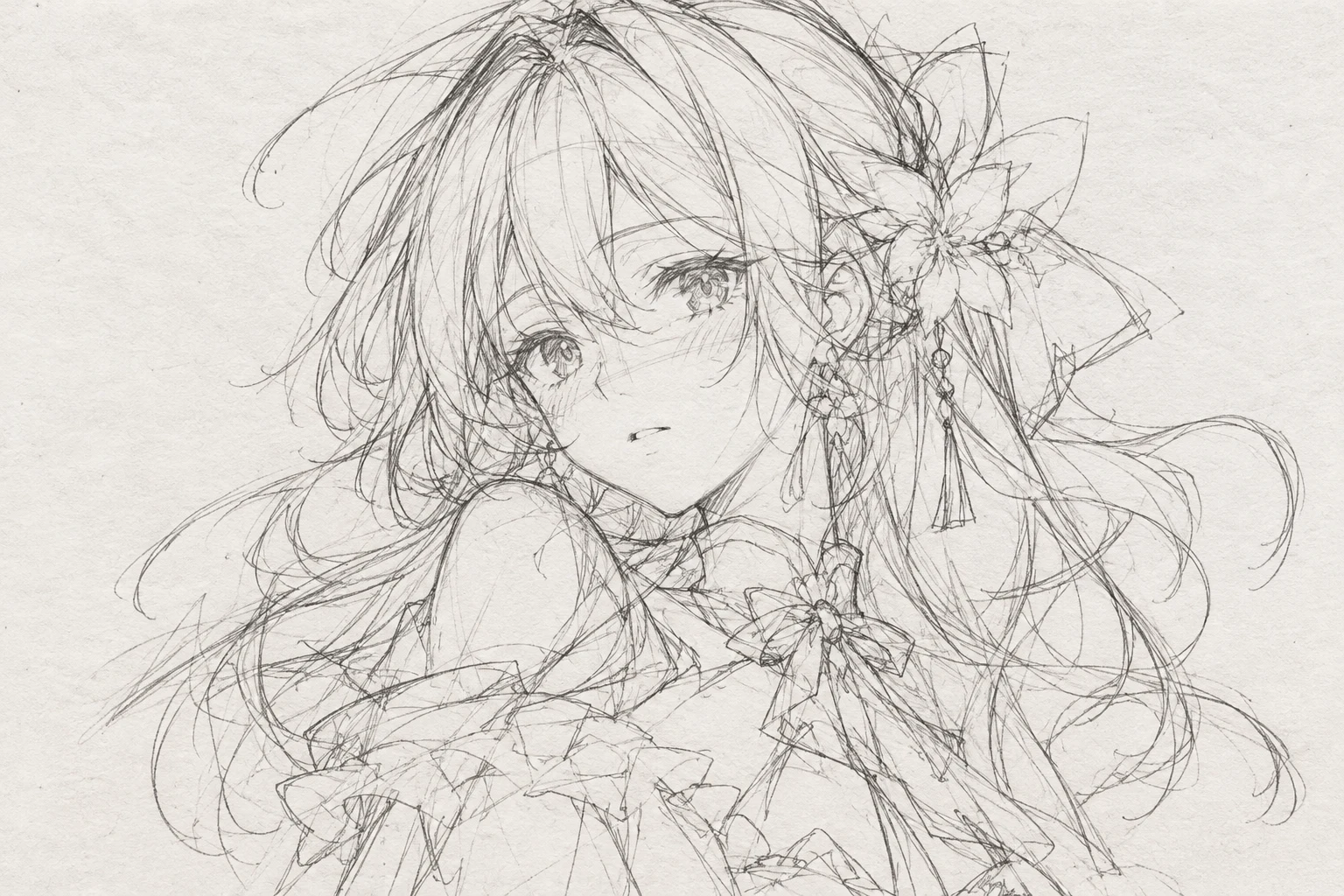
Messy anime portrait sketch
Overlapping hair strokes and guide lines became single clean contours, with the face, flower and bow kept in place.
One real cleanup at standard strength of a sketch made with ChatGPT. Results vary with the drawing.
Works best on one drawing per image. Results are AI-generated, so compare details with your original.
What you get
Line art in the formats artists use
One cleanup gives you the PNG and PSD, plus an SVG when the drawing can be traced. You pay once, not per format.
Transparent PNG
Black lines on a transparent layer with soft edges, ready to sit above your colors.
Layered PSD
A Clean ink layer over a White background layer that you can hide or delete.
SVG outlines when available
For drawings that can be traced, scalable vector shapes made from the lines, for resizing or print.
ZIP with your original
Every file that was created plus your original sketch in one download.
The SVG is made of filled outlines traced from the lines. It is not a set of editable brush strokes, and very detailed drawings may not get one.
How it works
From pencil draft to line art in three steps
1
Upload your sketch
We even out the paper tint and shadows and size the image for cleanup. Images we can't use are refused before any credits are taken.
2
Choose a cleanup strength
Light keeps nearly every stroke. Standard merges repeats and removes guide lines. Strong simplifies the most.
3
Check and download
Compare the lines with your sketch, then download the PNG and PSD, the SVG when one was made, or the full ZIP.
Cleanup strength
Pick how much of your sketch to keep
Light
Use it when the sketch is already fairly clean, or when fine hatching and detail matter.
Standard
The right start for most pencil drafts with repeated strokes and a few guide lines.
Strong
Use it for very loose, scribbly drafts. Expect minor detail to be dropped.
Each level changes the instructions we send to the model, so you can run another level on the same sketch if the first is not right.
What to expect
A cleaned drawing, not a perfect copy
The cleanup is done by an AI image model that redraws your sketch as ink. It follows your composition, but it can change small things such as eyes, fingers, jewelry or the exact position of a line.
We check that the new lines stay on your original strokes and mark results that drifted. That check cannot tell whether a face still looks right, so you should always compare.
Good inputs to try
- Pencil or pen sketches on paper
- Characters, creatures and props
- Rough drafts with overlapping strokes
- Scans and straight-on photos
Not a good fit for
- Colored or shaded artwork
- Pages with several separate drawings
- Photographs
- Exact tracing of every original stroke
If a result drifts, try a lighter strength or a sharper, evenly lit photo.
Before you upload
Get a cleaner result
Photograph straight on
Hold the camera above the page so the lines are not stretched.
Use even light
Avoid shadows across the page and strong glare on graphite.
Fill the frame
Crop away the desk and page edges so the drawing is most of the image.
Keep to one drawing
Several drawings on one page can be merged or reshaped.
Draw dark enough
Very faint pencil can be mistaken for paper texture and removed.
Start with standard
Move to light or strong only if you need more or less cleanup.
Large images are scaled down to 2048 px on the long side before cleanup.
FAQ
Sketch to clean line art: questions
What files do I get?
A transparent PNG and a layered PSD with a Clean ink layer and a White background layer. An SVG is added when the drawing can be traced, and a ZIP holds every file with your original sketch.
How much does it cost?
One cleanup costs the number of credits shown next to the button. The PNG, PSD and SVG come from the same cleanup, so you are not charged per format.
Will it keep my drawing exactly as I drew it?
No. An AI model redraws the sketch as clean ink. It is told to keep your composition, pose and design, but small details can change, so compare the result with your original.
What does the cleanup strength change?
It changes the instructions sent to the model. Light keeps nearly every stroke, Standard merges repeated strokes and removes guide lines, and Strong simplifies minor detail the most.
Why is there a transparent PNG?
The lines are saved as black with transparency, so white paper disappears and you can place your own colors on a layer below.
Is the SVG made of my original brush strokes?
No. It is traced from the finished lines as filled outlines. You can scale it freely, but it does not recover editable strokes or brush widths. Very detailed drawings may come without an SVG.
What happens if the cleanup fails?
Your credits are returned in full. If the cleaned lines don't follow your sketch, the job fails instead of giving you a different drawing.
What are the file limits?
JPG, PNG or WebP up to 10 MB, at least 256 px on the short side. Large images are scaled to 2048 px on the long side.
Can I use the result commercially?
You keep the rights you already have in your own sketch. Check the terms of service for how generated output may be used.
Can I clean up a digital sketch instead of a paper drawing?
Yes. Upload a digital rough sketch as a JPG, PNG or WebP image. The tool works from image pixels, so results depend on line clarity, detail and the artwork itself.
Can I open the layered PSD in Photoshop or Clip Studio Paint?
The PSD has a transparent Clean ink layer and a separate White background layer. It is meant for PSD-compatible editors, so you can hide the background and keep drawing or coloring.
Will every drawing include an SVG file?
Not always. Very detailed drawings may be too complex to trace into a practical SVG. When the SVG is skipped, your PNG and PSD are still delivered.
Does the cleanup keep my original resolution?
Images larger than 2048 px on the long side are resized to 2048 px before cleanup. The result can't restore detail lost in resizing.
Related tools
Keep working with your line art
Clean up your next sketch
Upload a rough draft and get line art you can color, ink or print.
Clean my sketchTransparent PNG and layered PSD from one cleanup, with SVG when available.