Transform a favorite photo, drawing, or simple design into a custom two-color overlay mosaic crochet pattern. Upload your image, create a simplified stitch design, and get a chart with row-by-row instructions—without drawing every stitch by hand.
Start with an image you love. We'll simplify it into a two-color motif and prepare an overlay mosaic crochet chart you can review, print, and use as a guide for your project.
Upload Your Photo or Design
Choose a flower, animal, geometric pattern, icon, or another image you'd like to turn into crochet art.
JPG, PNG, or WebP. Maximum 10 MB. Images with a clear subject and simple background usually produce easier-to-read patterns.
Generation Cost20 Credits
Generation usually takes a minute or two.
See Your Image Become a Crochet Pattern
Mosaic Crochet Pattern
Original Image
Rose Mosaic Crochet Pattern
Turn a favorite flower into a decorative crochet motif.
These examples show generated patterns and digital simulations—not photographs of finished crochet pieces.
Made for crocheters, pattern designers, and creative makers. Your image is simplified to suit the stitch grid, so fine details may change.
Your Pattern Files
More Than a Picture That Looks Like Crochet
A beautiful design is a great starting point, but you also need to know where each stitch goes. Turn your picture into a structured pattern with files you can actually work from.
X-Marked Stitch Chart
Get a clear grid with stitch positions, row numbers, and X markings for the drop-down stitches used in overlay mosaic crochet. Follow the chart as you work through your design.
Row-by-Row Instructions
Spend less time translating the chart into written instructions. Review each row's color and stitch sequence, including the operations used to create the motif.
Simplified Two-Color Design
Turn a detailed picture into a bold motif designed for a two-color crochet grid. Keep the subject recognizable while reducing details that would be difficult to express in stitches.
Downloadable Design Files
Save your chart as a printable PDF or SVG and keep a PNG preview for reference. Use compatible software to resize or inspect the artwork before printing.
From a family photo to a new geometric motif, your creative idea becomes a chart you can inspect, adapt, and work with—without building the entire design one square at a time.
From Image to Stitch Chart
Make a Custom Mosaic Crochet Pattern in Three Steps
1
Upload Your Image
Start with a flower, animal, symbol, drawing, or simple photo. A clear silhouette gives the pattern generator more to work with than a busy scene full of tiny details.
2
Generate Your Crochet Design
Your image is simplified into a two-color motif. The pattern engine converts that design into a stitch chart using supported overlay mosaic crochet rules, checks the chart structure, and prepares the written instructions.
3
Review, Download, and Start Your Project
Compare your source image with the pattern preview, examine the stitch chart, and download your files. Try a small swatch to check how the stitches and colors work together before making a larger piece.
Every photo contains more detail than a crochet grid can reproduce. Explore how recognizable subjects can become simpler patterns built around bold shapes and contrasting colors.
Mosaic Crochet Pattern
Original Image
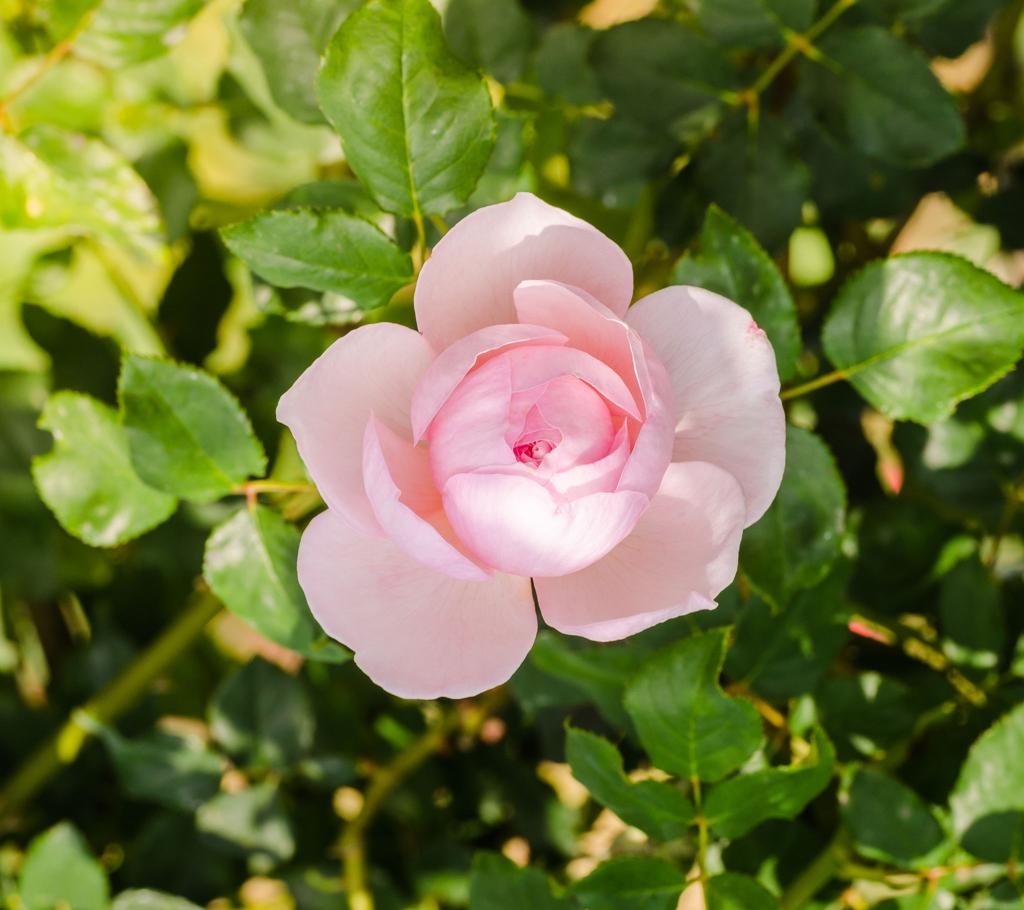
Example 1: Rose Mosaic Crochet Pattern
Before:
A rose photograph with overlapping petals, a narrow stem, and leaves.
After:
A simplified floral motif with a recognizable bloom, visible stem, and distinct leaf shapes. Small petal details may be merged or removed.
Turn a favorite flower into a decorative crochet motif.
Mosaic Crochet Pattern
Original Image
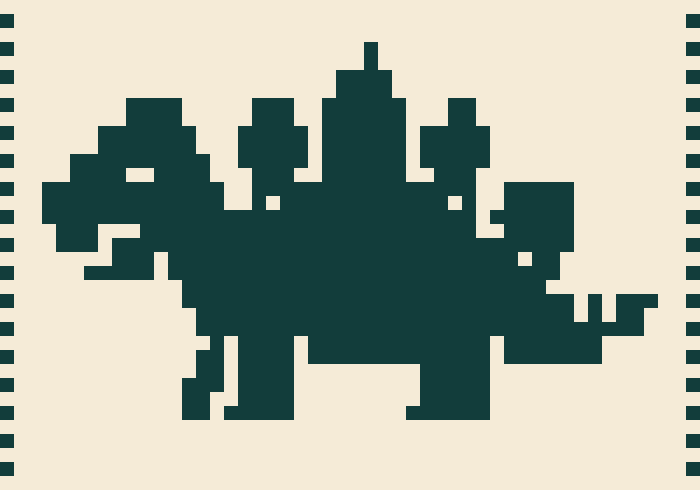
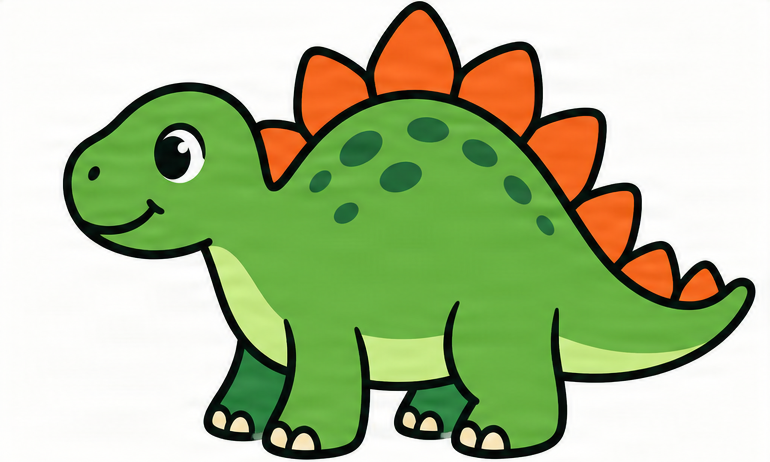
Example 2: Dinosaur Mosaic Crochet Pattern
Before:
A cartoon dinosaur with a curved body, tail, legs, and back plates.
After:
A two-color pattern that emphasizes the dinosaur's silhouette and larger features while simplifying small details such as toes and narrow spaces.
Make playful crochet designs inspired by your favorite characters and animals.
Mosaic Crochet Pattern
Original Image
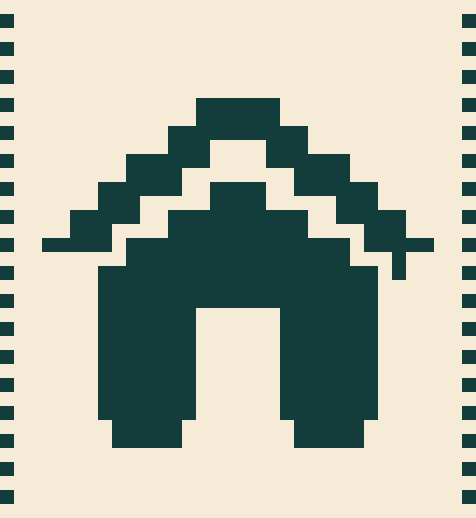
Example 3: House Mosaic Crochet Pattern
Before:
A simple illustrated house with a roof, walls, and door.
After:
A bold geometric crochet design that keeps the house's main identifying features in a compact stitch grid.
Simple icons and geometric artwork can become clear, beginner-friendly-looking motifs, although stitch difficulty still depends on the generated chart.
Examples are digital conversions. Results vary by source image, pattern width, and the detail needed to keep the subject recognizable.
Create Something Personal
Make Mosaic Crochet Patterns for Projects You'll Love
Custom Crochet Blankets
Turn bold illustrations, decorative symbols, and repeating motifs into designs you can plan for a blanket or throw. Create multiple pattern panels or adapt a single motif for a larger composition.
Personalized Crochet Gifts
Start with a meaningful image—a favorite flower, a beloved animal, or a simple symbol—and make a pattern for a handmade gift with a personal touch.
Floral Mosaic Crochet Designs
Create rose, leaf, and botanical motifs with simplified shapes that work within a two-color stitch chart. Use them as decorative panels or as inspiration for repeating designs.
Animal Crochet Patterns
Transform clear animal illustrations into graphic mosaic motifs. Choose a larger stitch width when you need more room for features such as ears, legs, wings, or tails.
Wall Hangings and Home Decor
Experiment with geometric patterns, nature-inspired artwork, and decorative shapes to create crochet designs for wall art, cushion covers, and other textile projects.
Digital Crochet Pattern Design
Develop original motif ideas and prepare charts you can review and refine as part of your pattern-design workflow. If you plan to sell finished instructions or patterns, check the underlying image rights and verify the instructions through actual making.
Whether you're creating something for yourself or developing your own collection of crochet designs, start with an image that inspires you.
Spend More Time Creating
Your Design Idea, Without Hours of Manual Charting
Start With Your Own Images
You don't have to search endlessly for a pattern that's close to the picture you imagined. Begin with your own image and turn it into a personal motif.
Let the Pattern Engine Handle the Grid
Drawing a motif is one task. Converting it into an overlay mosaic stitch chart is another. Use automated chart generation to prepare the structured pattern instead of manually placing every mark.
See the Trade-Offs Before You Begin
View the simplified motif and simulated result before committing yarn and time. Some details may become clearer at a larger pattern width, while others may need a simpler source image.
Keep the Chart and Instructions Together
Download a consistent set of design files instead of juggling separate sketches, screenshots, and handwritten notes.
Explore More Designs
Try different subjects, simple illustrations, or broader shapes to discover what translates well into mosaic crochet.
Build on a Design You Recognize
A familiar subject makes it easier to judge whether the generated motif preserves the features that matter most to you.
Choose the Right Pattern Style
What Makes Overlay Mosaic Crochet Different?
Overlay mosaic crochet uses alternating yarn-color rows and a combination of regular stitches and drop-down stitches to create contrasting graphic patterns.
This generator focuses on that technique rather than trying to produce every type of crochet pattern.
What This Generator Is Designed For
Two-color geometric and illustrative motifs
X-marked overlay mosaic stitch charts
Alternating yarn-color rows
Structured row-by-row stitch instructions
Decorative motifs for handmade projects
What It Doesn't Generate
–Amigurumi construction instructions
–General garment shaping or fitted patterns
–Inset mosaic crochet instructions
–Tapestry crochet color-change charts
–Multi-color crochet designs with arbitrary color changes
If you want a bold, two-color design created through overlay mosaic stitches, you're in the right place. If you're making a stuffed toy or a fitted sweater, you'll need a different kind of pattern.
Before You Upload
How to Create a Clearer Mosaic Crochet Pattern
Choose a Recognizable Main Subject
Images with a clear flower, animal, symbol, or simple object often make stronger motifs than busy backgrounds with lots of competing detail.
Look for Bold Shapes
Broad petals, large leaves, distinct silhouettes, and simple geometric forms are easier to translate than thin outlines or delicate textures.
Avoid Tiny Text and Fine Details
Small letters, individual hairs, narrow gaps, and intricate shading may disappear or merge when the design is converted into stitches.
Use a Larger Pattern for More Detail
Try a wider chart when essential features need more room. Remember that additional stitches also mean a larger or more involved crochet project.
Review the Simulated Design
Look at the result as a crochet motif, not just as a copy of your photo. Check whether the subject still reads clearly at the chosen width.
Test Before Making a Large Project
Try a small sample with your preferred yarn and hook. It helps you check the appearance, stitch instructions, and gauge before committing to a blanket or larger piece.
For the best result, prioritize a clear design over perfect photographic detail.
From Chart to Yarn
Get Ready to Crochet Your Design
Choose Two Contrasting Yarn Colors
Overlay mosaic patterns depend on visible color contrast. Pick two yarn colors that are easy to distinguish so the motif remains clear.
Match Your Yarn and Hook
Your chosen yarn, hook, and tension affect how large the finished motif becomes. A digital stitch width is not an exact measurement in inches or centimeters.
Follow the Row Order
Use the generated row numbers and color schedule to work through the pattern in the correct sequence. Check any starting-row and edge-stitch notes before beginning.
Keep the Chart Nearby
Some makers prefer reading the X-marked chart while others prefer written instructions. Keep both available so you can check your place.
Make a Sample First
A short test section can reveal issues with stitch placement, tension, or the visual appearance of a motif before you spend time on the complete project.
Understanding Your Result
A Crochet Interpretation, Not an Exact Copy of Your Photo
Your original picture may contain gradients, tiny details, overlapping objects, or subtle curves. Overlay mosaic crochet expresses designs through a limited set of stitch operations in a two-color grid.
That's why the generator simplifies your image before preparing the pattern. A rose may keep its bloom, leaves, and stem while losing its smallest petal folds. An animal may retain a recognizable silhouette while omitting fine details.
The generated preview is a digital simulation of the supported stitch rules, not a photograph or guarantee of the finished textile.
What You Can Expect
A simplified two-color design
A structured overlay mosaic stitch chart
Row-by-row instructions generated from the chart
Automated checks of the supported stitch rules
Downloadable files for further review
What You Shouldn't Expect
–Photographic reproduction of every detail
–Guaranteed yarn consumption or physical dimensions
–Finished-project photographs
–A substitute for checking your own gauge and stitches
–Patterns for every crochet technique
The goal is to help you move from an image to a useful creative starting point—with the chart, instructions, and visual references needed to explore the design yourself.
Frequently Asked Questions
Mosaic Crochet Pattern Generator FAQ
What is a mosaic crochet pattern generator?
A mosaic crochet pattern generator helps turn an image or design into a structured chart for mosaic crochet. Instead of manually drawing a stitch grid, you can upload a picture and create a simplified motif with stitch markings and instructions. This tool focuses on two-color overlay mosaic crochet.
Can I turn a photo into a mosaic crochet pattern?
Yes. Upload a photo, and the generator will simplify it into a two-color design before creating a stitch chart. Images with clear subjects usually work better than complex scenes. The finished pattern may look more graphic or geometric than the original photograph.
Does this tool generate overlay mosaic crochet patterns?
Yes. It is designed specifically for overlay mosaic crochet, using alternating color rows and marked drop-down stitch positions. It does not generate inset mosaic, tapestry crochet, or amigurumi patterns.
Can I make a crochet pattern from any picture?
You can start with a wide variety of images, but not every picture will convert into a useful pattern. Tiny details, text, thin outlines, and busy backgrounds can be difficult to represent with the supported stitch technique. A simpler image or wider chart may produce a clearer result.
How do I turn a picture into an overlay mosaic crochet chart?
Upload your image, choose the available pattern size, and start generation. The tool simplifies the design, converts it into a two-color stitch grid, and prepares the chart and instructions. Review the preview and chart before beginning your project.
What do the X marks mean on the crochet chart?
The X marks identify the drop-down double crochet stitch positions used to create the contrasting motif. The chart also includes regular stitch positions and row information. Always follow the instructions supplied with your generated chart, including any setup or edge-stitch conventions.
Does the generator include written instructions?
Yes. The pattern workflow prepares row-by-row stitch instructions from the generated chart, including stitch sequences and color information. The instructions reflect the chart data rather than being separately invented from the picture.
Can beginners use these patterns?
Beginners who are learning overlay mosaic crochet can use the charts as practice material, especially when starting with simple designs. However, the generator does not replace learning the basic stitches, reading charts, managing yarn changes, or following edge-stitch conventions. Start with a small sample if you're new to the technique.
How many colors can my crochet pattern have?
This generator is designed for two-color overlay mosaic crochet patterns. Even if your source photo contains many colors, the design is simplified into two contrasting colors for the stitch chart.
Should I choose 32 or 48 stitches?
A 32-stitch-wide design is a practical starting point for bold, simple motifs. A 48-stitch-wide design offers more room for recognizable shapes and details, but it requires more stitches. Choose based on how complex your source image is and how large you want your project to be.
Will my crochet pattern look exactly like my photo?
No. The image is simplified to fit a limited stitch grid and the construction rules of overlay mosaic crochet. Important shapes may remain recognizable, but textures, shading, thin lines, and small features can be merged, changed, or omitted.
Can I make a rose or flower mosaic crochet pattern?
Yes. Flowers are a good subject to try when they have a distinctive shape. A generated rose motif may retain the flower head, stem, and leaves while simplifying some of the smaller petal details. Review the preview to see whether it captures the parts of the flower you want to keep.
Can I use animal pictures to create crochet patterns?
Yes. Simple animal illustrations and clear silhouettes can work well. Details such as thin legs, small eyes, or closely spaced features may need simplification, especially in smaller charts.
What files can I download?
The workflow provides a printable PDF pattern, an SVG stitch chart, a PNG pattern preview, and row-by-row text instructions. Additional pattern data and a quality report may also be available. SVG files can be viewed, resized, or printed using compatible software.
Can I print my mosaic crochet pattern?
Yes. The PDF is laid out for printing, with the chart and the row instructions on separate pages, and you can also open the SVG chart in a compatible application. Check the print size and legibility of the row numbers and X markings before using the chart at your worktable.
Does the generator tell me how much yarn I need?
No. Yarn requirements depend on the chart size, yarn weight, hook size, gauge, stitch tension, and your chosen project construction. The stitch chart is not a reliable yarn-quantity calculator. Make a sample and estimate your materials using your actual gauge.
Can I sell crochet patterns made with this tool?
You can use the tool as part of a pattern-design workflow, including work you intend to sell, provided you have the necessary rights to the source image and comply with the applicable service terms. Before selling a finished crochet pattern, review the design, verify the instructions, and test it in practice. Automated generation alone does not guarantee a commercially ready pattern.
Is the generated pattern guaranteed to be crochet-ready?
The generator checks the chart against its supported stitch rules, but automated validation cannot guarantee that the finished textile will match the preview or meet your expectations. We recommend trying a small sample and reviewing the full instructions before starting a large project.
Why do some small details disappear from the pattern?
Overlay mosaic crochet has limits on where contrasting stitches can be placed. A feature that looks clear in a photograph may become too narrow or complicated when translated into the stitch grid. The generator may simplify, merge, or omit such details to produce a more usable design.
Do I need to install crochet design software?
No desktop installation is required to generate a pattern through the web tool. You can upload an image and review the result in your browser. For editing or printing the downloaded SVG, use a compatible application of your choice.
Have a flower, animal, or simple picture you'd love to turn into a handmade project? Create a custom overlay mosaic crochet pattern, explore the stitch chart, and download the files for your next creative idea.