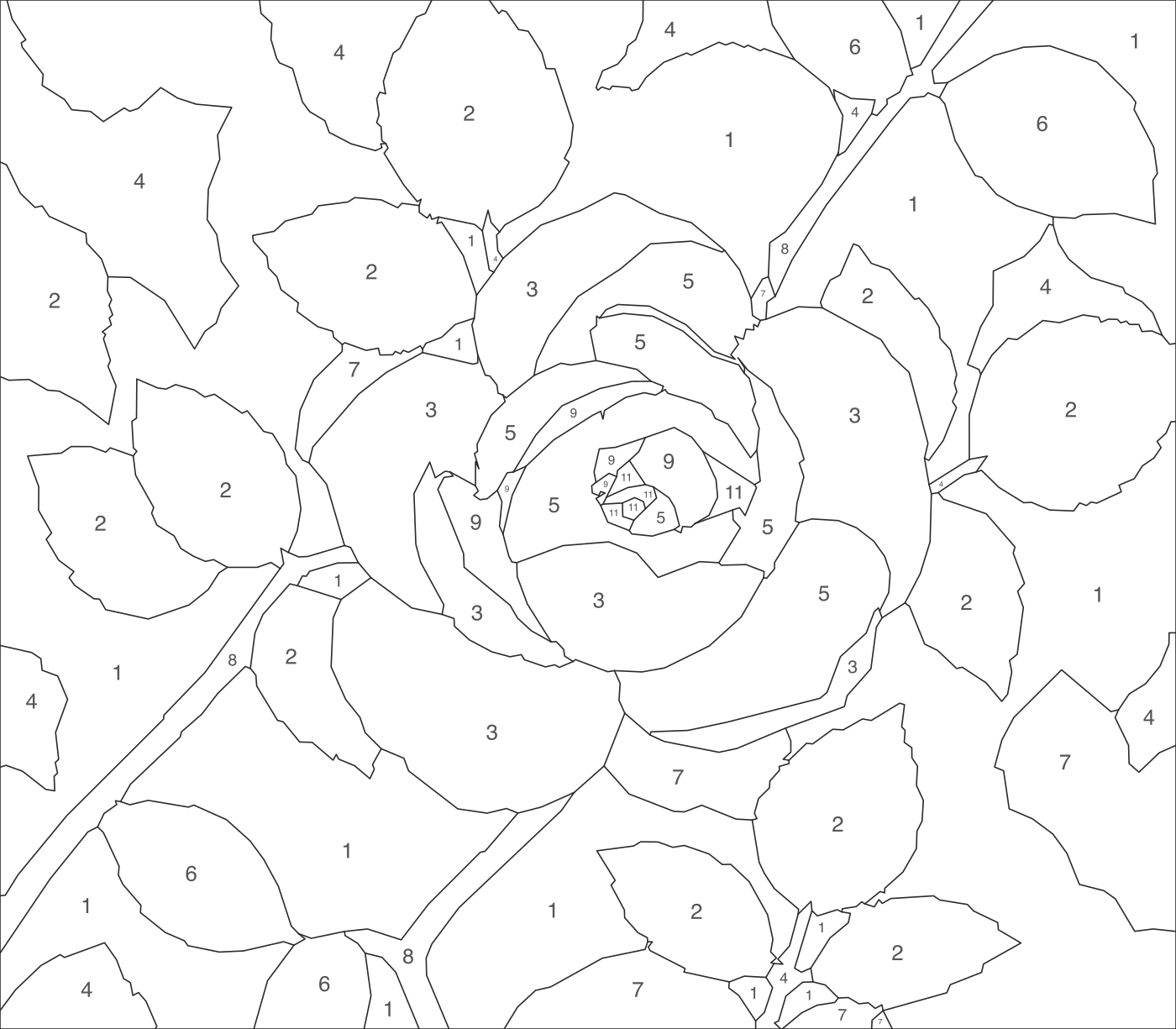
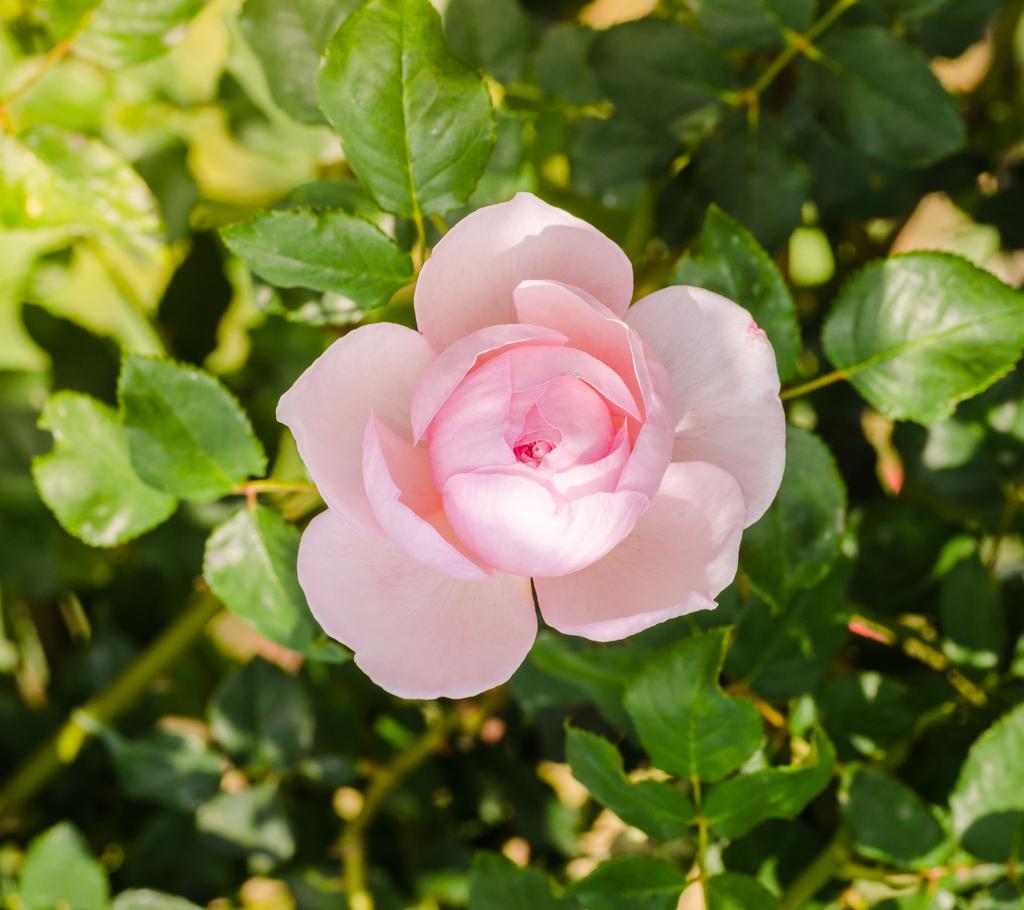
Make something personal with your favorite photo. Turn it into a custom paint by numbers design with numbered sections, a matching color guide, and editable SVG artwork. Create a painting project from a picture that means something to you.
Upload a photo and turn it into a painting pattern with outlined regions and matching color numbers.
Upload Your Photo
Choose a picture you'd love to paint, from a flower or animal to a favorite personal photo.
JPG, PNG or WebP. Clear subjects and good lighting usually work best.
Generation Cost30 Credits
Generation usually takes a minute or two.
See How It Works
Paint by Numbers Design
Original Photo
Turn a Rose Photo Into a Painting Pattern
See how a flower can be transformed into outlined color regions you can fill in one by one.
Each design is generated from an image. Colors, details, and section shapes may differ from the original photo.
From photo to painting template, without manually tracing and numbering every section.
Your Painting Files
Everything You Need to Start Your Painting Project
You shouldn't have to spend hours drawing outlines, assigning color numbers, or building a reference chart by hand. Your generated template brings the essential design files together.
Numbered Painting Template
Get a pattern with individual outlined sections and numbers that tell you which color belongs in each area. Matching colors share the same number across the design.
Color Reference Image
See how the completed design is intended to look. Keep the color reference nearby while you paint to check shapes, colors, and overall composition.
Numbered Color Guide
Match each number in your template to a corresponding color. Use the guide to plan your paint selection and keep track of your painting as you work.
Editable SVG Artwork
Download scalable vector artwork that can be opened in compatible design applications. Resize the pattern or make additional adjustments before printing or preparing your project.
Your photo becomes more than a digital image. It becomes a painting project you can personalize, prepare, and enjoy.
From Photo to Painting
Make Your Own Paint by Numbers in Three Steps
1
Upload a Photo You Love
Choose an image you want to turn into a painting. A flower, a favorite animal, or a meaningful picture can make a great starting point.
2
Generate Your Numbered Template
AI interprets the image as simplified colored regions. The pattern workflow creates outlines, assigns colors, and labels matching regions with the same numbers.
3
Download and Start Painting
Review the numbered template and color guide, then download your files. Print or resize the design with compatible software, prepare your paints, and start filling in the sections.
From an Ordinary Photo to a Painting You Can Create
Your photo contains the memories, colors, or subjects you care about. A paint by numbers template gives you a new way to enjoy them.
Paint by Numbers Design
Original Photo
Rose Paint by Numbers
Before — Original Photo:
A natural rose photo with soft pink petals, overlapping shapes, and green leaves.
After — Painting Design:
A simplified composition with defined petal shapes, distinct color regions, and outlines that can be turned into a numbered painting template.
Turn a flower photo into a personalized painting project.
The generated design simplifies the photo and may reinterpret some details rather than reproducing every pixel.
Creative Possibilities
Make Paint by Numbers Projects That Mean More to You
Custom Paint by Numbers From Photos
Turn a personal photo into a project you can paint yourself. Choose an image that holds a favorite memory and create a new piece of art around it.
Flower Paint by Numbers
Bring roses, sunflowers, and other botanical subjects to life with numbered shapes and a coordinated color guide.
Animal-Themed Painting Projects
Explore designs inspired by birds, wildlife, and other animals. Review complex features and fine details before choosing the final painting size.
Personalized Painting Gifts
Create a painting project inspired by someone’s favorite photo. The finished painting or prepared template can become a thoughtful gift for a birthday, anniversary, or special occasion.
DIY Wall Art
Create artwork for your living room, bedroom, craft space, or gallery wall using a photograph and colors that fit your personal style.
Painting Projects for Beginners
Use numbered regions as a guide instead of drawing every shape from scratch. Choose a simple image and work through each section at your own pace.
Creative Activities and Workshops
Prepare personalized painting activities for craft gatherings, classroom-style projects, and small group sessions. Check print sizes, number legibility, and material requirements in advance.
Digital Pattern Design for Sellers
Use the generated artwork as a starting point for creating original digital craft templates. Refine the pattern, verify image rights, and prepare final files for the products you plan to sell.
The best paint by numbers project is one you actually want to finish. Start with an image that inspires you.
A More Personal Way to Paint
Paint Something You Actually Care About
Create From Your Photos, Not Just Preset Designs
Instead of choosing from a catalog of generic templates, start with a photo you've selected yourself.
Skip Manual Outlining
Let the generator prepare the painting regions rather than drawing boundaries and arranging numbers by hand.
Use a Color Guide While You Paint
Matching numbers help you identify which areas belong to the same color, making the pattern easier to follow.
Work With Scalable Files
SVG gives you a flexible starting point for adjusting the design in compatible vector software.
Make a Meaningful Handmade Gift
Combine a personal image with the experience of painting it. The result can be more meaningful than an ordinary printed picture.
Keep the Creative Part for Yourself
Spend less time preparing the template and more time mixing colors, painting sections, and enjoying the finished artwork.
Understand the Difference
More Than a Simple Coloring Page
A coloring page gives you outlines and lets you decide which colors to use.
A paint by numbers template goes further. Each region has a number that connects it to a specific color in the guide.
That means you can follow an intended color arrangement while still choosing your own paints and painting style.
Paint by Numbers Template
Outlined painting regions
Numbers linked to colors
Matching color guide
Colored design reference
A structured painting process
Regular Coloring Page
–Outlined illustration
–No required color assignments
–Freedom to choose any colors
–No color-number guide needed
–Open-ended coloring experience
Choose paint by numbers when you want a guided project based on a particular photo or image.
Before You Upload
Pick the Right Photo for a Better Painting
Start With a Clear Main Subject
A flower, animal, or other recognizable subject is easier to interpret than a picture with many competing elements.
Choose Good Lighting
Clear highlights, shadows, and color separation can help create more distinct regions.
Avoid Too Many Tiny Details
Fine textures, small background objects, and intricate patterns may become difficult-to-paint sections after conversion.
Try a Simpler Crop
If your photo contains a crowded background, crop closer to the subject before uploading.
Consider the Size You'll Paint
A pattern that looks readable on a large screen may contain areas too small for a miniature canvas. Review the numbered template at your intended final size.
Match Your Paints Carefully
The generated color guide is a digital reference. Real paints can vary in pigment, finish, and color reproduction, so compare and adjust them before painting.
Simple, recognizable images are often the easiest place to begin, especially for a first paint by numbers project.
Prepare Your Project
Make Your Painting Work on Paper or Canvas
After downloading your pattern, you can prepare it for the painting materials you prefer.
Choose Your Painting Surface
Think about whether you want to work on paper, canvas board, or another suitable surface.
Check the Final Size
Scale the vector template in compatible software and check that numbers, outlines, and small painting regions remain readable.
Prepare Your Colors
Use the color guide to select or mix approximate paint colors. Digital color values are not guaranteed matches for any specific paint brand.
Print or Transfer the Pattern
Use your preferred printing or image-transfer workflow. Verify the dimensions and test the result before transferring it to an expensive surface.
Paint One Section at a Time
Find the number on the template, match it to your color guide, and gradually fill in the corresponding sections.
This tool creates the digital pattern. Paints, brushes, canvas, printing, and physical painting materials are supplied separately.
What to Expect
Your Photo, Reimagined as a Paint by Numbers Design
A photograph can contain thousands of color variations, intricate textures, and details too small to paint comfortably.
AI simplifies the image into more defined sections, so your finished pattern may look more stylized than the original photograph.
Important features can be simplified, rearranged, or interpreted differently.
What You Can Expect
A photo-inspired painting composition
Numbered sections with a corresponding color guide
A colored reference for the finished design
Vector artwork for further preparation
A custom pattern you can review and adjust
What You Shouldn't Expect
–An exact pixel-for-pixel reproduction
–A guaranteed number of painting sections
–Perfect matching to physical paint colors
–Every region to be suitable for every canvas size
–Physical paints, brushes, or a canvas included with the digital file
The generator gives you a starting point for a personal painting project. You remain in control of the final materials, sizing, and finishing decisions.
Frequently Asked Questions
Paint by Numbers Generator FAQ
What is a paint by numbers generator?
A paint by numbers generator turns an image into a painting template made of outlined, numbered regions. Each number corresponds to a color in a guide, helping you paint the picture one section at a time.
Can I turn my own photo into paint by numbers?
Yes. Upload a supported image, and the generator creates a photo-inspired painting design with numbered regions and a color reference. The result may simplify or reinterpret parts of the original photo.
How do I make paint by numbers from a photo?
Upload your image, generate the template, and review the numbered pattern and color guide. Download the files, prepare your paints and painting surface, and fill in the areas using the corresponding numbers.
What types of photos work best?
Images with a clear main subject, good lighting, and recognizable shapes are a good starting point. Busy scenes, very fine textures, and low-contrast details can produce regions that are harder to paint.
Can I make a custom paint by numbers flower painting?
Yes. Flower photos are a natural starting point because petals, leaves, and contrasting colors can be simplified into paintable sections. Fine details may be reduced or changed during conversion.
Does the generator include a numbered template?
Yes. The intended output is a numbered template in which regions are marked with their corresponding paint-color numbers. The same number may appear in different parts of the picture when those regions use the same color.
Do I get a color guide?
Yes. The color guide links the numbers in your pattern to the colors in the generated design. It is a digital color reference, not a guarantee that a particular commercial paint will match exactly.
Can I print my paint by numbers template?
You can open the downloaded SVG in compatible software and prepare it for printing. Check the page dimensions, scaling, and number legibility before printing your final pattern.
Can I edit the pattern after generating it?
Yes. SVG is a vector format supported by many design programs. You can use compatible software to adjust artwork, sizing, and labels. Editing support depends on the application and how it interprets the exported SVG.
What is the difference between a paint by numbers template and a coloring page?
A coloring page usually provides outlines without specifying colors. A paint by numbers template assigns numbers to regions and includes a color guide, giving you a structured color reference to follow.
Can I choose exactly how many colors or sections the design contains?
The final number of colors and regions depends on the generation workflow. There is no control for an exact count, so review the result before preparing your materials.
Will the completed painting look exactly like the original photo?
Not necessarily. The generated design simplifies the photo into more defined color regions. Some textures, shadows, edges, and small details may be changed to produce the painting pattern.
Can beginners use custom paint by numbers templates?
Yes. Following numbered regions can be an approachable way to paint without drawing the entire composition yourself. Beginners may prefer clear subjects and larger painting sections.
Do I receive physical paints or a canvas?
No. This is a digital pattern generator. You'll need to supply your own paints, brushes, canvas or paper, and any printing or transfer materials you plan to use.
Can I use my generated designs for Etsy or other products?
Generated artwork can be used as a starting point for craft or digital design projects, subject to the service terms and your rights to the source material. Review the pattern, make any necessary refinements, and ensure you have the appropriate rights before offering products for sale.
What if some numbered sections are too small to paint?
Try preparing the template at a larger size or adjusting the SVG in compatible editing software. Small details can be difficult to paint accurately, especially on a small canvas.
How much does it cost to generate a template?
The required number of credits is displayed in the generator before you submit your photo. A new generation is treated as a separate request and may require additional credits.
What happens if my paint by numbers generation fails?
If the system cannot deliver a usable pattern, check the task status and its applicable credit refund policy. A successfully generated pattern that needs manual adjustments is not necessarily a failed generation.
Turn a Favorite Photo Into Your Next Painting Project
Create a custom paint by numbers template with numbered regions, a matching color guide, and editable artwork. Start with your photo and make a painting that's personal to you.