
Jewelry & Glass Product Photo Editor
Clean up distracting reflections, harsh glare, dust specks, and smudges on gold, silver, gemstones, watches, and glass bottles.
Drop your jewelry, watch, or glass product photo here
Ideal for rings, necklaces, watches, perfume bottles, and stainless steel
Remove glare & reflections
Upload a reflective product photo or try the sample ring to preview the retouching flow.
Before & after
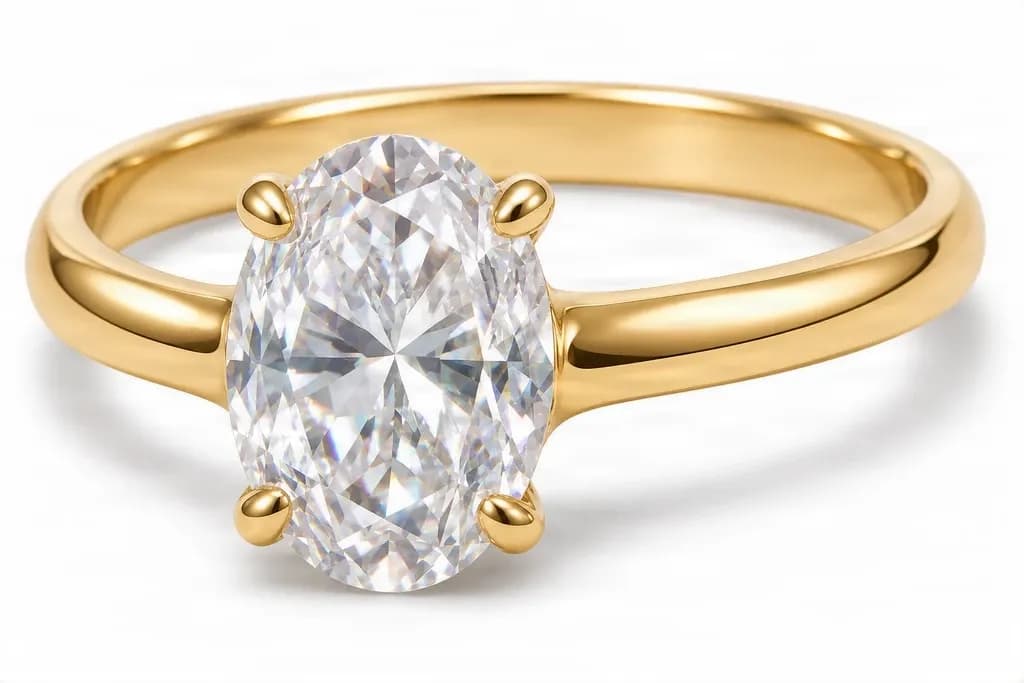
Clean metallic luster without dark room reflections
Removes distracting studio reflections and dust specks while keeping prong geometry, stone cut, and metal tone faithful.
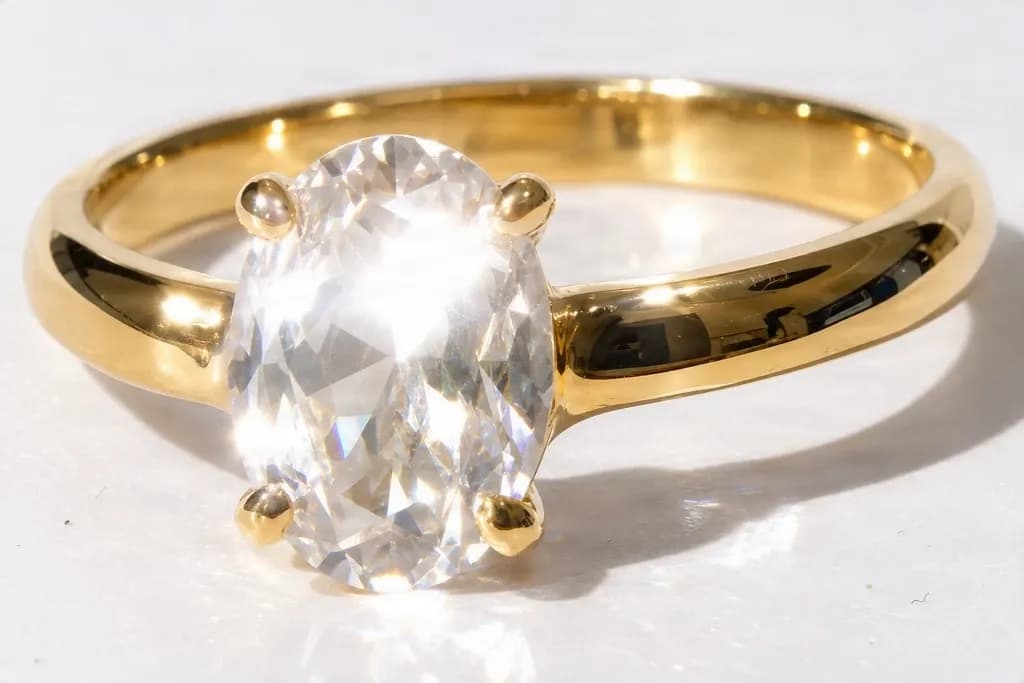
Raw studio shot
Retouched studio finish
Reflective surface retouching
Built for hard-to-shoot reflective products
Handles the common lighting and dust challenges of jewelry, watches, and glassware.
Reflection & glare cleanup
Softens blown-out hotspots and removes distracting camera or room reflections from curved metal.
Dust & micro-scratch removal
Cleans macro-visible lint, fingerprints, and tiny polishing marks without plasticizing metal grain.
Geometry & engraving preservation
Respects prong shapes, gemstone cuts, watch dials, and printed glass bottle typography.
Case studies
How jewelry and beauty brands retouch reflective shots
Practical workflows for rings, watches, and glass skincare or fragrance bottles.
Fine jewelry
Cleaning macro dust and dark reflections on a gold ring
Goal: Fix dark camera reflections and macro lint on an 18k gold gemstone ring photographed in a tabletop lightbox.
Workflow: Uploaded the macro ring shot, selected Remove Glare & Reflections, and noted to keep the oval stone facets crisp.
Result: Smooth gold band luster and clear gemstone sparkle without altering prong count or shape.
Fragrance & glass
Refining a glass perfume bottle with readable label text
Goal: Remove harsh window glare streaks across a transparent glass bottle without blurring the front typography.
Workflow: Uploaded the bottle photo, selected Clean Glass & Bottles, and added a note to preserve the label lettering.
Result: Balanced glass highlights with legible label text ready for product detail pages.
Watches & metal
Polishing stainless steel bezels and bracelet links
Goal: Remove fingerprint smudges and uneven studio hotspots on brushed and polished steel watch links.
Workflow: Selected Polish Metal & Gems and specified keeping brushed metal texture distinct from mirror bevels.
Result: Consistent commercial finish across the bezel, lugs, and bracelet.
How to use
Three steps to clean reflective product photos
No tedious manual clone-stamping or multi-layer frequency separation required.
Step 1
Upload your reflective product photo
Drop a close-up shot of jewelry, a watch, glassware, or metallic hardware.
Step 2
Select a retouching preset
Choose Remove Glare & Reflections, Polish Metal & Gems, or Clean Glass & Bottles, plus any custom note.
Step 3
Generate and download
Inspect the retouched image on the result page and download it for your store.
FAQ
Frequently asked questions
What types of products work best with this editor?
Rings, necklaces, earrings, watches, sunglasses, glass perfume bottles, crystalware, and polished stainless steel products.
Will it change my ring's prong count or gemstone shape?
The workflow is instructed to preserve exact product proportions, prong geometry, and gemstone cuts. Always review macro details before publishing.
Can it remove dark reflections of the camera or photographer?
Yes. The Remove Glare & Reflections preset specifically targets dark room and lens reflections on curved metallic surfaces.
Does it keep printed text on perfume or skincare bottles legible?
The Clean Glass & Bottles preset prioritizes preserving label typography while refining glass highlights.
Can I specify which area to clean or protect?
Yes. Use the optional retouching note field to point out engravings, hallmarks, or specific smudges.
What file formats and sizes are accepted?
JPG, PNG, or WebP images up to 20 MB.
How many credits does one retouching job cost?
Each generation costs 50 credits, shown clearly on the generate button before submission.
Are credits refunded if a job fails?
Yes. If a job fails due to a system or provider error, the frozen credits are automatically refunded.
Does this replace a pure white background too?
It keeps a clean studio background; if you specifically need Amazon #FFFFFF compliance, pair it with our Amazon Main Image Editor.
Can I use the retouched images commercially?
Output usage rights depend on your subscription plan, applicable model terms, and your rights to the source product photo.
Ready to polish your jewelry and glass photos?
Upload a reflective product shot and remove harsh glare and dust in seconds.