
From Static Image to PSD: A Faster Workflow for Designers Who Need Editable Files
Designers do not usually struggle with the final creative decision. They struggle with the setup work that happens before the first useful revision. A static image may look close to the desired result, but if it is flat, it still needs to be unpacked into a file that can actually move through a design workflow.
On this page
The gap
A static image may contain the right inspiration, but it does not contain the editing structure a designer needs to work quickly.
Why PSD still matters
Layered files remain important because teams still need organized edits, clearer handoff, and reusable production assets.
What slows revisions
Flattened images force masking, rebuilding, and regrouping work before the real creative revision even starts.
Designer workflow
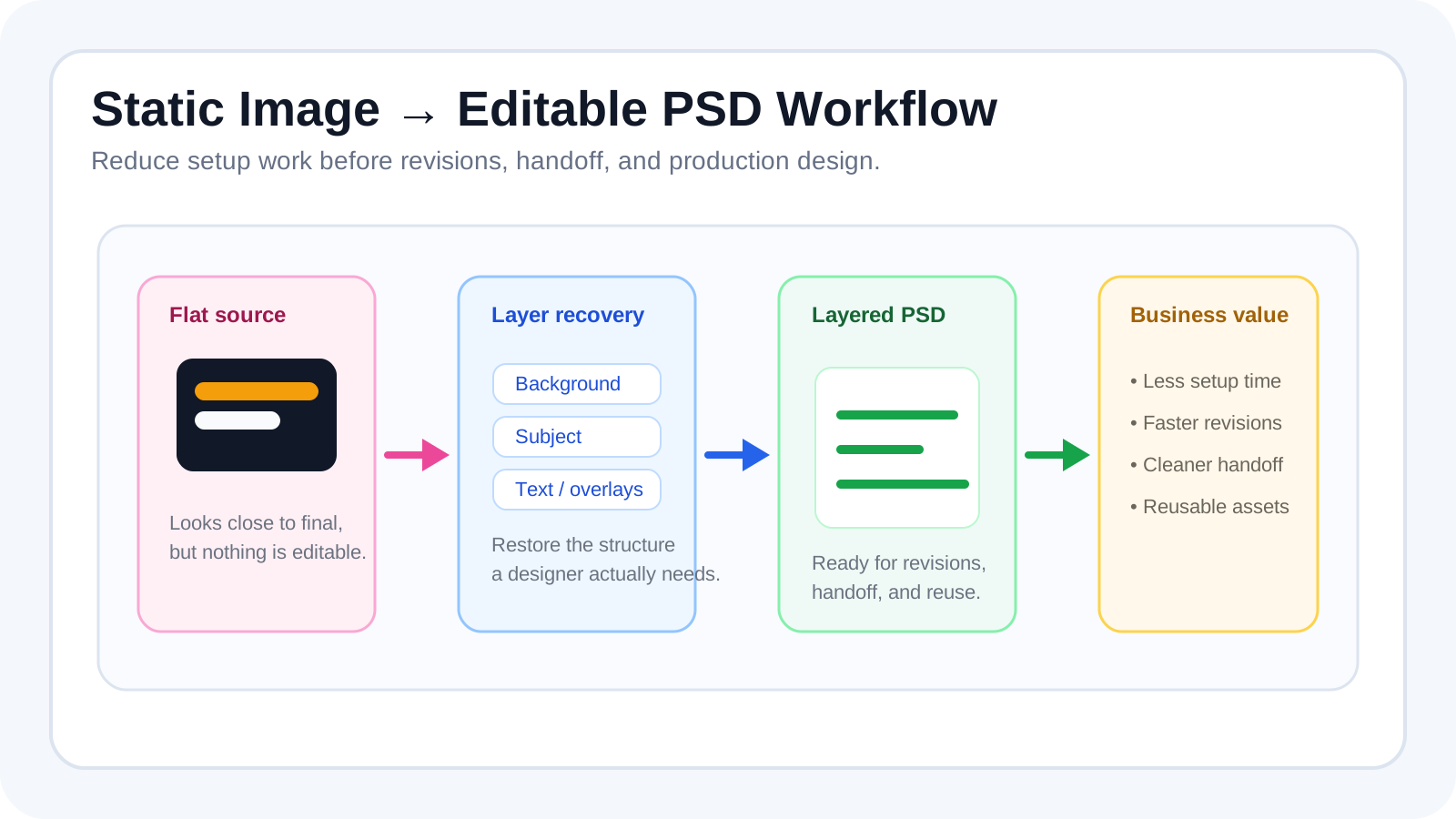
The problem with flat images
Designers regularly inherit flattened source images from clients, marketers, or internal teams. The image may look close to the final direction, but it is still a dead end for editing. Text is fused into the background. The subject cannot move without exposing broken space behind it. Supporting objects cannot be reused independently. Even simple revision requests become expensive because the file is missing structure.
That gap between visual inspiration and editable asset is where a lot of design time disappears. Teams often think they are starting from “almost finished” material when they are actually starting from a file that still requires layer recovery.
What designers usually do today
Open the image in Photoshop
The file loads in the right app, but it still behaves like a single bitmap.
Manually cut out subjects and objects
The designer spends time separating major elements before composition work can even begin.
Reconstruct blocked regions
Once the foreground moves or text is removed, the hidden image area behind it has to be repaired.
Organize before designing
Layer naming, grouping, and cleanup happen before the actual revision request can be executed confidently.
A better workflow from static image to PSD
A stronger workflow separates the setup stage from the design stage. Instead of opening Photoshop and manually decomposing the image by hand, the image is first turned into a layered editing structure. Once the biggest groups are separated and the hidden background regions are rebuilt, the PSD export becomes genuinely useful.
This matters because the next step is still design. PSD conversion is not the final value. The final value is reducing the time between “we have a source image” and “we can now revise this layout with confidence.” That is exactly why graphic design layer decomposition and Image to Layers are valuable in production design contexts.
Use cases for this workflow
ad design that starts from a flattened campaign visual
poster and social graphics that need layout revisions
marketing assets reused across multiple channels
quick concept adaptation from reference imagery
client revisions based on approved but flattened visuals
handoff between team members who need a readable layer stack
Why this workflow is valuable
The biggest gain is reduced setup time. Designers can spend more of their working hours making visual decisions and less of their time reverse-engineering a flattened asset. That effect compounds during revisions because every round starts from a more flexible file.
It also improves handoff quality. A layered PSD is easier for the next person to understand, easier to update later, and easier to reuse as a future asset. That is a practical commercial advantage for teams that ship campaign work continuously rather than treating every file as a one-off design artifact.
What makes a good PSD export
| Trait | Why it matters |
|---|---|
| Logical layer separation | The file should reflect actual editing intent rather than random technical fragments. |
| Clean enough edges | The subject or object should move without drawing attention to rough isolation work. |
| Usable transparency | The layer stack should preserve believable edges, soft effects, and enough control for retouching. |
| Consistent sizing and placement | The file should open in a way that another designer can understand immediately. |
| Downstream compatibility | The PSD should act as a handoff asset, not a file that needs to be reconstructed again after export. |
Designers do not just need images. They need assets they can edit, rearrange, and reuse. The more quickly a static source becomes an editable PSD workflow, the more time the team gets back for actual design thinking.
Step 1
Upload the flat source image
Bring in the reference image, campaign visual, or inspiration file that needs to become editable before real design work can begin.
Step 2
Separate the major visual groups
Split the composition into background, subject, text, and supporting objects so the PSD follows design intent instead of raw pixels.
Step 3
Recover blocked or hidden regions
Rebuild the covered areas that appear once the foreground moves, a headline is removed, or the layout is reframed.
Step 4
Organize the stack for handoff
Check naming clarity, transparency, and grouping so another designer can open the file and keep working immediately.
Step 5
Export to a layered PSD workflow
Move into Photoshop or another design tool with a file that is ready for iteration instead of forcing setup work from zero.
Designer PSD workflow FAQ
How do designers turn a static image into an editable PSD workflow?
The goal is to separate the flat image into useful groups first, then export a layered PSD that a designer can keep editing instead of rebuilding from scratch.
Why are flat reference images so slow to work from in Photoshop?
A flat image collapses text, subjects, overlays, and background detail into one surface, which means the real design work is blocked by cleanup and reconstruction first.
Can AI help convert a flat image into a PSD-ready file for designers?
Yes. AI can restore useful editing structure by separating the biggest visual groups and reducing the amount of manual prep before revisions start.
What kinds of design projects benefit from static image to PSD workflows?
Ad design, posters, social graphics, client revisions, concept adaptations, and reusable marketing assets are all strong candidates.
What makes a PSD export actually useful for design teams?
Useful PSD exports have logical group separation, believable transparency, clean enough edges, and a stack that another designer can understand quickly.
Can a layered PSD reduce revision time for client work?
Yes. Once the source is separated into editable groups, common revision requests become much faster than re-masking the entire image each round.
Do I still need Photoshop after converting a static image to PSD?
Usually yes. The layer-separation workflow reduces setup time, while Photoshop or another design tool remains useful for final layout, retouching, and typography work.
What source images are strongest for static image to PSD conversion?
High-resolution images with clear subject boundaries, legible overlays, and less compression usually lead to cleaner layered output.
Can this workflow help with team handoff between designers?
Yes. It creates a more understandable file structure, which reduces the time a second designer spends decoding a flattened source image.
When do designers still need manual cleanup after PSD export?
Manual cleanup is still common when the source is heavily compressed, highly complex, or requires precise visual reconstruction beyond broad layer separation.
Next step
Turn flat images into PSD-ready editing files
Start with Image to Layers when your team needs faster revisions, clearer handoff, and less setup work before design begins.
Ask AI about this page
Continue exploring this page with your preferred AI assistant.