
How to Separate Character Images into Layers for a Faster Game Asset Preparation Workflow
Game teams often receive character art in the least convenient form for production: one flattened image. That is fine for review. It is bad for asset prep. Animation, avatar systems, and even prototype pipelines usually need separated parts, cleaner handoff, and more editability than a single image can provide.
On this page
Why the bottleneck exists
Character art is often approved as a flat image even though later stages need separate parts for motion, variation, or interaction.
Where time goes
Artists spend hours cutting apart body parts, isolating accessories, and repairing the hidden edges exposed by those edits.
What layers unlock
A usable layer stack improves rigging prep, handoff between artist and animator, and iteration speed inside the production pipeline.
Game art workflow
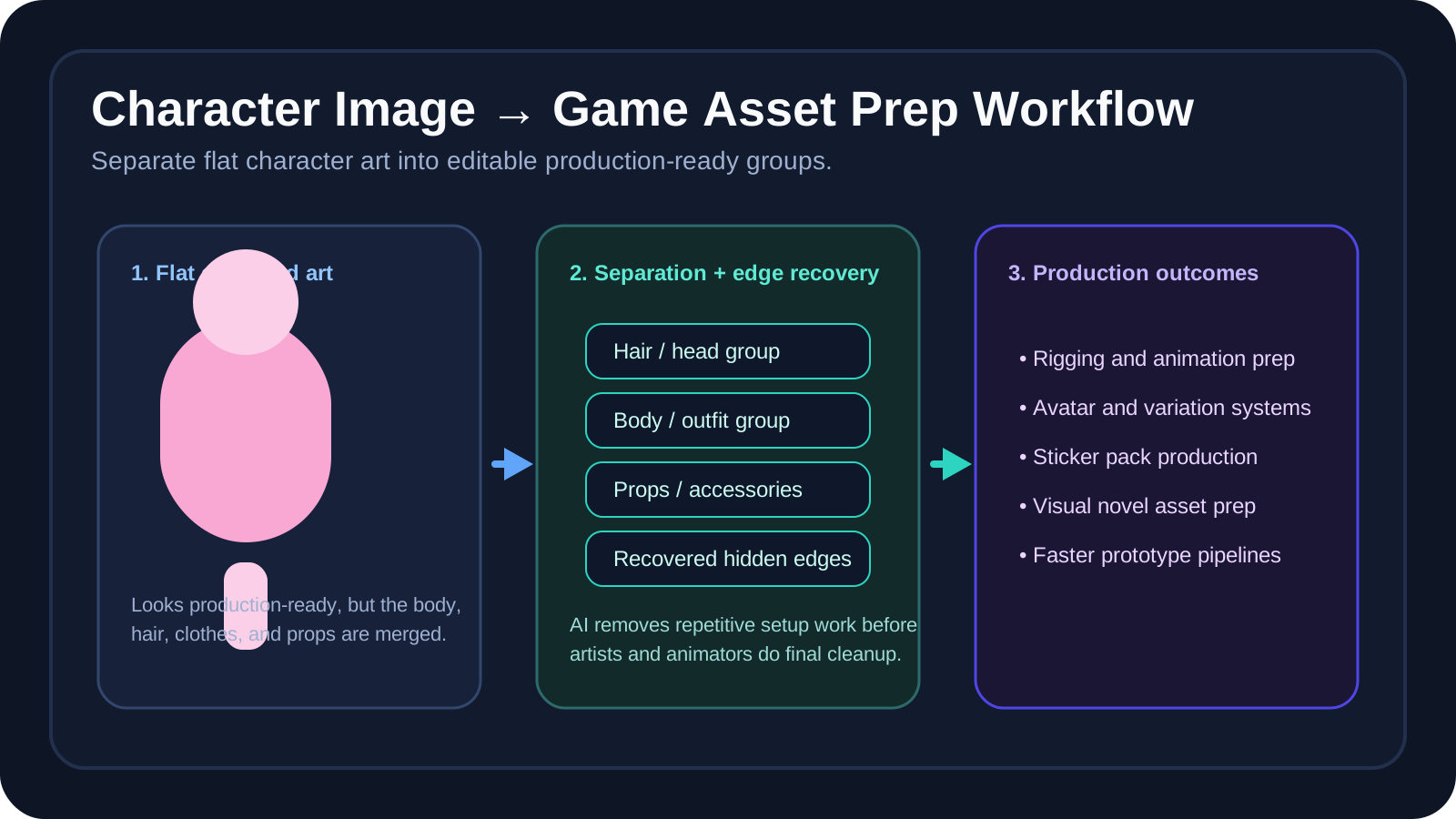
Why game asset prep takes so long
Character production often begins with artwork that was never structured for motion or modular reuse. The image looks complete, which is useful for approval, but that completeness hides a problem: body parts overlap, accessories cover important edges, and the hidden image areas behind those overlaps no longer exist as editable content.
That is why manual layer prep becomes repetitive and expensive. A team has to isolate body parts, separate clothing, recover blocked edges, and organize the file before animation or variation work can begin. The process is essential, but much of it is setup labor rather than high-value creative decision making.
The traditional asset preparation process
Manual body-part cutout
Each limb, hair section, and visible body region is separated by hand to create motion-ready parts.
Accessory and clothing isolation
Props, costume layers, and decorative details need their own structure for variations or animation cleanup.
Hidden-edge reconstruction
Once a sleeve, hand, or hair section moves, the previously covered image areas need believable recovery.
Production organization
Files are grouped for animators, technical artists, or asset pipeline tools before the project can move forward.
A faster workflow using AI layer separation
AI layer separation is most useful when it is treated as the first production pass, not the final one. It can break the image into broad editable groups, recover some of the hidden visual areas, and hand the file to artists in a state that is much closer to useful.
That does not replace final art judgment. It reduces the repetitive setup burden. For game teams, that is a meaningful difference. A flatter, manual pipeline spends valuable artist time on separation work. A stronger pipeline uses AI to accelerate the first pass, then uses artists to improve the result where creative precision matters most.
This is especially useful when paired with Character into Layers and Animator Prep, where the next step is production-oriented cleanup rather than a simple static export.
Why editable layers are important in game pipelines
| Pipeline need | Why layers help |
|---|---|
| Rigging and animation prep | Parts can move more independently when the file already contains separated body regions and accessories. |
| Asset variations | Outfits, props, or avatar parts can be revised faster when the base structure is already editable. |
| Artist-to-animator handoff | A readable layer stack reduces ambiguity and rework between production roles. |
| Prototype pipelines | Teams can test movement or UI use quickly before investing in a fully polished asset preparation pass. |
Tips for better results
- Use front-facing or clearly separated characters when possible because readable silhouettes produce cleaner first-pass separation.
- Start with simpler poses when the goal is fast production prep rather than final polished illustration cleanup.
- Review edge quality before export so hair, clothing boundaries, and overlapping parts remain believable after movement.
- Organize the output by body part or asset type so the next artist or animator can use the file immediately.
AI does not replace the full art pipeline. But it can remove a large amount of repetitive setup work. For teams shipping 2D characters, visual novel assets, sticker packs, or game prototype art, that time savings is often commercially meaningful.
Step 1
Upload the character or object art
Start with the clearest version of the image you have so body parts, clothing, and accessories remain easier to separate.
Step 2
Break the image into production-ready groups
Separate the main character, outfit pieces, accessories, props, and background into parts that match the real asset pipeline.
Step 3
Recover hidden edges and covered regions
Rebuild the image areas that were blocked in the flat artwork so separated pieces remain usable after motion or variation changes.
Step 4
Review the stack for animation prep
Check edge quality, overlap handling, and file organization before handing the asset to the next artist or animator.
Step 5
Export for the next game art workflow
Move the layered output into rigging prep, PSD-based cleanup, or a wider production pipeline built around editable asset groups.
Game asset prep FAQ
How do I separate character images into layers for game asset prep?
Start by isolating the character, clothing, accessories, props, and background regions so the asset can move into animation or production more quickly.
Why is manual character layer prep so slow for game teams?
Artists often receive a single flat image and then have to spend hours cutting parts apart, rebuilding hidden edges, and organizing files before animation even begins.
Can AI help prepare character art for animation workflows?
Yes. AI can reduce repetitive setup by separating broad asset groups and recovering hidden areas that appear when parts need to move independently.
What game workflows benefit most from layered character assets?
2D character prep, visual novel assets, mobile game production, avatar systems, sticker packs, and prototype art pipelines all benefit from editable layers.
Why do animators need editable layers instead of flat character art?
Rigging, motion prep, and variation work all become easier when body parts, hair, clothing, and accessories can be handled independently.
What kinds of character images work best for layer separation?
Front-facing or clearly separated characters with readable silhouettes, simpler poses, and enough resolution usually produce stronger results.
Can AI completely replace manual game art preparation?
No. It is better viewed as a setup accelerator that removes repetitive work before artists and animators do the final production cleanup.
How should I organize separated character layers after export?
Group layers by body part, clothing, accessories, props, and background so the next artist or animator can navigate the file quickly.
Can layered character outputs help create asset variations faster?
Yes. Once character elements are separated, teams can build costume changes, avatar variants, and animation-ready edits more efficiently.
When should I move from character layer separation to animator prep tools?
Move into animator-prep workflows once the major groups are separated and you need cleaner production organization for rigging or motion work.
Next step
Speed up repetitive character asset setup
Use Image to Layers for broad separation first, then move into character and animator workflows when the asset needs deeper production cleanup.
Ask AI about this page
Continue exploring this page with your preferred AI assistant.