
AI Product Image Translator
Translate Product Images Without Redesigning Them
Selling to customers who speak another language? Translate the text in your existing product images without starting your design from scratch. Upload a product photo, choose the text you want to change, and use AI to create a translated version while aiming to preserve your product, layout, and visual style.
Keep your original image. Review your translated result before using it.
Make changes to an existing image, even when you don't have the original design file.
Text is detected in your browser, and nothing is uploaded until you choose an AI edit. Free edits cover the original words with a flat colour patch, so they work best on plain or evenly coloured backgrounds. This is AI image editing, not recovery of a hidden Photoshop text layer. The model redraws the requested area and may change nearby pixels.
See what you can change
Small Text Changes. A Whole New Purpose.
You don't always need a completely new image. Sometimes changing a few words is enough to make the design useful again.
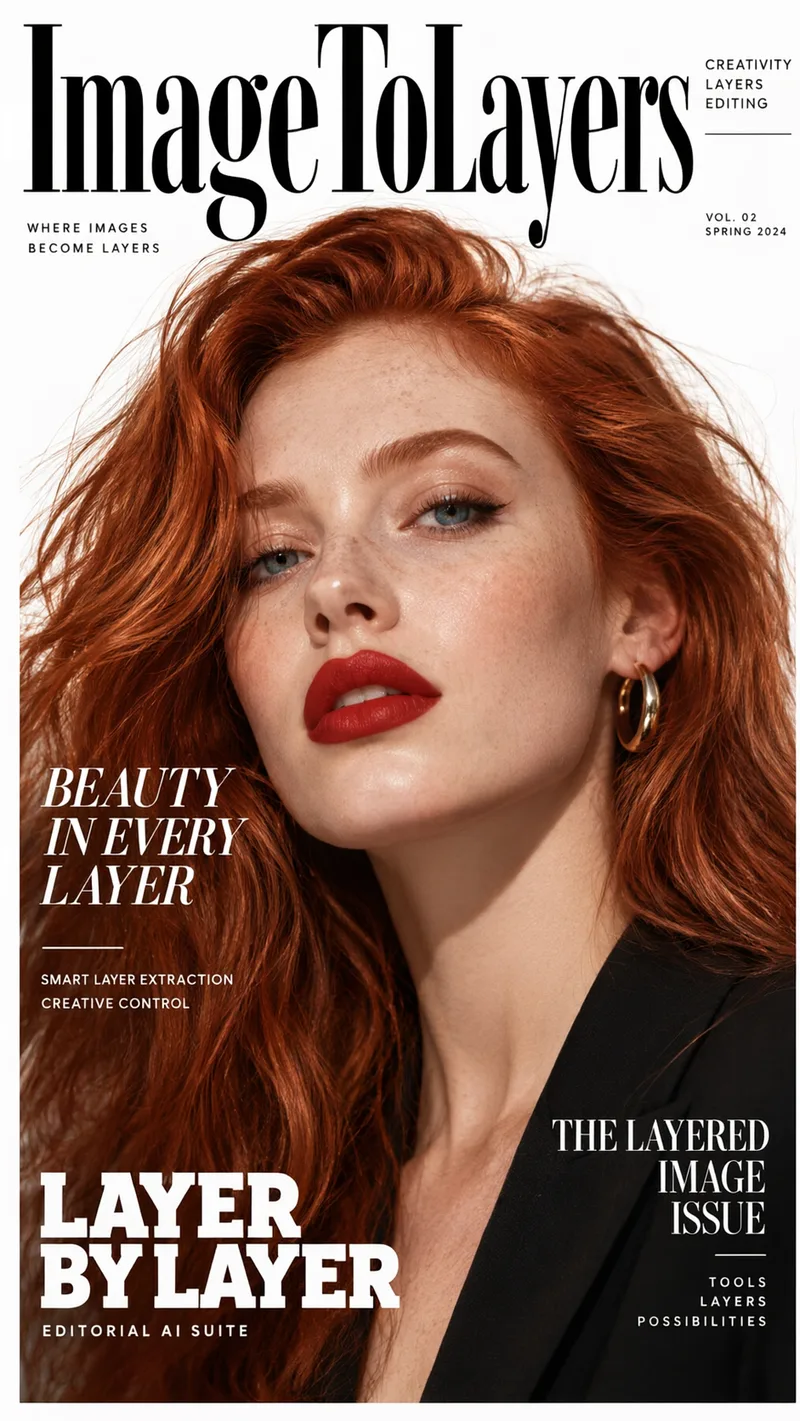
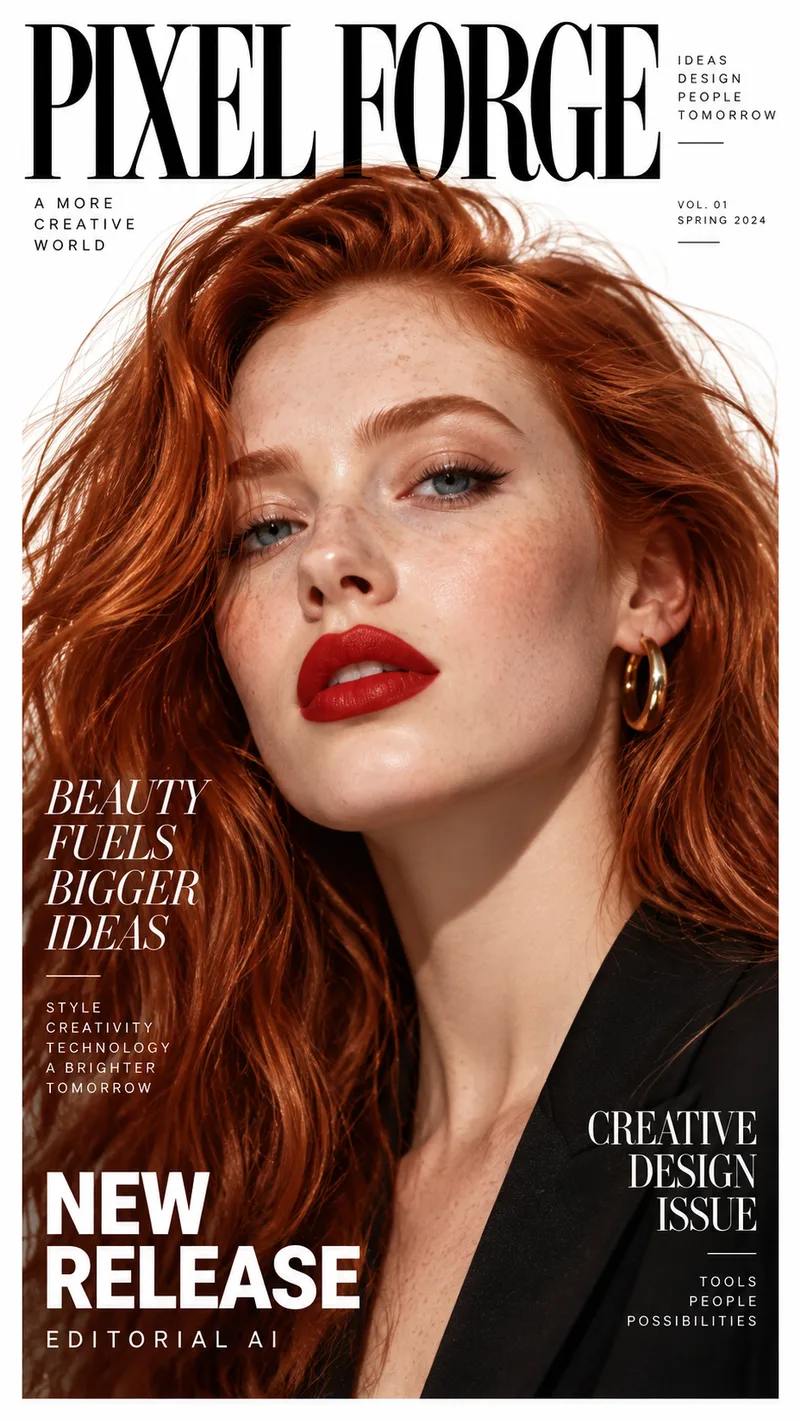
Rename a Magazine Cover
The photo and layout stay. The masthead, headlines, and small print are rewritten for a different title. Drag the slider to compare the original cover with the edited one.
Example change
PIXEL FORGE · BEAUTY FUELS BIGGER IDEAS · NEW RELEASE
ImageToLayers · BEAUTY IN EVERY LAYER · LAYER BY LAYER
Update several lines of text on the same image while aiming to keep the composition.
Results vary depending on text placement, image quality, font styling, and background complexity.
See it on a real ad
Every line of text on the ad is its own layer
This finished ad was split into a background, a photo, and separate text layers. Click any text block, change the wording, and see the update on the creative.
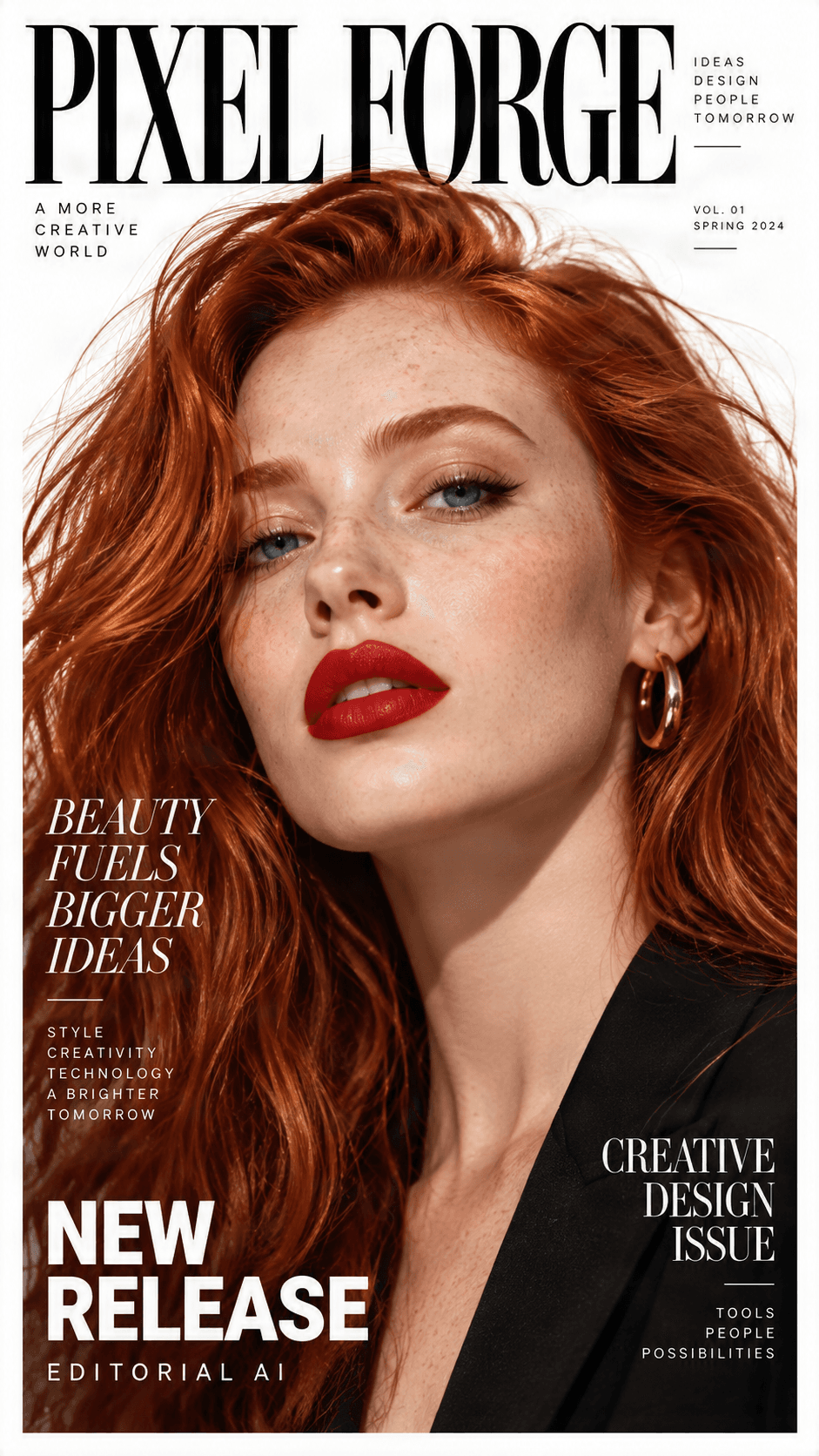
Original ad preview
Detected text, ready to edit
Click a text block, change the wording, and preview the update directly on the ad.

NEW RELEASE
Headline / Promo label

BEAUTY FUELS BIGGER IDEAS123
Campaign headline

CREATIVE DESIGN ISSUE
Secondary subhead

PIXEL FORGE
Brand logo
Background
Clean reconstructed image
Need to change more than the text?
Split any ad into separate text, image, logo, graphic, and background layers.
A Simpler Way to Reach More Customers
Your Product Images Look Great. But Can Every Customer Read Them?
You've already created the product photos, feature graphics, and promotional images you need. Now you want to share those images with customers in another country.
Recreating every graphic can take time. Covering old words with new text can look awkward. Translating the words alone also does not give you an updated image you can actually use.
Stop Rebuilding Product Graphics
Make Product Features Easier to Understand
Keep Your Product at the Center
Whether you are updating one promotional graphic or preparing a new market, start with the images you already have.
Made for Existing Product Images
Translate the Text. Keep the Work You've Already Done.
Reuse Existing Product Photos
Keep Your Visual Style Consistent
Translate Specific Text
Reach Different Markets
Update Older Marketing Graphics
Keep Control of the Final Image
What Can You Translate?
Product Images for Shops, Listings, and Promotions
Product Feature Images
Specification Graphics
Comparison Images
Promotional Product Banners
Instruction Images
Social Media Graphics
Online Store Images
Packaging Mockups
For safety instructions, ingredients, certifications, measurements, and regulated information, verify the translated wording independently before publishing or printing.
Get Started in a Few Steps
How to Translate Text in Product Images
1. Upload Your Product Image
2. Find the Text to Change
3. Choose a Target Language
4. Translate and Review
5. Download the Updated Image
Your Design Still Matters
A Different Language Shouldn't Mean a Completely Different Product Image
The words are part of the design. A short English headline may become longer in German, while Japanese or Korean may need different spacing. Image translation needs more than the correct words.
The goal is not just a translated image. It is a product image that still looks appropriate for the customers you are trying to reach.
Keep the Product Photography
Respect the Existing Layout
Preserve Brand Identity
Check Fonts and Effects
One Product, More Languages
Make Your Product Images Easier to Understand Worldwide
English to Spanish
English to German
English to French
English to Japanese
English to Korean
Other Supported Languages
Language availability and recognition quality may differ. Always check translated claims, measurements, and other important details.
Choose the Right Approach
Do You Really Need to Recreate the Entire Product Graphic?
Manual Redesign
AI Product Image Translation
Which Should You Choose?
Before You Translate
Small Checks That Make a Big Difference
Start With a Clear Image
Translate One Area at a Time
Keep Names and Codes Consistent
Verify Technical Information
Watch for Longer Translations
Compare Original and Result
Review Marketing Claims
Keep Your Original Image
Built for Everyday Product Image Tasks
Translate Product Graphics Without a Complicated Design Workflow
Online Sellers
Independent Store Owners
Small Business Owners
Creators and Designers
Individual Sellers
You do not need to rebuild your entire product catalog. Begin with one image and create the language version you need.
Frequently Asked Questions
Common questions about translating text in product images with AI.
How can I translate text in a product image?
Upload your image, identify the text, choose a target language, and use the AI translation option. Review the updated image before downloading it, especially if it contains specifications or claims.
Can I translate product images without changing the background?
You can ask AI to preserve the original image and surrounding design. Background preservation is not guaranteed for every image, especially with complex textures or overlapping text.
Will the translated text use the same font?
AI can attempt to reproduce the original typography, including its general style, size, and color. An exact font match is not guaranteed.
Can I translate only one part of a product image?
Yes. Select a text region so you can focus on a headline or label while leaving other wording unchanged.
Can I translate English product images into Spanish?
Yes. Spanish is one of the available target languages. Review the result to make sure the wording is natural for your customers.
Can I translate product images into Japanese or Korean?
The workflow supports Japanese and Korean. Check dense text and complicated typography carefully for readability and positioning.
Can I keep my brand name and logo unchanged?
Select only the text that needs translating and instruct the editor to preserve brand details. Always review the output to confirm logos and trademarks are unchanged.
Can I use translated images on Amazon, Etsy, Shopify, or other stores?
You can prepare translated images for listings or your online shop. Before publishing, check the requirements and policies of the platform you use.
Can I translate product specifications and measurements?
You can translate descriptive labels, but measurements, units, technical claims, and numbers should be verified carefully. The tool is not a product specification validator.
What if the translated text is longer than the original?
You may need to adjust text size, placement, or wording so the translated layout stays readable and does not cover important content.
Can I translate product packaging and labels?
You can explore translated packaging artwork and label mockups. For commercial packaging, independently verify mandatory, safety, ingredient, and warning information.
Do I need the original Photoshop or design file?
No. You can start with a supported image even without the original project. Not every visual effect can be preserved as an editable Photoshop text layer.
Can I translate several product images at once?
The workflow is designed around one image at a time. Repeat it for each image; batch translation should not be assumed to be available.
Will translating a product image change the product itself?
The intended operation updates text while preserving the product and surrounding elements, but AI editing can introduce unintended changes. Compare the original and result before commercial use.
Your Product Image Is Already Designed. Now Make the Words Work for More Customers.
Don't rebuild a finished graphic just because you need another language. Upload your product image, translate the text you need, and create a new version while keeping the original design in mind.
Translate Your Product ImageStart with an image you already have. Review the result, make any necessary changes, and download when you're ready.