

One Flattened Poster
The CITY NIGHTS festival design combines its performer, headline, event details, badge, and background in one composition.
Your card design looks finished. But what if you need to change the artwork, update the border, or create another card using the same style? Upload your flattened trading card image and let AI attempt to separate recognizable artwork, frames, symbols, decorations, and backgrounds into visual layers you can review and edit.
Upload your image
JPG, PNG, WebP up to 10MB · Drag & drop anywhere
Leave this blank to let Detailed Layers identify the main editable elements automatically. Or name the parts you want separated.
Separate the Visual Elements of Your Card
Designed for flattened card artwork containing illustrations, frames, symbols, and decorative graphics. Keep recognizable visual objects together while separating them from the surrounding design where possible.
Upload an Image to Continue
Private File Handling
Uploaded files are associated with your account and delivered through signed URLs. You can delete completed jobs manually.
Transparent PNG Output
Detailed Layers returns each detected element as its own layer on a transparent background.
Review the required credit cost in the workspace before generating.
Tips for Better Results
REAL IMAGE LAYER SEPARATION EXAMPLE
This real poster example demonstrates how AI separates a main subject, headline artwork, badge, supporting graphics, and background. Trading card designs contain similar types of visual elements, although card-specific separation results may differ.
The CITY NIGHTS festival design combines its performer, headline, event details, badge, and background in one composition.
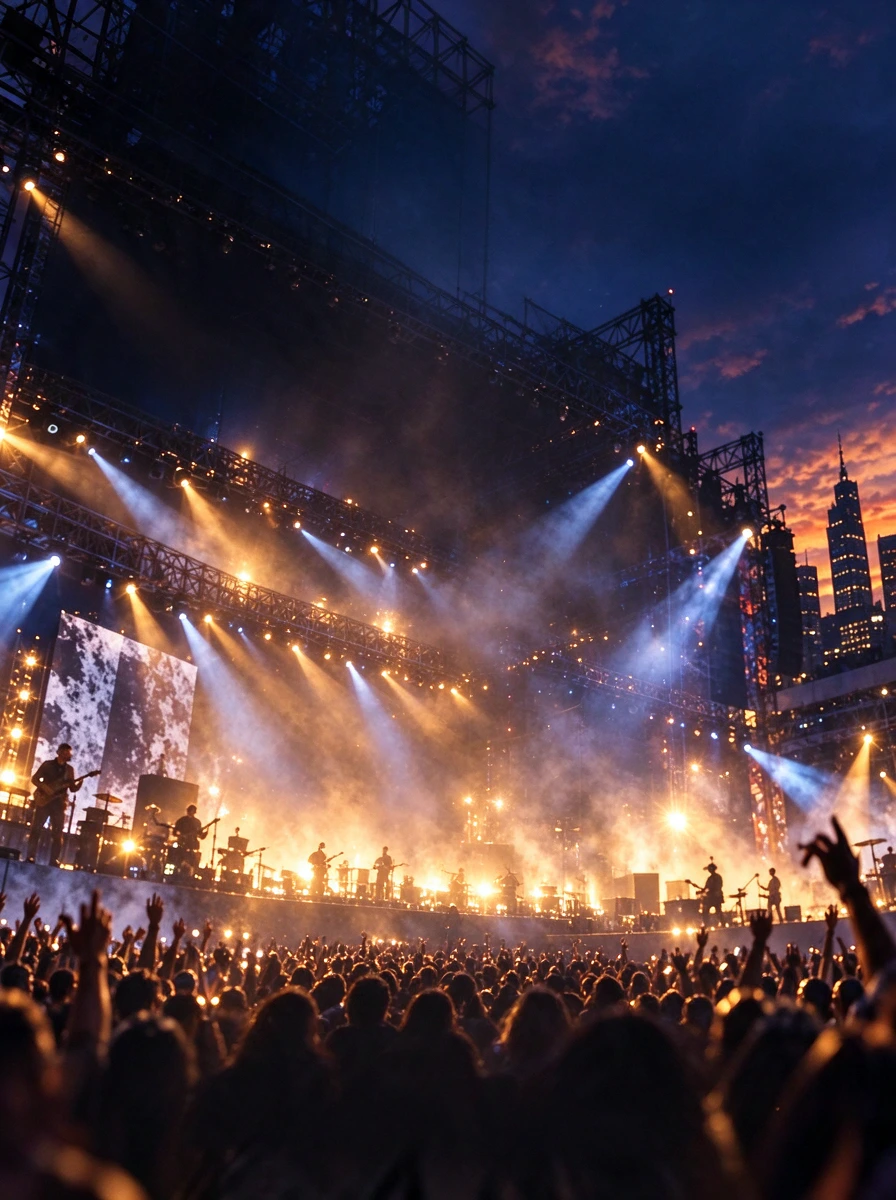
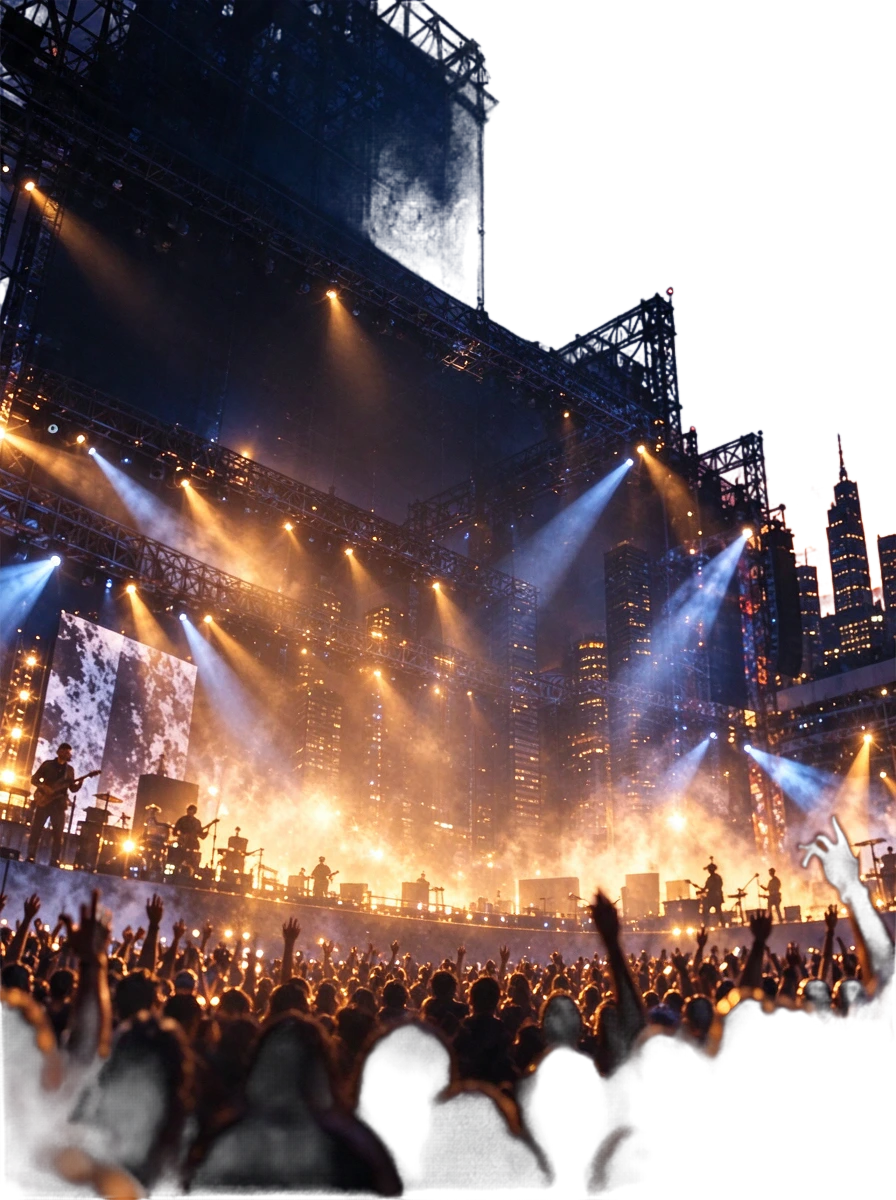
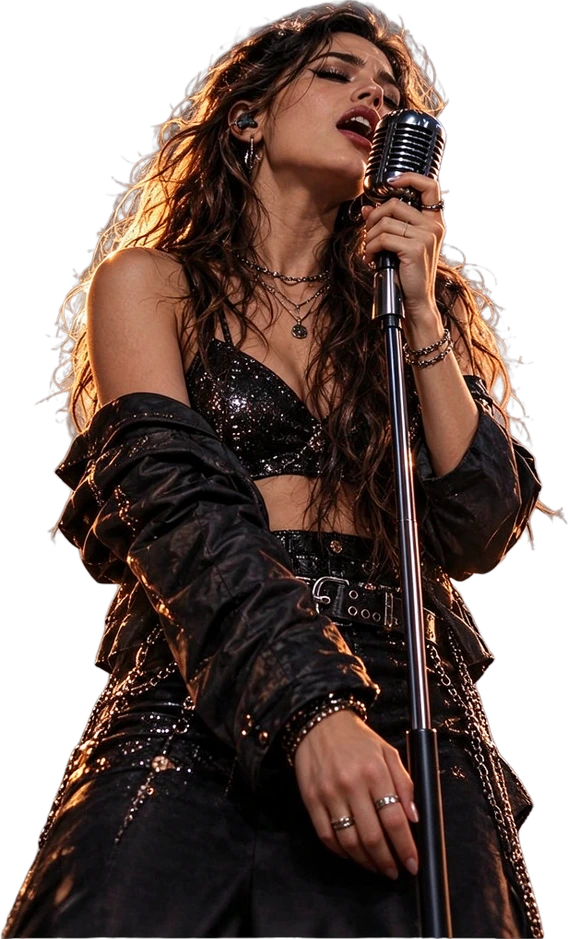

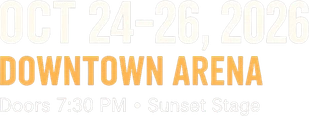


The real 8-layer result includes a background plate, concert backdrop, singer, subtitle, event details, lineup, headline, and early bird badge.
This is a real poster separation result using Detailed Layers, not a trading-card-specific test. It demonstrates the underlying layer workflow only. Card borders, printed symbols, tiny text, and complex card effects have not been verified by this example. Generated layers may need alignment fixes or manual cleanup.
EDIT THE CARD YOU ALREADY HAVE
A character illustration, frame, symbols, and decorations can all be combined in one flattened PNG. Even a small revision may require careful selections, masks, and manual reconstruction.
Trading Card to Layers helps create a new visual layer structure from a finished image, giving you a more flexible starting point for revisions and alternate layouts.
THE PROBLEM WITH FLATTENED CARD ART
The character illustration looks great. The frame fits the theme. The icons and decorations work together. Then you need a different rarity style, a new background, or another card that shares the same visual structure.
If the only file you have is a flattened PNG, the illustration, border, symbols, and decorations are all combined. What should be a small adjustment can turn into careful selection, masking, and reconstruction.
Common problems
Keep the visual work you've already created while making future revisions easier.
GIVE YOUR ARTWORK MORE FLEXIBILITY
The main illustration is often the most important part of a trading card. It might show a fantasy character, creature, item, or scene. You may want to reuse that artwork without the original border, or replace the illustration while keeping the card's visual style.
AI-assisted layer separation can attempt to identify the main artwork as an independent visual element.
Possible editing tasks
When artwork is obscured by a frame or other elements, hidden regions may be estimated by AI rather than recovered exactly.
FRAMES ARE PART OF YOUR CARD'S IDENTITY
A distinctive frame helps define the look of a game. Your cards might use ornate borders, faction colors, or elaborate decorations for special editions. When the design is flattened, the frame and the artwork beneath it can be difficult to edit independently.
The tool can attempt to separate recognizable borders, ornaments, and other frame elements.
Potential uses
A frame may be extracted as one combined element, split into several pieces, or remain merged with other regions. This does not guarantee a production-ready template.
SMALL DETAILS, BIG VISUAL IMPACT
Trading cards often use recognizable symbols for an element, faction, class, resource, or rarity. When these graphics are embedded in a flattened image, changing them can take time.
AI separation can attempt to identify distinct graphic elements and create separate image layers.
Examples
Small icons, tiny lettering, and closely spaced symbols may remain grouped or lose detail during processing.
BUILD ON THE DESIGN YOU LIKE
If a card establishes the visual direction for your game, suitable extracted components can help you explore alternate compositions without rebuilding every decoration from scratch.
Potential variations
Use extracted design pieces as a starting point, then finish the layout in your design software. The tool does not generate a complete deck, replace card data, or keep layouts consistent across outputs.
HOW IT WORKS
1
Choose a flattened TCG design, personal card project, or prototype exported as PNG or JPG. You don't need the original Photoshop file.
2
AI analyzes the image and attempts to identify recognizable artwork, ornaments, frame elements, and background regions.
3
Review which card elements were separated. Check small text, symbols, borders, and overlapping shapes.
4
Use the available editing and export options, then continue designing in compatible software.
Make your card design editable
NO ORIGINAL PSD REQUIRED
Maybe a previous designer delivered only the final image, or you no longer have the application or layered project used to create it. You can start with the card you still have and generate a new layered interpretation.
Separate recognizable artwork, extract some decorations, create transparent image layers, prepare selected parts for reuse, and rebuild a more editable composition.
Original Photoshop layer history, native vector paths, editable typography, smart objects, exact masks, adjustment layers, or hidden artwork with certainty.
Create a new starting point for editing, even if the original design file is gone.
CONTINUE IN YOUR DESIGN SOFTWARE
AI layer separation can reduce some of the preparation work when a card image has been flattened. Use the resulting image layers as a starting point, inspect their boundaries, and continue the precision work in Photoshop or another editor.
1
Start with the best-quality image you have.
2
Generate a new set of image layers.
3
Correct boundaries, missing details, and reconstructed areas.
4
Use supported downloads or PSD export available to your account, then finish the design in your editor.
Rebuild editable text and refine the frame in your design software.
TEXT IS DIFFERENT FROM IMAGE LAYERS
On a flattened card, names, descriptions, numbers, and other text are image pixels. Layer separation might identify a text-containing region, but it does not restore the original typeface, editable text object, spacing rules, or game data.
Text you may need to rebuild
Use layer separation for the card's visual structure and a text editor for its typography and game information.
MADE FOR CARD DESIGN WORKFLOWS
Prepare visual elements from existing card artwork while refining prototypes or exploring new styles.
Separate illustrations and decorations from flattened cards for further editing.
Make client revisions when the source design is unavailable or has been flattened.
Use successfully extracted frames and decorations as source material when rebuilding editable templates.
Prepare suitable card graphics for further asset development in your preferred game engine.
Rearrange artwork and decorations in original custom card designs.
Make existing card artwork easier to work with, whether you're creating one card or a larger visual system.
PREPARE DESIGN ASSETS, NOT PRINT SPECS
A print project may need specific dimensions, resolution, color settings, bleed, safe areas, and specialty finishes. Layer separation does not automatically prepare these production requirements.
Verify before printing
This tool does not create a print-ready dieline, separate foil or spot-color channels, or guarantee press-ready files. Follow your printer's specifications.
PRESERVE THE DESIGN YOU CREATED
AI separation aims to preserve recognizable shapes, colors, and textures while generating a new layered version. Small artistic choices such as frame thickness, ornament shapes, illustration colors, and icon textures may change.
Details worth checking
AI-generated layers may differ from the original flattened card. Review each layer when precise alignment or repeated details matter.
SET REALISTIC EXPECTATIONS
AI layer separation generates a new interpretation of visible card elements. It does not recover the original design file. Frames and decorations may remain grouped, icons can merge into nearby elements, small text can change, and hidden areas may be reconstructed imperfectly.
You may need to correct
Treat generated layers as an editing starting point, not a guaranteed production-ready card template.
CHOOSE THE RIGHT WORKFLOW
Best for screenshots with HUD bars, menus, buttons, panels, minimaps, and other interface elements.
Best for flattened collectible card designs with artwork, visual frames, ornaments, symbols, and backgrounds.
Choose this workflow when you're editing the visual design of an individual card rather than a full game interface.
THE DESIGN AROUND THE ART MATTERS
Focuses on separating characters, props, scenery, and background elements from a finished illustration.
Focuses on the complete card composition, including main artwork, frames, decorative symbols, and surrounding backgrounds.
Use Illustration to Layers for standalone artwork. Choose this page when the illustration is part of a finished card layout.
CARD ART OR GAME INTERFACE?
Flattened game screenshots and interface captures
Separate recognizable HUD elements, menus, panels, buttons, and other game interface graphics.
Explore Game UI to LayersFlattened collectible card designs
Prepare artwork, frames, symbols, decorations, and backgrounds as visual layers for further card design work.
You're viewing this workflow
Use the game UI workflow for interface screenshots. Use Trading Card to Layers for the visual design of an individual card.
Upload a flattened card image and start AI layer separation. The tool attempts to identify artwork, decorative frames, symbols, and backgrounds, then creates visual layers you can inspect and edit.
You can generate image layers from a flattened PNG. Supported layer downloads and PSD export depend on the available workflow and your account. The output is a newly generated layer structure, not the original design file.
The AI can attempt to identify the main artwork and decorative border as separate visual elements. Heavily overlapping or intricate frames may remain grouped or need manual correction.
Not necessarily. Small symbols, text, and decorative elements may be grouped together or stay part of a larger region. The model has practical limits on the number of layers it can generate.
If a frame is extracted successfully, you can use it as a starting point for another design. You may need to repair edges, reconstruct hidden areas, or rebuild parts of the layout.
The workflow can attempt to isolate a recognizable character or main subject. If it overlaps other graphics, the result may need cleanup or AI reconstruction.
Separating surrounding elements may make it easier to replace artwork in a design editor. This workflow does not choose, generate, or insert a new illustration for you.
No. Text in a flattened image is made of pixels. A separated text region is still an image and does not restore the original font, editable characters, or formatting.
Use a text or design application to reliably change names, rules text, and statistics. Layer separation does not restore editable text fields or structured card data.
You can try different styles, including fantasy, science fiction, cartoon, and illustrated designs. Results depend on the image's clarity and complexity.
It can help prepare visual assets from a flattened prototype for further editing. It does not generate game mechanics, balance data, or a complete playable deck.
The AI can attempt to separate recognizable icons and decorations, but very small or closely connected symbols may stay grouped or change during processing.
That is not guaranteed. Generated layers may alter fine decorative edges, small details, or alignment. Check important borders and measurements in your editor.
It may estimate some hidden regions from nearby artwork. These areas are AI-generated and may differ from the original unseen image.
Yes. You can continue editing supported exported assets in Photoshop. You may need to correct layer positions, rebuild typography, and refine details.
Supported transparent image exports can be imported into compatible game engines. Final layout, rendering, interaction, and game logic remain part of your game workflow.
Yes. Game UI to Layers focuses on interface elements such as buttons, HUD components, and panels. Trading Card to Layers focuses on the artwork and visual structure of an individual card.
You can use extracted visual assets while preparing a card for print, but the tool does not guarantee print-ready artwork. Follow your printer's requirements for dimensions, resolution, bleed, safe areas, and color.
Only upload and reuse artwork when you have the necessary rights or permissions. Processing an image does not grant rights to its characters, artwork, logos, or other protected content.
The workflow uses credits for AI processing. Review the applicable generation cost shown in the workspace before starting. Available export options depend on your account.
Separate interface panels, icons, menus, and other visual elements from game screenshots.
Extract recognizable characters, scenery, and objects from a finished illustration.
Create a new layered editing structure from a flattened image.
Prepare flattened promotional artwork for further design editing.
Use the general-purpose image layer separation workflow.
You already have the artwork. Now you want to make changes without rebuilding every border, decoration, and visual element by hand. Upload your finished trading card, generate a new set of visual layers, and continue refining your design with more flexibility.
Make My Card EditableUpload your card image and review the credit cost before generating.
Creative Toolkit Index
Quick access to precision layer extraction, AI photo editing & asset tools.