
MiniMax H3 AI Video Generator Guide: Prompts & Examples
Turn a still image, a motion reference, or a short scene brief into a more directed audiovisual result. This guide explains how to plan an eight-second product reveal, work with video and audio references, use first-and-last frames, and inspect the result before publishing.
On this page
Quick answer
Choose the simplest supported MiniMax H3 workflow that gives you the control you need. Describe the subject, action, camera, timing, sound, and details that must remain stable, then review the complete clip rather than judging one attractive frame.
What is MiniMax H3?
MiniMax H3 is an audiovisual generation model from MiniMax. Depending on the supported workflow, it can use text, images, video, and audio context to direct a short scene.
The useful idea is not simply a higher-resolution output. H3 lets a creator describe relationships: use the product from one image, follow the camera behavior in a video, and connect a sound or dialogue instruction to a visible event.
Availability, controls, pricing, and reference limits depend on the interface or API you use. Treat the official documentation as the source of truth for the current model specification.
| Duration | 4–15 seconds in the documented H3 workflow |
| Base generation | 768p short side |
| Higher resolution | Up to 2K through H3-Regenerate-2K where available |
| Frame rate | 24 FPS in the official specification |
| Audio | Native stereo audiovisual generation |
| Inputs | Text, image, video, and audio references |
| Keyframes | First and last frame workflows |
| Common ratios | 16:9, 9:16, 1:1, 4:3, 3:4, and 21:9 where supported |
The three H3 Max tools on ImageToLayers use specialized workflows: video relighting, image-to-video lip sync, and inserting a generated scene into an existing video. They should be described as separate tools rather than as the generic H3 text-to-video workflow.
Choose the right video generation mode
Before writing a long prompt, decide what kind of control your shot needs. More references are not automatically better; each one adds another instruction for the model to reconcile.
Text-to-video
Start with an imagined scene described in text. This is useful for concepts and atmospheres where no exact starting image is required.
Image-to-video
Upload a still image and describe how it should move. This is useful for products, illustrations, posters, and characters.
First-and-last-frame
Provide opening and ending compositions for a reveal, transformation, or planned camera transition.
Reference-guided generation
Use an image, video, or audio reference when you need to guide appearance, motion, performance, or sound.
| A new imaginary scene | Text-to-video |
| Animate a product photograph | Image-to-video |
| Reach a specific ending composition | First-and-last-frame |
| Follow a particular camera movement | Reference-guided generation |
| Guide a character's appearance and voice | Multimodal references |
Build an eight-second product reveal
Imagine a clear skincare bottle on a stone pedestal. The goal is a vertical product reveal with one slow push-in, controlled reflections, and a short glass chime. The storyboard below is a planning example, not a claim about a completed generation.
The shorter the clip, the more important it is to give it one main visual purpose. An eight-second shot can still have an opening hold, one movement, a sound cue, and a final composition.
| Subject | One skincare bottle |
| Setting | Minimal studio with warm neutral lighting |
| Action | Reflections move gradually across the bottle |
| Camera | One slow push-in |
| Sound | Quiet ambience and a soft glass chime |
| Format | 8 seconds, 9:16 |
| Preserve | Geometry, cap, colors, materials, and visible label arrangement |
| Time | Visual | Audio |
|---|---|---|
| 0–2 seconds | Stable opening composition | Quiet ambience |
| 2–5 seconds | Slow camera push-in | Gentle rising texture |
| 5–7 seconds | Highlight reaches the cap | Soft glass chime |
| 7–8 seconds | Final composition holds | Natural fade |
Repository example
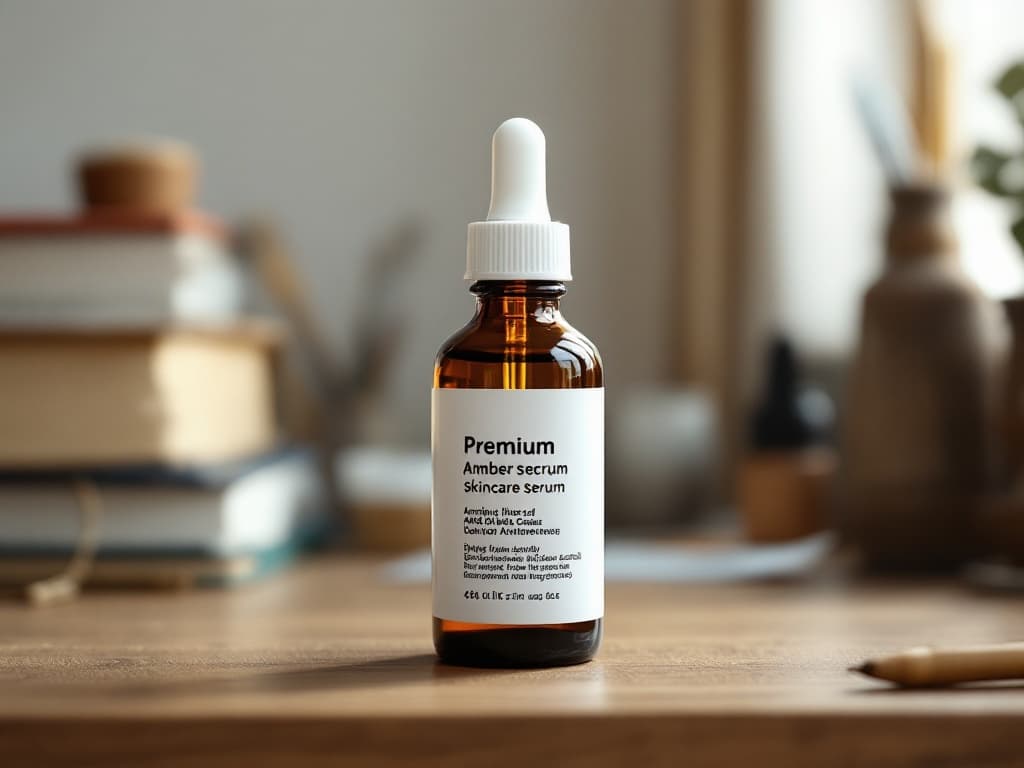
Repository example
Example product reveal prompt
Use the uploaded skincare bottle image as the main visual reference. Create an eight-second vertical product reveal in a minimalist studio. The bottle stands on a pale limestone pedestal against a warm neutral background. During the first two seconds, hold a stable composition. From seconds two to six, perform one smooth, slow camera push-in while soft reflections move across the bottle. At approximately six seconds, a narrow highlight reaches the cap and a soft glass chime is heard. Hold the final composition briefly. Include restrained room ambience beneath the sound effect. Keep the product's overall geometry, cap, colors, and visible label arrangement as close to the reference image as possible. Do not introduce another product, additional lettering, a sudden camera cut, or a new background object. Premium editorial product photography, realistic materials, controlled motion, 9:16.
Why this prompt is more useful
- It identifies one subject and one environment.
- It gives the camera one dominant movement.
- It divides the shot into manageable time intervals.
- It ties the sound cue to a visible event.
- It states which product details matter most.
Step 1
Step 1 — Prepare the starting image
For image-to-video, upload the clearest source image you have. The subject should be easy to recognize, framed for the target aspect ratio, and surrounded by enough visual room for the intended camera movement.
| Subject clarity | Is the product or character easy to recognize? |
| Composition | Is there room for the planned push-in or other movement? |
| Packaging | Are important shapes, colors, and labels visible? |
| Framing | Does the source work for the target ratio? |
| Background | Does the existing environment fit the concept? |
Do not remove the background automatically. Keep it when the original scene already fits the idea, and prepare a different source only when the environment needs to change.
A clear reference helps, but preservation instructions do not guarantee identical branding. Small labels, logos, reflections, and unseen product surfaces can still change as the subject moves.
Step 2
Step 2 — Write a prompt that directs change over time
A video prompt should describe what changes, when it changes, and what should remain stable. Treat it like a short production brief rather than a list of cinematic adjectives.
Subject + environment + action + camera + timing + audio + preservation rules
Weak
Make a cinematic skincare commercial.
Better
Use the uploaded bottle as the visual reference. Hold a stable vertical studio composition for two seconds, then make one slow push-in as reflections travel across the bottle. Add quiet ambience and a soft chime when the highlight reaches the cap. Preserve the bottle geometry, cap, colors, and visible label arrangement. No extra products, lettering, or camera cuts. Eight seconds, 9:16.
If the shot includes dialogue, write the exact short line and explain who says it. If it includes sound effects, connect each important sound to a visible event.
Avoid changing the subject, camera, lighting, soundtrack, and style in the same revision. Targeted corrections make it easier to understand what improved.
Step 3
Step 3 — Choose duration, aspect ratio, and resolution
Choose the shortest output that tells the intended story. Longer clips create more space for action and more opportunities for identity drift, unexpected objects, or unstable timing.
| Duration | H3 documentation describes 4–15 second clips. Use eight seconds for the tutorial product reveal. |
| Aspect ratio | Use 9:16 for vertical mobile creative, 16:9 for horizontal presentation, or another supported ratio that matches the destination. |
| Resolution | Base generation is documented at 768p short side. H3-Regenerate-2K is a separate higher-resolution workflow where available. |
| Cost | Pricing can depend on duration, resolution, references, and the host service. Review the current estimate before submitting. |
2K output does not guarantee perfect typography, facial identity, product geometry, or sound timing. Higher resolution is not a substitute for a good source and a coherent base composition.
The relighting H3 Max tool has its own 480P, 768P, 1080P, and 2K controls. Do not generalize those settings to every H3 workflow.
Step 4
Step 4 — Generate and review the first result
Review the output against the creative brief, not only against whether one frame looks cinematic.
| Subject identity | Compare the opening, middle, and ending for shape, face, cap, label, color, or costume changes. |
| Camera motion | Check for the planned push-in and look for unexpected orbiting, cuts, zooming out, or product rotation. |
| Timing | Does the clip begin steadily, develop naturally, and hold the ending composition? |
| Sound | Does dialogue, ambience, or the sound effect occur near the intended visual moment? |
| Artifacts | Look for warped geometry, flickering text, material changes, extra objects, and abrupt audio endings. |
At minimum, inspect an opening frame, an intermediate moment, and the ending. For an important product or person, review the complete clip with sound before publication.
A practical revision log records what worked, what failed, what changed, and what you will inspect next. This makes repeated generation more intentional.
Step 5
Step 5 — Improve one problem without changing everything
If the product video looks good except for a sideways camera drift, keep the successful subject, setting, and sound instructions stable and correct only the camera behavior.
Keep the same skincare bottle, studio environment, lighting, product colors, and overall composition. Replace the previous camera movement with one continuous slow push-in. Do not orbit, pan sideways, rotate the product, or introduce camera cuts. Preserve the existing restrained ambience and soft glass chime. End with a stable final composition.
When prompt refinement is not enough, use a different source image or workflow. A blurry label, an unseen side of a product, or a complex physical interaction may require conventional compositing or a controlled 3D workflow.
Do not expect a generative model to restore exact commercial typography or geometry that was never visible in the input.
Use video and audio references for directed motion
A reference video can communicate a camera orbit, body movement, timing, or editing rhythm that is difficult to describe in text. The key is to assign each input a specific role.
Use Image 1 as the product appearance reference. Use Video 1 only for the camera movement. Apply the slow camera orbit from Video 1 to the product in Image 1. Keep the visible design, proportions, color, and material as close to Image 1 as possible. Do not copy the object, background, or branding from Video 1. Generate a short product showcase with restrained studio lighting and subtle ambience.
- Choose a reference clip where the important motion is easy to identify.
- State whether a video controls the camera, the subject movement, or the editing rhythm.
- Watch for product identity being replaced by the motion reference.
- Avoid clips with many cuts and unrelated objects when testing a simple movement.
The official omni-reference workflow documents limits for image, video, and audio inputs. Online interfaces may expose a smaller subset, so use the controls actually available in your chosen interface.
Use first and last frames for planned transitions
When a shot has a clear opening and destination, provide compatible first and last frames instead of leaving both compositions entirely to the model.
- 1. Prepare a first frame that represents the intended opening composition.
- 2. Prepare a last frame that represents the desired final composition.
- 3. Describe the motion between them, including camera direction, lighting continuity, and sound cues.
- 4. Inspect the intermediate movement rather than checking only the two supplied frames.
Begin on the close-up provided in the first frame. Slowly pull the camera backward to reveal the entire skincare bottle. Maintain the same product design, lighting direction, background color, and material appearance. Arrive at the final-frame composition with a smooth, continuous camera movement. Avoid sudden cuts or transformations. Add subtle room ambience and a soft chime during the reveal.
First-and-last-frame control guides the visual destination but does not guarantee perfect interpolation. Extreme differences in subject, camera angle, lighting, or environment can produce unstable transitions.
Generate short character dialogue with sound
H3 can also be used for a short audiovisual character scene. Start with one brief sentence so you can inspect pronunciation, performance, facial continuity, and lip synchronization.
Use the uploaded illustrated detective as the appearance reference. The detective stands beside a rain-covered train window at night. During the opening two seconds, the character looks outside, then slowly turns toward the camera and quietly says, "The last train has already gone." Use a restrained, thoughtful performance. Add faint rain against the glass, distant train ambience, and a soft room tone. Perform one gentle camera push-in. Keep the hairstyle, clothing, facial features, and illustration style consistent. Seven seconds.
| Dialogue | Are the intended words present and understandable? |
| Lip synchronization | Does the visible mouth movement reasonably follow the speech? |
| Character identity | Do the face, hairstyle, costume, and illustration style remain stable? |
Use only voice samples and character references you have permission to process. A reference does not guarantee exact voice reproduction or perfect synchronization.
Four reusable MiniMax H3 prompt examples
These are practical templates, not claims of verified model outputs.
Product reveal
8 seconds
A single matte ceramic skincare bottle stands on a stone pedestal in a warm studio. The camera performs one slow push-in while soft reflections move across the bottle. The product remains stationary. Add subtle room ambience and a soft chime when light reaches the cap. Preserve the geometry, cap, colors, and visible branding as closely as possible. No extra products, camera cuts, or new lettering. 9:16.
Cinematic landscape
10 seconds
A wide cinematic view of a quiet mountain lake at sunrise. Low mist moves slowly across the water while warm light appears between distant peaks. The camera performs a gentle forward movement above the lake. Include soft wind, distant birds, and natural water ambience. No people, buildings, logos, or text. One continuous shot, 16:9.
Talking illustrated character
7 seconds
Use the uploaded character illustration as the appearance reference. The character stands by a train window at night, turns slightly toward the viewer, and says, "We still have time." Keep the delivery calm and natural. Add rain against the window and low train ambience. Preserve the facial design, hairstyle, clothing, and illustration style. One gentle push-in, seven seconds.
Animated event poster
6 seconds
Animate the uploaded event poster with subtle background movement. Soft light travels behind the main illustration while small decorative shapes move gently. Keep the headline, date, logo, and existing layout as close to the original as possible. Add restrained electronic ambience. Do not create additional words or change event details. Hold the final composition for the last second. Vertical format.
Common MiniMax H3 problems and fixes
The product changes shape
The model may infer unseen surfaces while generating motion. Reduce camera movement, improve the reference, and identify the physical details that matter. Use controlled compositing when geometry must be exact.
Logos or small text distort
Fine detail can change from frame to frame. Simplify movement, use a clearer source, inspect at full resolution, and replace critical text in post-production if necessary.
The camera moves in the wrong direction
Conflicting movement instructions make the dominant action unclear. Use one camera direction and remove secondary motions.
Extra objects appear
The model may complete a composition with new props. State the exact number of important subjects and discourage additional objects, lettering, or characters.
The character's face changes
Identity can drift during rotation, speech, or motion. Use a clearer reference, reduce the range of motion, and keep the face visible.
Dialogue does not match the mouth
Speech timing and mouth movement may not align. Shorten the line, reduce competing actions, and consider a dedicated lip-sync workflow for precise timing.
A sound effect happens too early
Natural-language timing is not frame-accurate. Tie the sound to one clearly defined event and adjust it in a video editor when timing must be exact.
Motion looks unnatural
The action may conflict with the original pose, geometry, or reference motion. Use a simpler action, improve the input, or split the sequence into smaller shots.
First and last frames do not connect
The supplied frames may differ too much in identity, angle, lighting, or environment. Use more compatible frames and describe the transition.
2K still looks soft
Higher resolution does not repair poor motion or incorrect detail. Improve the source and base composition instead of relying on resolution alone.
Too much happens in a short clip
Give each generation one main visual purpose. Create separate shots when the story needs more locations, subjects, or camera changes.
The result does not fit the layout
The subject may be too close to an edge or the ratio may be wrong. Prepare a better composition and specify the intended placement and negative space.
MiniMax H3 vs. Hailuo 2.3
Both belong to the MiniMax video ecosystem, but they fit different levels of direction. Choose based on the actual controls and output you need, not the model name alone.
| MiniMax H3 | Native generated audio, first-and-last-frame control, multimodal references, detailed audiovisual direction, and documented 4–15 second scenes. |
| Hailuo 2.3 Fast | Quick image-to-video drafts, straightforward product animation, and lower-cost creative iteration when the scene is simple. |
| Hailuo 2.3 | Conventional text-to-video or image-to-video work with fewer complex reference relationships and a simpler interface. |
If a simpler model already produces an acceptable clip, the broader H3 workflow may not provide enough extra value to justify its cost or review time.
Is MiniMax H3 suitable for commercial content?
It can support commercial creative workflows subject to the applicable model license, hosting terms, and rights associated with your inputs. Commercial readiness requires more than a cinematic frame.
- Confirm that you are authorized to use source photos, logos, reference videos, audio, and character designs.
- Inspect brand identity, packaging claims, visible text, and realistic representations of people.
- Review the current MiniMax H3 Community License and the platform terms before paid publication.
- Do not present generated footage as authentic footage when that distinction matters.
- Correct any generated label, feature, date, name, or product detail before using the result in marketing.
Video quality checklist before publishing
Visual consistency
- • The subject remains recognizable.
- • Important colors and materials remain stable.
- • Hands, faces, and moving elements are acceptable.
- • No unwanted objects appear.
Camera and motion
- • The main movement matches the prompt.
- • There are no unexpected cuts.
- • The movement feels continuous.
- • The ending composition fits the goal.
Audio
- • Dialogue is understandable.
- • Sounds match visible events.
- • Music and ambience are balanced.
- • There are no unexplained silences or abrupt endings.
Branding and delivery
- • Logos, labels, dates, and names are accurate enough for the intended use.
- • The aspect ratio and resolution are correct.
- • The exported file plays correctly.
- • Rights and license checks are complete.
Repository example
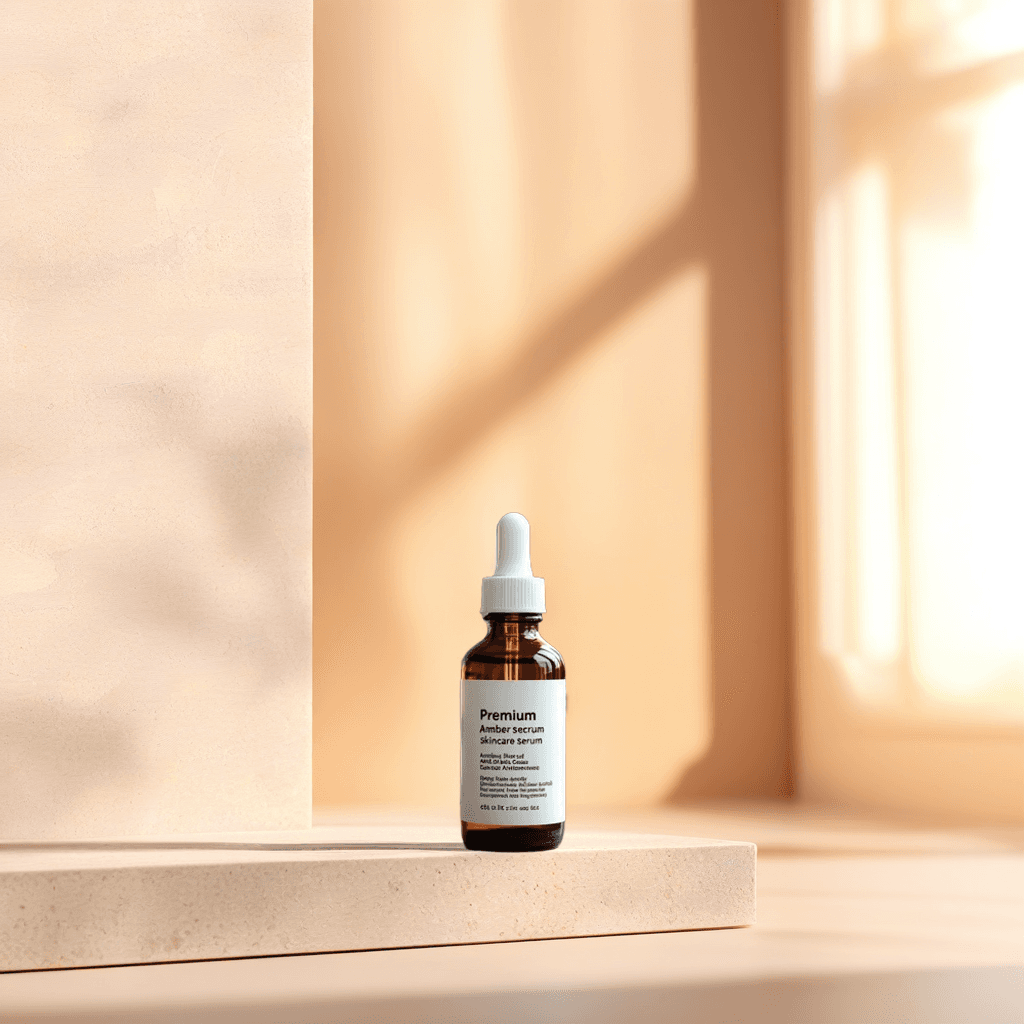
Repository example
Connected H3 Max tools on ImageToLayers
These pages use specialized H3 Max workflows. They are not the same as the general MiniMax H3 text-to-video page.
Try H3 Max relight
Upload a video and a lighting reference to change the illumination while preserving the scene structure.
Try H3 Max lip sync
Combine a still image with audio to create a talking video and review facial timing before publishing.
Try H3 Max insert scene
Replace a selected part of an existing video with a generated scene while keeping the edit focused.
MiniMax H3 frequently asked questions
What is MiniMax H3?
MiniMax H3 is an audiovisual generation model that can use text, image, video, and audio context for short video scenes with native stereo sound.
Can MiniMax H3 generate videos from text?
Yes. Supported text-to-video workflows can create a scene without requiring a starting photograph.
Can I turn an image into a video with MiniMax H3?
Yes. An image can serve as a starting frame or appearance reference, depending on the selected workflow.
Can MiniMax H3 generate sound automatically?
The documented H3 audiovisual workflow supports native stereo sound, including dialogue, effects, ambience, and music. Review the result for timing and clarity.
Does MiniMax H3 support dialogue?
Yes, but pronunciation, voice consistency, and lip synchronization still need to be checked. Short lines are easier to test.
How long can a MiniMax H3 video be?
The official H3 specification describes clips from 4 to 15 seconds. A specific interface may expose a smaller range.
Does MiniMax H3 support 2K resolution?
The H3 system includes an H3-Regenerate-2K workflow where available. Base generation is documented at 768p short side, and 2K does not guarantee perfect fine detail.
Is MiniMax H3 natively 2K?
No. The base generation stage is documented at 768p short side; the higher-resolution result uses a separate in-context regeneration stage.
What frame rate does MiniMax H3 use?
The official model specification lists 24 FPS output.
Can I provide a first and last frame?
Yes. The first-and-last-frame workflow uses compatible opening and ending images to guide the shot, but the intermediate motion still needs review.
Can MiniMax H3 follow a reference video?
Yes, in supported omni-reference workflows. Use the prompt to explain whether the video controls camera behavior, subject motion, or timing.
Can I use audio as a reference?
Yes, in supported multimodal reference workflows. Audio references must follow the documented input requirements and may not be available in every interface.
How many reference files can MiniMax H3 accept?
The official omni-reference documentation describes limits of up to 9 images, 3 videos, and 3 audio clips, with a combined maximum of 12 files. Online interfaces may expose fewer controls.
Can MiniMax H3 preserve a product logo?
It can use the product image and preservation instructions, but pixel-perfect consistency of logos, labels, and small text is not guaranteed throughout a moving clip.
Can I generate a talking character from an illustration?
Yes. Use a character reference and a short dialogue prompt, then check facial continuity, speech accuracy, and lip synchronization.
Is MiniMax H3 better than Hailuo 2.3?
It depends on the task. H3 offers broader multimodal and native-audio direction, while Hailuo may be sufficient for a straightforward image-to-video draft.
Is MiniMax H3 open source?
MiniMax has released H3 model weights under a community license. Review the license requirements and distinguish local model weights from hosted higher-resolution processing.
Do I need a powerful computer?
Not when using a hosted service. Generation runs on the provider's infrastructure. Local deployment requires appropriate computing resources.
How much does MiniMax H3 cost?
Pricing depends on the service, duration, resolution, and reference workflow. Check the current estimate displayed by the platform before generating.
Can I use MiniMax H3 videos commercially?
Potentially, subject to model and platform terms, input rights, output review, and applicable restrictions. Verify the license before using a result in paid advertising or commercial publication.
Next step
Explore the MiniMax H3 video workflow
Start with a focused scene, then compare the specialized H3 Max tools for relighting, lip sync, and scene insertion.
Ask AI about this page
Continue exploring this page with your preferred AI assistant.