
Keep your existing character
Start with the illustration you already have instead of creating a completely new character.
You love how your character looks from the front. But what do they look like from behind?
Upload one character image and generate its rear perspective.
Generate one rear view without creating a full turnaround.
Rear details hidden in the source image are interpreted by AI. Review the generated design before using it as an official character reference. Upload a character image · Generate a rear view · Download PNG
Front, side, back & 3/4 views in one run
Lateral, heel & outsole sneaker views
Front, side & rear model reference sheets
Share your original character in multiple views
Prepare multi-view references for model artists
Prepare character views for Blender and 3D modeling
Prepare multi-view references for 2D animation planning
Front, side, back & 3/4 views for anime characters
One left or right profile, 30 credits
Clean marketplace angles for listings
Interactive 360° rotatable spin view
Precise azimuth & elevation controls
Already have a character design but never drew the back? Upload your existing character artwork and let AI generate a rear view based on the details it can see. Explore how the hairstyle, clothing, accessories, and overall silhouette might appear from behind.
Start with the illustration you already have instead of creating a completely new character.
Generate a proposed rear view of the hairstyle, outfit, and accessories.
Create one back-view image rather than paying to generate three or five perspectives.
SEE WHAT’S BEHIND YOUR CHARACTER
A great character illustration can still leave half of the design unseen. Generate a new view to explore the hairstyle, outfit, and silhouette from behind.
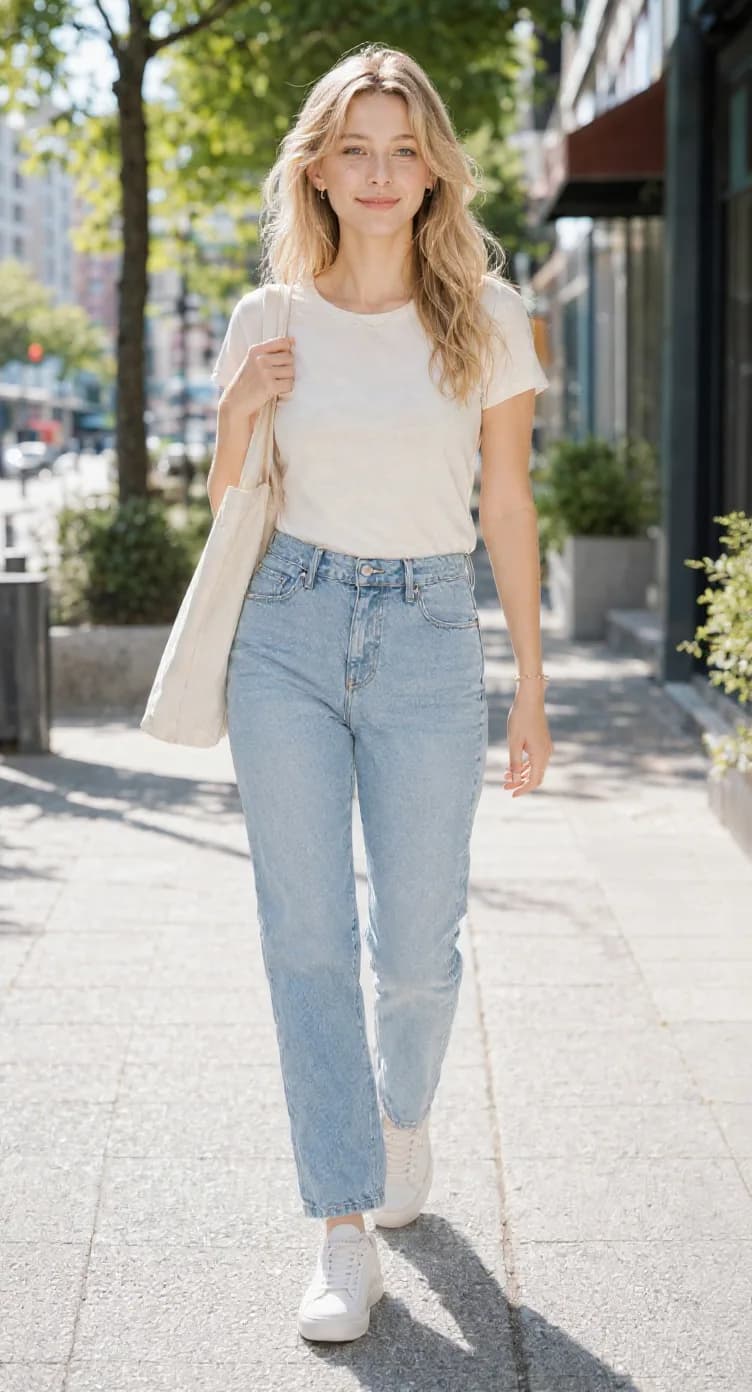
The original front-facing character illustration.
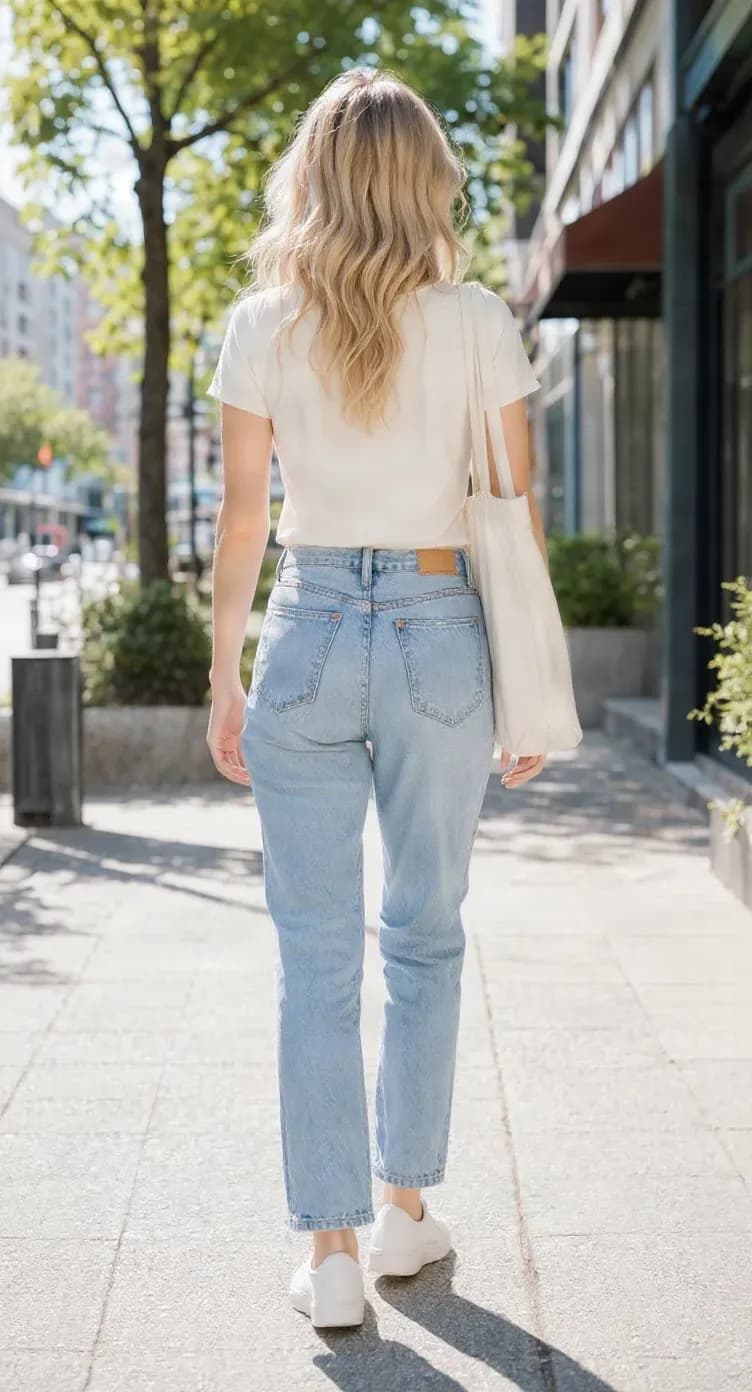
A generated back-facing view of the same character.
Existing Front and Back results from the same character view set. They demonstrate the workflow; details and consistency vary by source image. The back view includes AI interpretations of details that are hidden in the original image. Review it before treating it as a finalized character design.
Generate a Back View From My CharacterSee a proposed view of the hair behind the head and shoulders.
Explore jackets, coats, capes, armor, dresses, and other clothing from behind.
Compare the front with the generated rear outline.
Use the result when planning an illustration, discussing a commission, or developing a turnaround.
Choose anime, cartoon, fantasy, or other supported character artwork. A clear image showing the hairstyle, clothing, and body shape provides more useful design information.
The generator uses your artwork as a visual reference and creates a proposed rear-facing perspective. You do not need to draw the rear angle or generate a full multi-view sheet.
Compare the original with the result. Inspect the hairstyle, costume, body shape, and inferred details, then download the back-view image.
Rear-view details can matter when preparing animation references, designing an outfit, or drawing a new scene.
Explore how long hair, ponytails, braids, short hair, and other styles may look from behind.
Examine possible folds, hoods, collars, and flowing costume elements.
Create a starting point for armor, shoulder pieces, belts, and layered outfits.
Explore how visible accessories may be positioned when the character faces away.
Review the rear silhouette, shoulder width, leg placement, and overall shape.
Inspect features such as animal ears, tails, wings, and other unusual design elements.
AI may omit, change, or invent details, especially when they are hidden in the source. Treat the output as a design proposal until you have reviewed it.
A back-view reference can help you explore the rear hairstyle, costume, and silhouette before drawing a new manga panel, illustration, or animation scene.
Plan scenes where a character walks away, faces someone, or looks into the distance.
Explore the hairstyle, shoulders, and costume when the character faces away.
Keep a visual starting point for a character you plan to draw repeatedly.
Experiment with a proposed rear appearance and refine it to match your design.
A back-view image gives you another visual reference when developing a protagonist, NPC, or enemy who may be shown from multiple directions.
Explore the rear appearance of a character often shown from behind.
Develop visual references for characters that appear from multiple directions.
Examine possible capes, armor, backpacks, and clothing from the back.
Use the result as a visual starting point when discussing or preparing a character model.
The generated image is a 2D visual reference. It is not a game-ready sprite sheet, a 3D model, or a calibrated orthographic blueprint.
A horizontal flip changes the direction a character faces within the image. It does not reveal the back of the head, coat, or body details hidden from view.
Mirrors the existing pixels from left to right. It does not reveal the character’s rear appearance.
Generates a new back-facing interpretation using the original character as a reference. The unseen details are inferred, not recovered from an actual 3D model.
Use the result as a proposed rear view to inspect, refine, or build upon.
Choose the single Back View Generator when you only need a rear-facing image. Choose Character Turnaround when you want a broader multi-angle reference set.
Best for filling one missing angle. Output: one generated character back-view image with preview and download.
Best for exploring several directions. Output: three or five character views with supported sheet and archive exports.
Each generated view is billed separately. The back view costs 30 credits; check the turnaround workbench for its current multi-view price.
Explore a possible rear design before drawing or commissioning more artwork.
Prepare references for back-facing scenes and recurring characters.
Give an artist another visual reference for hairstyle, outfit, and accessories.
Explore playable characters and NPCs from another direction.
Review rear hairstyle and outfit during design discussions.
Use the image as a design reference, then verify proportions and construction independently.
The back may not be visible in the source image, but other design information can help AI create a useful interpretation.
A full-body image provides more information about clothing, proportions, footwear, and accessories.
Hair shape, length, and color help guide a proposed rear view.
Clear sleeves, collars, jackets, armor, dresses, and costume elements provide useful context.
A simple background and fewer obstructions can make the character easier to distinguish.
A standing character with visible body parts can be easier to interpret than an extreme action pose.
If the back of an item or costume is not shown, expect AI to propose those details.
With a front-facing illustration, AI can use visible colors, clothing shapes, hair length, accessories, and construction details as references. It cannot know exactly what you intended for parts that are not shown.
Review and refine the generated image before treating it as a finalized character design.
Pay for the view you need
If you are only missing the back of your character, generate that view on its own instead of creating extra side or three-quarter images.
Back View Generation: 30 credits per generated view under the current pricing configuration.
One AI-generated back-facing character image with result preview and download.
Starting another generation uses credits according to the displayed price.
Check the credit amount shown in the generator before starting. Existing generation and refund rules apply.
Generate Back View — 30 CreditsGenerate a profile view from existing character artwork.
Generate a Side ViewCharacter Turnaround GeneratorGenerate three or five perspectives for a broader view set.
Create Full TurnaroundCharacter Reference Sheet GeneratorBring multiple character perspectives together in one reference sheet.
Create Reference SheetAnime Character Turnaround GeneratorGenerate multiple views for anime-style character artwork.
Explore Anime TurnaroundCharacter Model Sheet GeneratorPrepare multi-view character references for design review.
Create Model SheetOC Reference Sheet GeneratorPrepare an original character for commissions and collaboration.
Create OC ReferenceYes. Upload a character illustration and the generator can create a proposed rear-facing view based on visual details in the source. Since the back is not visible, some details are inferred by AI. Review the result before using it as your final design.
No. Start from an existing character image without manually drawing the rear view. The generator creates a back-facing interpretation that you can inspect, use as a reference, or refine.
Exact consistency is not guaranteed. Hairstyle, clothing, colors, body shape, and other details may change or be invented. Compare the result with your intended character design.
Yes. Upload existing anime-style artwork to generate a rear-facing perspective for planning illustrations, manga panels, or animation references.
It can propose a rear hairstyle based on visible hair length, shape, color, and accessories. If the source does not show the back of the hair, AI must infer its appearance.
It can create a rear-facing interpretation of outfits, armor, capes, coats, and other clothing. Hidden construction details may differ from your intent, so inspect the result carefully.
This page generates one character back view. For front, side, back, and three-quarter views together, use the Character Turnaround Generator.
The workflow requests a rear perspective corresponding to 180° in the character view configuration. Exact camera geometry and orthographic alignment are not guaranteed.
Yes. Upload your original character illustration and use the generated back view as an additional reference for new artwork or artist discussions.
Yes, as a visual reference. Share the proposed back view with an artist to discuss the intended hairstyle, outfit, and accessories. Check inferred details before treating it as final.
Yes, as a character design reference for scenes where a character faces away. It does not create animation frames, a rig, or a production-ready model sheet.
Yes, as a visual reference. AI-generated perspectives are not guaranteed to have exact proportions or calibrated orthographic projection, so alignment and correction may be needed.
Yes. Upload an existing VTuber illustration to create a proposed rear view. It is not a Live2D-ready PSD, rigged model, or complete VTuber asset.
No. A horizontal flip only mirrors the original pixels. Generating a back view creates new visual information about the unseen rear of the character.
Upload supported character illustrations, including anime, cartoon, fantasy, and original designs. PNG, JPG/JPEG, and WebP are supported. Clear artwork with visible character details is a useful starting point.
This can happen when the rear design is not shown. Treat those details as suggestions, then review or adjust them to match the character you intended.
It uses visible features as references and may reproduce distinctive accessories. Tails, wings, horns, and layered accessories can be difficult to represent consistently, so check their appearance and placement.
Yes. The single-view workflow provides a result preview and download control so you can save the rear-view image for further artwork.
The current configuration charges 30 credits for one character back view. Check the amount displayed in the generator before starting; another generation is a separate action.
No. A back view shows one direction. A reference sheet usually combines multiple views or design details. Use a Turnaround or Reference Sheet workflow when you need more perspectives.
GIVE YOUR CHARACTER ANOTHER POINT OF VIEW
You have already created the front of your character. Upload your artwork, generate a back view, and download another useful reference for your creative project.
Generate My Character Back ViewOne character image · One rear perspective · Downloadable result
Creative Toolkit Index
Quick access to precision layer extraction, AI photo editing & asset tools.