
NEWGPT Image 2.5 is here — make focused edits with less rework.

Try GPT Image 2.5

AI OC Reference Sheet Generator

Upload your original character to create front, side, back, and three-quarter views for commissions and collaborations.

1Your OC artwork
2Choose your OC reference views Recommended
3Views in this sheet5 views
Front(0°)Front ¾(45°)Side(90°)Back ¾(135°)Back(180°)
OC detailsReview your OC views
Face identity
Costume details
Colors
Body proportions

Your OC reference preview

5-view OC reference preview

Five angles for sharing more of your character design.

Front
0°
Active
FrontExample
Front ¾
45°
Front ¾Example
Side
90°
SideExample
Back ¾
135°
Back ¾Example
Back
180°
BackExample
OC angle preview
OC angle preview0°
Angle previewPreview

From One Drawing to a Multi-View OC

Maybe you have drawn your OC dozens of times from the front but never designed the back of their outfit. Maybe you want to commission new artwork but need more references to explain the hairstyle, accessories, or clothing.

Start with the drawing you already love and create additional visual references.

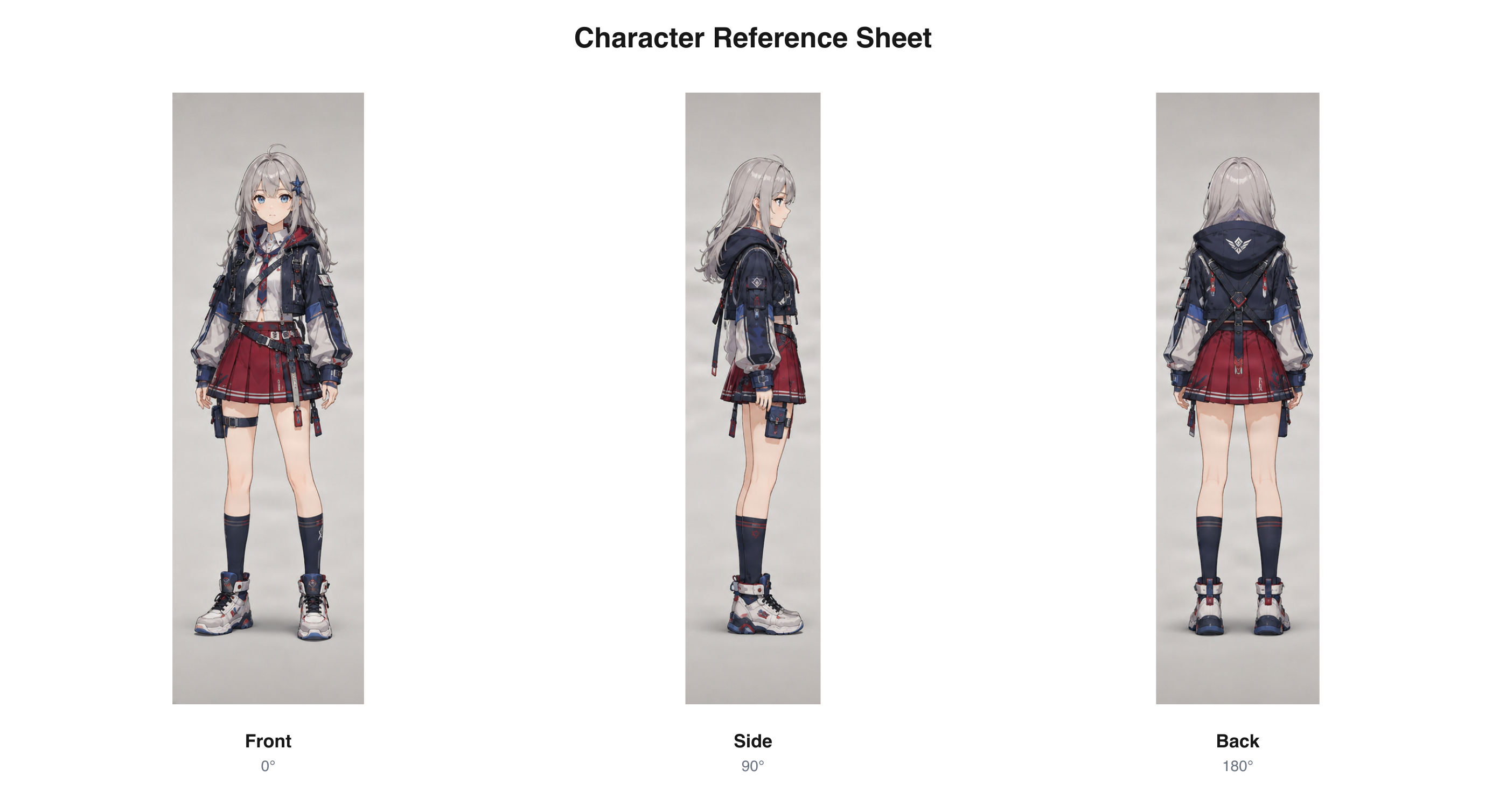
Anime OC reference views

Explore how an anime-style character’s hairstyle, outfit, and signature details may look from different directions.

Existing anime-style front, side, and back views arranged as a sheet

Existing anime-style multi-view sample arranged as a three-view sheet.

Download sample PNG

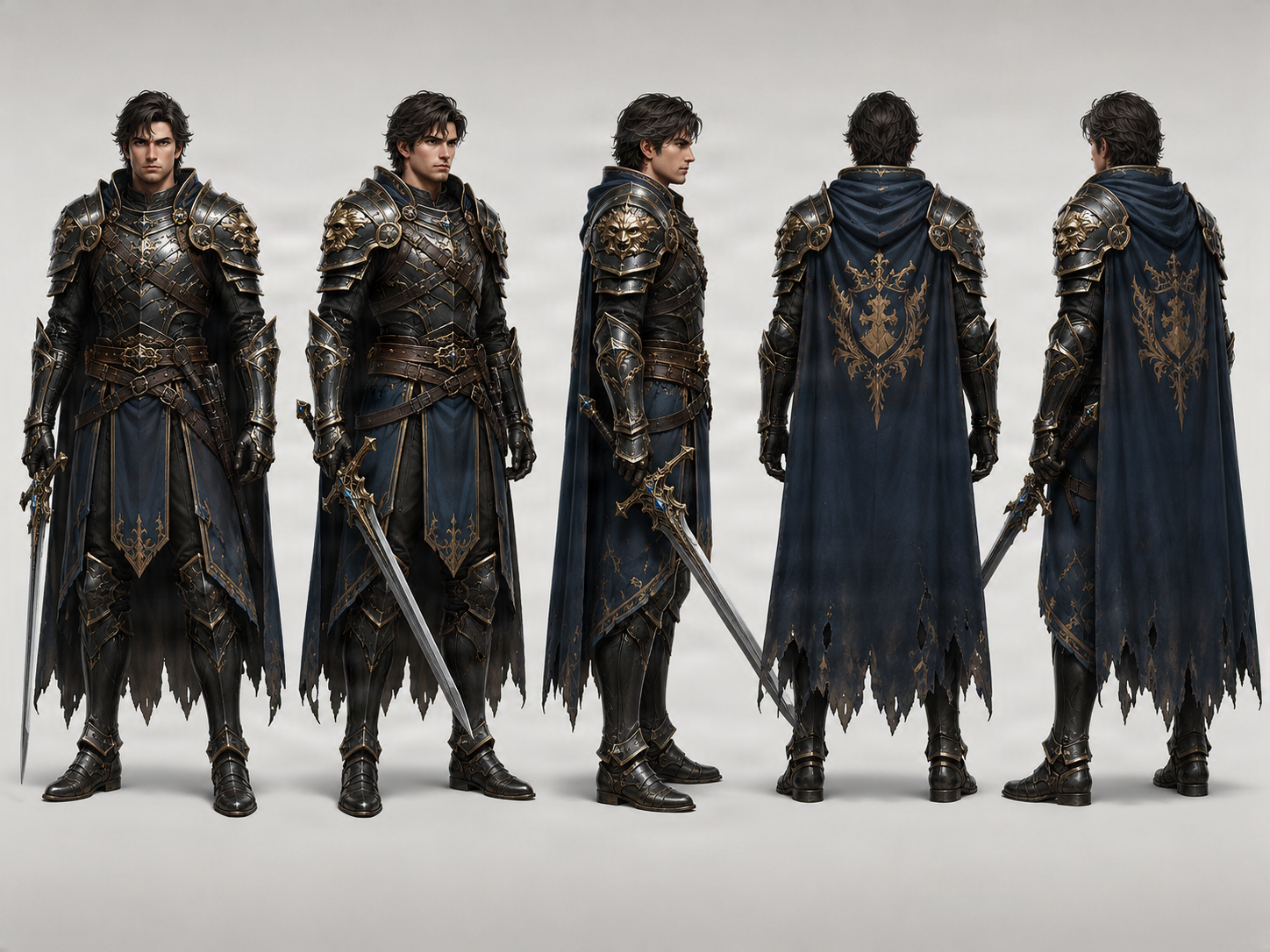
Fantasy character reference views

Review a cloak, hairstyle, belt, or armor from several directions to help communicate a visual design.

Existing fantasy character turnaround sample with multiple views

Existing fantasy character turnaround sample. It is a general example, not an OC-specific generation.

Download sample PNG

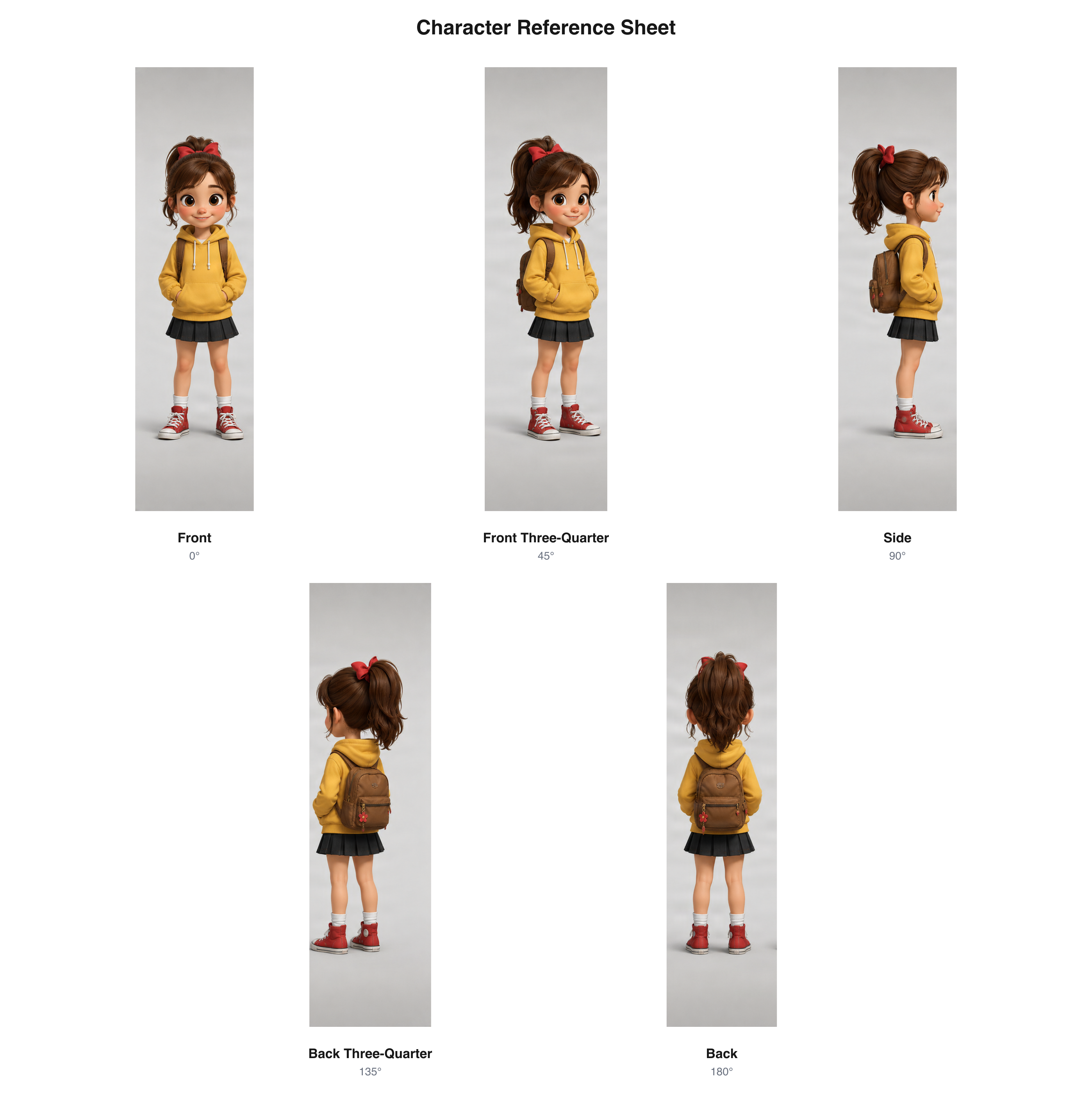
Cartoon OC reference views

Compare a cartoon character’s body shape, outfit, and silhouette across multiple perspectives.

Five existing cartoon character perspectives arranged as a labeled sheet

Existing cartoon character views arranged as a five-view sheet.

Download sample PNG

These examples reuse existing published character artwork and multi-view results. They are demonstrations of the view and sheet formats, not new OC-specific generation tests. The characters shown are not presented as user-submitted OCs; printed sheet labels are in English.

Start with your own OC

Use an existing character illustration instead of creating an unrelated character.

Show the missing angles

Explore how the hairstyle, clothing, silhouette, and accessories may look from other directions.

Make your OC easier to share

Download an organized sheet for commissions, collaborations, and personal references.

A Simple Three-View Sheet or a More Detailed Five-View Reference.

Choose how much of your character you want to show.

3-view OC reference sheet

The essential angles for showing your character.

Included views

  • Front — 0°
  • Side — 90°
  • Back — 180°

Best for

  • First OC reference sheet
  • Basic front and back design references
  • Sharing an original character with an artist
  • Planning the character’s overall appearance

5-view OC reference sheet

More angles for showing the details in between.

Included views

  • Front — 0°
  • Front three-quarter — 45°
  • Side — 90°
  • Back three-quarter — 135°
  • Back — 180°

Best for

  • OCs with layered clothing or accessories
  • Detailed character design reviews
  • Animation or 3D modeling discussions
  • Sharing additional views with commission artists

Five views provide more visual information and use more generation credits. Check the current cost in the workbench before generating.

Give Your Commission Artist Something Clearer Than One Picture.

You do not want to spend the whole commission conversation explaining what your OC looks like. A multi-view reference gives an artist more visual material and helps answer questions about a hairstyle, jacket, cape, or accessory.

  • Review AI-inferred details before sharing the sheet with an artist. Hidden areas may be interpretations that differ from your intended design.

Show the overall appearance

Help an artist understand the character’s body shape, hairstyle, clothing, and silhouette.

Include views you did not have

Add side and back references when your original artwork only shows the front.

Make design details easier to discuss

Point to a view when you want a collaborator to understand or refine one feature.

Keep a reference for future orders

Save the sheet as a starting guide for later commissions and collaborations.

Download Your OC’s Views in One Reference Sheet.

Individual images are useful for studying one angle. A single labeled sheet is easier to share when you want to show the overall design.

  • Arranging already generated perspectives does not require another AI image-generation run.

Combined OC reference sheet PNG

Keep the generated perspectives in one downloadable image.

Clearly labeled views

Identify the front, side, back, and three-quarter angles.

Individual view images

Keep separate perspectives for closer review or annotation.

ZIP download

Save the generated view images together in your project files.

One Character. Many Ways to Bring Them Into Your Work.

An OC reference sheet can give you and your creative partners a shared visual starting point.

OC artists

Explore additional angles and keep a visual guide for future drawings.

Art commission customers

Share several views when requesting new artwork of your original character.

Art trade and collaboration partners

Give another artist more detail than a single illustration can show.

Webcomic and story creators

Refer to front, side, and back views as a character appears across scenes.

Anime and cartoon character creators

Compare and refine an existing character design across perspectives.

Indie game and VTuber creators

Use the images as a starting visual reference in conversations with collaborators. The sheet is not a rigged character or production-ready Live2D asset.

Keep What Makes Your OC Yours.

Your original character has details that make them recognizable: a particular hairstyle, unusual jacket shape, pointed ears, or distinctive colors. The uploaded image is the visual starting point for the new perspectives.

  • The AI aims to retain recognizable details, but perfect consistency is not guaranteed. Details hidden from the source image must be inferred.

Your character’s face

Use the source artwork as a guide to recognizable facial features.

Your character’s hairstyle

Explore how the hair may look from the side and back.

Your character’s outfit

Review clothing, colors, and major costume elements across views.

Your character’s silhouette

Compare the head shape, proportions, and distinctive outline.

Your character’s accessories

Inspect how visible accessories may appear from other directions.

Start With Your Best Character Drawing.

Your input image should communicate the character features you care about.

Use a full-body illustration

When you need full-body references, choose artwork that shows the character from head to toe.

Make the outfit readable

Keep clothing, hairstyle, and major accessories easy to identify.

Avoid hiding important features

Large props, dramatic poses, or heavy obstructions can make the design harder to interpret.

Choose a useful pose

A simple standing pose can make the character easier to compare across views.

Check inferred details

If the back of a hairstyle, coat, or accessory is not shown, the generated view will interpret it. Decide whether it fits your OC.

Need an OC Ref Sheet, a Turnaround, or a Production Model Sheet?

Choose the page that fits how you plan to use the character images.

  • These pages share the core character multi-view workflow. Choose based on the creative task.

OC Reference Sheet Generator

Best for sharing your own original character in commissions, art trades, collaborations, and future artwork.

Character Reference Sheet Generator

Best for generating and organizing general multi-view character references.

Character Model Sheet Generator

Best for reviewing silhouette, proportions, clothing, and appearance for animation or game art planning.

Character Turnaround Generator

Best for generating front, side, rear, and optional three-quarter perspectives.

A Multi-View Visual Reference for Your OC.

Generate additional perspectives of an existing original character and bring those views together. This workflow does not replace every part of character design or professional art preparation.

  • Three-view or five-view OC references
  • Front, side, back, and three-quarter perspectives
  • Combined sheet PNG, individual views, and ZIP archive
  • No complete written character profile or biography
  • No automatic color palette or expression sheet
  • No editable layered artwork, 3D model, or animation rig
  • Exact proportional alignment may need manual work

Generated views are visual references. Review inferred features and correct details before using the images as the final design guide.

How to Create an OC Reference Sheet From One Image

Step 1 — Upload your original character

Choose an existing illustration of your OC. Anime-style, cartoon, fantasy, or another supported character image can be a starting point. A clear full-body image helps show the design details.

Step 2 — Choose the views you want

Select three views for front, side, and back, or five views to add front and back three-quarter perspectives. Choose a pose preference to guide the generated references.

Step 3 — Generate and download your reference sheet

Generate the selected perspectives and review the character across the results. When required views pass applicable checks, download one PNG sheet, individual images, or a ZIP archive.

OC reference sheet FAQ

What is an OC reference sheet?

An OC reference sheet is a visual guide for an original character you created. It can show features such as hairstyle, clothing, body shape, and accessories. This tool focuses on front, side, back, and optional three-quarter visual references from an existing image.

What does OC mean?

OC stands for Original Character. It usually means a character someone created for artwork, stories, comics, games, roleplay, or another creative project.

Can I make an OC reference sheet from just one image?

Yes. Upload an existing character illustration and select three or five views. The generator uses your image as a reference for additional perspectives.

Do I need to draw the front, side, and back views myself?

No. Start with one character image and generate additional angles. Details hidden in the original must be inferred, so review the results before treating them as final.

Can I use the reference sheet for art commissions?

Yes, as a visual reference. Share it with an artist to communicate your character from several directions. Check generated details and add any design notes the artist needs.

Can I use this for art trades or collaborations?

Yes. A multi-view sheet gives collaborators more information about your character than a single illustration.

Can I generate an anime OC reference sheet?

Yes. Upload an anime-style original character illustration and choose the perspectives you want to generate.

Can I make a cartoon OC reference sheet?

Yes. Use an existing cartoon-style character as the reference image to generate additional views.

What is the difference between a 3-view and 5-view OC sheet?

Three views include front, side, and back. Five views add front and back three-quarter perspectives to show more transitions between the main angles.

Will my OC look exactly the same in every view?

Exact consistency is not guaranteed. Hairstyle, costume details, accessories, and proportions may vary, so review the finished views.

Can the generator show the back of my OC if I have not drawn it?

It can generate a proposed back view based on the source image. Since the actual design is not visible, the result is an interpretation that you should review.

Does the generator make a complete OC character profile?

No. It focuses on visual perspectives and does not create biographies, personality details, age, species descriptions, or profile fields.

Does it create a color palette or facial expression sheet?

No. The workflow creates different viewing angles. Color swatches, expression studies, alternate outfits, and detail drawings require additional tools or manual design.

What poses can I choose?

The workbench offers Neutral, T-Pose, A-Pose, and Match Original preferences. They guide generation but do not guarantee exact anatomy or identical positioning.

Can I download all the views as one OC reference sheet?

Yes. When the selected views complete and meet applicable quality checks, download them as one PNG. Individual images and a ZIP archive are also supported.

Is this the same as an OC maker or character creator?

No. An OC maker helps invent or assemble a character. This generator is for people who already have a character image and want more visual references for that design.

Can I use my OC reference sheet for comics or games?

Yes, as a visual design reference. Additional corrections, artwork, or technical assets may be needed for production.

Can I create a fursona reference sheet?

You can use an existing anthropomorphic character image when it suits the supported workflow. Results depend on how well the model interprets distinctive anatomy and details; review markings, colors, and costume carefully.

Does downloading the combined reference sheet require another AI generation?

No. Credits generate the selected character views. Arranging completed views into a sheet does not require another AI image-generation run.

What happens if a generated view fails or needs review?

The result page shows the state of each view. If a required perspective fails or is flagged for review, the complete sheet export may remain unavailable until it passes applicable checks.

Make Your Original Character Easier to Draw, Share, and Remember.

You have already put your creativity into this character. Give yourself and other artists a clearer view of their appearance. Upload your OC, generate the missing angles, and download one reference sheet for your next drawing, collaboration, or commission.

Create my OC reference sheet

Start with one OC image · Choose 3 or 5 views · Download a PNG reference sheet

    AI OC Reference Sheet Generator | ImageToLayers